
Our Top Picks
 FLEXISPOT Reversible L-Shaped Corner Standing Desk with Monitor71x63"丨Maple63 x 70.9 x 29 inches128.92 poundsCheck on Amazon
 FLEXISPOT 71" L Shaped Standing Desk with Drawers71''x32''32 x 71 x 46.5 inches158 poundsCheck on Amazon
The best sit to stand l shaped desk for a home office balances a 60 x 60 inch or 63 x 63 inch footprint, a height range of 24 to 50 inches, and a dual-motor or triple-motor frame rated for at least 250 pounds distributed across both wings. If your corner is tight or you run multiple monitors and a desktop PC, prioritize the frame and weight distribution over desktop size alone.
Measure Your Corner Before You Choose a Size
An L-shaped desk needs more clearance than its listed dimensions. The desktop size does not include chair movement, cable access, or baseboard heaters.

FLEXISPOT 71 x 63 Reversible L-Shaped Corner Standing Desk, Black
Chosen because it specifies Black.
View on Amazon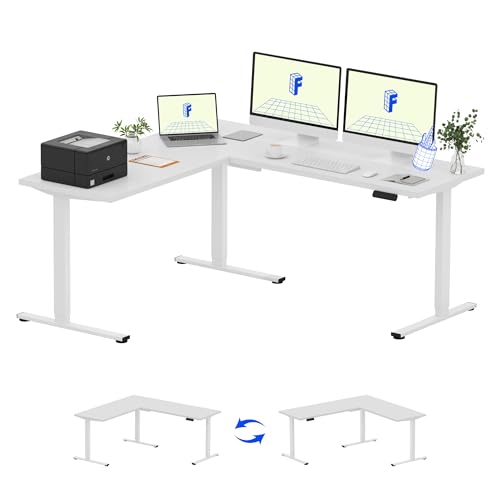
FLEXISPOT 71 x 63 Reversible L-Shaped Corner Standing Desk, White
Chosen because it specifies White.
View on AmazonFLEXISPOT Reversible L-Shaped Corner Standing Desk with Monitor Shelf
Picked as a relevant option in this category.
View on AmazonFLEXISPOT 71" L Shaped Standing Desk with Drawers, White Wood Grain
Chosen because it specifies White Wood Grain.
View on Amazon- Wall length needed: For a desk listed as 60″ x 60″, allow at least 62″ of clear wall on each side to account for wall trim and cable management trays. For a 63″ x 63″ model, plan for 65″ per wall.
- Front clearance: Leave 36 to 42 inches from the front edge of the desk to the opposite wall or furniture. This allows a standard office chair to roll back (about 24 inches) plus 12 to 18 inches to stand and push the chair in. In a typical 10 x 12 ft bedroom office, a 60″ x 60″ L-desk on one corner still leaves a 3-foot walkway and room for a 30-inch-wide bookshelf or file cabinet on the opposite wall.
- Corner gap: Most L-desks leave a 2 to 4 inch gap in the inner corner where the two desktops meet the walls. If your baseboards are thick or you have a corner floor outlet, measure from the baseboard out, not the drywall.
- Door and window swing: Check that the longer wing does not block a closet door, radiator, or window crank. A 71-inch wing can extend past a standard 30-inch doorway if placed on the wrong wall.
Measure both walls at desk height (29 inches) and at floor level. Walls in older homes are often not perfectly square, and a 1-inch variance can make a desk look crooked against one wall.
Height Range: Why 24 to 50 Inches Covers Most Users
Sit-to-stand height is not just about standing tall. The low end matters as much as the high end for ergonomic sitting.
| User Height | Seated Elbow Height (approx.) | Ideal Sitting Desk Height | Ideal Standing Desk Height |
|---|---|---|---|
| 5’0″ (152 cm) | 23.5 inches | 24 – 25 inches | 37 – 39 inches |
| 5’6″ (168 cm) | 25.5 inches | 26 – 27 inches | 41 – 43 inches |
| 5’11” (180 cm) | 27.5 inches | 28 – 29 inches | 44 – 46 inches |
| 6’2″ (188 cm) | 29 inches | 29 – 30 inches | 46 – 48 inches |
Most fixed-height desks are 29 to 30 inches high, which is too tall for users under 5’6″ without a footrest. A sit to stand l shaped desk with a range of 24 to 50 inches lets you set a true ergonomic sitting height and still reach a comfortable standing height even if you are over 6 feet or use a thick anti-fatigue mat (which adds 0.75 to 1 inch). If you are under 5’2″ or over 6’1″, look for models that specify a low of 23-24 inches or a high of 50+ inches in the spec sheet, not just “standing height.”
Also check the height with the desktop thickness included. Some brands list frame-only height. A 1-inch thick top adds a full inch to every position.
Motor Type and Weight Distribution: Where Stability Comes From
L-shaped standing desks fail in two places: the motors lifting unevenly and the long wing wobbling at standing height.
Single vs. Dual vs. Triple Motor
- Single-motor L-frames: Usually $350–$550. One motor drives both legs via a hex rod. They lift 180 to 220 pounds total, but lifting speed is slower (about 1 inch per second) and the far corner lags slightly when weight is uneven. Best for light setups: laptop + single monitor, total under 120 pounds.
- Dual-motor L-frames: Usually $550–$900. Each main leg has its own motor with a control box that syncs them. Lift capacity is typically 250 to 310 pounds, speed is 1.2 to 1.5 inches per second, and they handle uneven loads better. This is the most stable value option for home offices with two monitors and a PC.
- Triple-motor L-frames: Usually $800–$1200+. Found on frames from brands like UPLIFT Desk and FlexiSpot that use a third leg under the corner or return. Total capacity often 300 to 350+ pounds with the best anti-collision and leveling. Worth it if you load one wing heavily, like a 30+ pound workstation or three 27-inch monitors on one side.
How Weight Distribution Affects Stability
A 250-pound rating does not mean 250 pounds on one wing. Most manufacturers rate total evenly distributed weight, with a per-wing limit of 60 to 70% of total. Putting a 40-pound desktop PC, two monitors on an arm (25 pounds), and books on the same 48-inch wing can create a twisting force on the frame.
To keep an L-desk stable at 44+ inches high:
- Place the heaviest items (PC tower, large monitor) over or within 12 inches of a leg column, not at the far end of the wing or in the unsupported corner seam.
- Use a monitor arm clamped near the frame joint rather than at the tip of the desktop. This centers the load.
- Keep at least 60% of total weight on the primary (longer) wing if the frame has only two legs. Three-leg frames are more forgiving but still benefit from balanced loading.
- At standing height, expect some lateral wobble if you lean on the far corner. Frames with a wider foot (26 to 28 inches deep) and crossbar reduce front-to-back sway by 30 to 40% compared to narrow C-feet.
Frame and Top Materials: What Lasts in a Home Office
| Material | Weight and Feel | Durability Trade-off | Best For |
|---|---|---|---|
| Solid wood top (rubberwood, acacia) | Heavy, 70–110 lbs for an L-top | Resists dents, can be refinished; expands/contracts with humidity, needs sealing | Permanent offices where you want longevity and don’t move often |
| Engineered wood with laminate (MDF + melamine) | Medium, 50–75 lbs | Scratch and stain resistant, affordable; chips at edges if hit, cannot be sanded | Most home offices, renters, budget under $700 |
| Powder-coated steel frame with particle board top | Light frame, weaker top | Frame lasts, top sags under heavy center load after 2–3 years | Light laptop setups only |
| Steel frame with bamboo top | Medium weight, stiff | Harder than rubberwood, sustainable; higher cost, limited color options | Eco-focused buyers who want solid-surface stiffness |
For standing desks, frame steel gauge matters more than top material for wobble. Look for frames that list 14-gauge or thicker steel for columns and feet, and a lifting column with two or three stages. Three-stage columns achieve a lower minimum and higher maximum with less wobble than two-stage columns at the same height.
Decision Matrix: Which Type Fits Your Situation
| Your Situation | Recommended Spec | Why |
|---|---|---|
| Small apartment or 10 x 10 ft room | 60″ x 60″ or 55″ x 55″ compact L, dual-motor, reversible return | Leaves 36″+ clearance for bed or sofa; reversible lets you flip the return to fit the corner |
| Heavy setup: 2–3 monitors + desktop PC + printer | Triple-motor, 300+ lbs total, 71″ x 71″ top | Distributes 150+ lbs across wings without motor strain |
| Renter who may move in 1–2 years | Dual-motor with 2-piece top, engineered wood | Each box under 80 lbs, fits through 30-inch doorways; easier to disassemble |
| Back pain, alternating sit/stand often | Dual or triple motor with 4 memory presets, 24–50″ range, 1.2″+ per second speed | One-touch height changes encourage more transitions; low range prevents shoulder shrugging while sitting |
| Kids and pets at home | Triple-motor with anti-collision sensor and lockout, laminate top | Prevents pinching if a child or pet is under the desk; laminate wipes clean |
Picks by Situation, Not Just Price
Rather than one “best” model, home offices benefit from matching the frame to the use case:
For Corners in 10 x 12 ft Rooms
Choose a 60-inch wing on each side with a 42-inch return depth. Brands like FlexiSpot, Vari, and UPLIFT Desk all offer this size with a dual-motor frame that fits the footprint without overwhelming the room. The 60-inch length still holds two 24-inch monitors plus a laptop while leaving wall space for a window or closet.
For Stability with Heavy Equipment
If your setup exceeds 150 pounds, a three-leg frame is more stable than any two-leg L. The third leg under the corner prevents the seam from dipping when you stand and lean on it to write. Look for a control box that shows error codes for overload and has gyroscopic anti-collision.
For Quiet Home Offices and Shared Spaces
Dual and triple motors rated under 50 decibels are noticeably quieter than single-motor hex-rod systems, which can transmit vibration through the desktop. This matters if you adjust height during calls.
Assembly, Moving, and What Wears First
L-shaped standing desks ship in two to three boxes, each 60 to 90 pounds. The frame box alone is usually 70+ pounds and 48 inches long. Measure your doorway (standard interior is 29 to 30 inches) and elevator before delivery. Assembly takes 90 to 150 minutes with two people; the corner joint is the hardest part to align alone.
- Hardware to check first: The bolts that join the two desktops at the corner. They loosen with repeated height changes if not fully torqued. Retighten after the first two weeks of use.
- What wears first: The motor control box and the glides inside the lifting columns. Dust in the columns causes stuttering. Vacuum columns every 6 months and keep cables from pulling on the control box.
- Moving it: Never drag an L-desk while assembled. Remove the desktops, then move the frame at its lowest height. The feet are wide and will scratch hardwood if dragged.
- Cable management: An L-desk at standing height needs 12 to 15 inches of cable slack per wing. Use a cable spine or chain in the corner rather than loose zip ties, which will snap after 200+ cycles.
If you rent, avoid solid wood L-tops that are one-piece; they are difficult to get around tight hallways and cannot be separated without damage. Two-piece laminate or bamboo tops with a connecting bracket are easier to move and replace if one side is damaged.
Quick Checklist Before You Buy
- Confirm wall lengths at floor level and at 29 inches high, then add 2 inches for clearance.
- Verify height range includes desktop thickness and your seated elbow height with your chair and shoes.
- Check total and per-leg weight limits, and plan to keep heavy items over the legs.
- Choose dual-motor for most setups, triple-motor if one wing will hold 100+ pounds alone.
- Ensure the return is reversible if your corner could change in a future room layout.









