
Our Top Picks
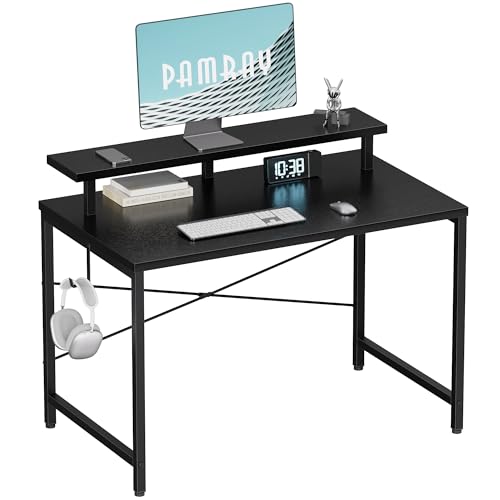


Small-space home offices fail for one of two reasons: people buy furniture sized for a den instead of a corner, or they skip the few items that actually matter and overspend on things that don’t. If you’re working from a bedroom corner, a closet, or a slice of the living room, the goal isn’t to shrink a normal setup. It’s to pick different categories of gear entirely.
Pick the desk by depth, not width
In a small room, desk depth matters more than width. A 60cm deep desk eats a room in a way a 48-55cm deep desk doesn’t, even if the width is the same. Most people don’t need 150cm of width if they’re running a laptop and one monitor. A 100-120cm wide, 50cm deep desk is enough for a keyboard, mouse, and a 24-27″ monitor on an arm, with room left for a notebook or mug.
Corner desks look like the obvious small-space answer, but they only win if the corner is actually usable in your room. A lot of corner desks need 70-80cm of clearance on both walls to install the support leg, which some rooms don’t have once you account for a door swing or baseboard heater. Measure before you buy, not after it arrives.
Wall-mounted folding desks are the real small-space move if you need the floor space back when you’re not working. They fold up to about 10cm of depth. The trade-off: most fold-down desks aren’t rated for much weight once extended, so check the stated load capacity if you’re putting a monitor on it, and don’t expect them to feel as sturdy as a four-legged desk under heavy typing or mouse use. If you want a sense of what’s out there before deciding on dimensions, browsing small space computer desks will show you the range of depths available, which is the number you should actually be filtering by.
Chair: don’t let the room size shrink your budget
This is the one area where small spaces create a bad incentive. People see a cramped room and buy a small, cheap chair to match the scale of everything else. Your back doesn’t care how big the room is. If you’re sitting 6+ hours a day, the chair budget shouldn’t shrink just because the desk did.
What should shrink is the chair’s footprint, not its quality. Look for chairs with a base diameter under 65cm and arms that tuck in or go armless, since wide-set armrests are what usually make a chair feel too big for a tight desk. A mesh task chair with real lumbar support and seat height adjustment, in the $150-300 range, will outlast and outperform a $90 chair that looks compact but has no adjustability. The $90 chair is fine for occasional use at a side table. It’s not fine for a full workday. If you need the visual search, compact ergonomic office chairs is a reasonable starting filter, but read the base and arm dimensions in the listing, not just the thumbnail.
Lighting fixes problems furniture can’t
Small rooms, especially interior ones or bedroom corners, tend to have one overhead fixture and a window that’s either behind your monitor (glare) or behind you (silhouette on video calls). Neither furniture nor room layout tricks fix this well. Lighting does.
Two cheap fixes solve most of it. First, a clamp-on desk lamp with adjustable color temperature, placed to the side of your monitor rather than behind it, kills most glare and gives you consistent light for video calls without needing a dedicated ring light. Second, if the room has no natural light at all, a lamp around 450-800 lumens at roughly 4000-5000K reads as neutral white on camera and doesn’t wash out skin tone the way cheaper 6500K “daylight” bulbs can. Browsing adjustable desk lamps gets you there faster than guessing at bulb specs separately.
Ring lights are oversold for home office use. They’re built for face-forward content creation, not for someone who’s also looking at a monitor and typing. A side-positioned lamp does the job for video calls at a third of the clutter.
Space-saving options compared
| Option | Floor footprint | Best for | Main trade-off |
|---|---|---|---|
| Wall-mounted folding desk | ~10cm when folded | Rooms that double as living space | Lower weight capacity, less sturdy under heavy use |
| Compact 4-leg desk (100-120cm wide, 50cm deep) | Fixed, ~0.5-0.6m² | Dedicated corners, daily full-time use | Takes up the space permanently |
| Corner desk | Fixed, uses two walls | Rooms with an unused square corner | Needs real clearance on both sides, hard to move later |
| Compact mesh task chair | ~60-65cm base diameter | Full-time desk work in tight rooms | Costs more than a basic chair, but worth it for daily use |
What not to buy
Skip monitor arms rated for ultrawide or dual-monitor setups if you’re running a single 24″ screen on a small desk. The clamp base alone can eat 10-15cm of desk depth you don’t have. Skip RGB or gaming-branded desk accessories; they add visual clutter in a room where clutter is already the enemy. And skip a second monitor entirely if your desk is under 110cm wide. A 27-32″ single monitor with window snapping (built into Windows and most Linux desktop environments) gets you most of the multitasking benefit without needing the physical width two screens require.
The pattern across all of this: in a small room, every piece of furniture has to justify its footprint, but that’s a reason to be deliberate about dimensions, not a reason to buy worse versions of things you’ll use eight hours a day.









