
Our Top Picks
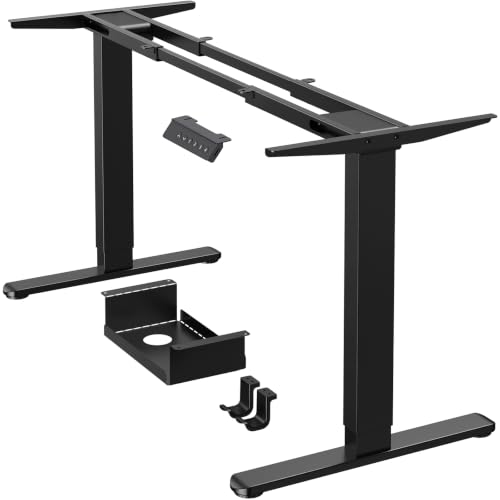


If you already have a desktop you like — solid wood, butcher block, an old door — sit stand desk legs let you turn it into a standing desk without buying a whole new desk. You keep the top, you replace the base with an adjustable frame.
It’s a good route, but legs are where most wobble, motor failures, and compatibility headaches live. Get the frame wrong and even a beautiful top will feel cheap.
What you’re actually buying
A set of sit stand desk legs is usually a two-leg lifting frame: two lifting columns, feet, a crossbar or center drive housing, a control box, a handset, and hardware. You supply the top. Most frames fit tops from about 48 to 72 inches wide, and most support 180 to 300 lbs total including the top.
Check what’s in the box carefully. Budget frames often ship without a top, without screws for thick tops, and without cable management. That’s normal, but you need M5 wood screws of the right length for your top thickness. Too long and you’ll punch through a 3/4-inch top. Too short in a thick butcher block and the top can work loose.
The three frame styles that matter
Most options fall into three buckets. T-frame (also called inline feet) is the standard: feet point front-to-back, motor housings sit near the back edge. It’s stable, simple, and works for gaming and office setups. C-frame / reverse columns push the columns back so your knees and chair have more clearance. Good if you sit deep or use a thick PC drawer. Four-leg / L-shaped frames are for corner desks — overkill unless you have a 60+ inch return to lift.
Width-adjustable frames telescope to fit different tops. That’s useful if you might swap tops later, but the telescoping crossbar is also a flex point. A fixed-width frame cut for your top will always feel stiffer side-to-side.
| Frame type | Best for | Stability | Watch out for |
|---|---|---|---|
| 2-leg T-frame, dual motor | Most 48-72 in. tops, office + gaming | Good to very good | Wobble above 43 in. height; check column stages |
| 2-leg C-frame, dual motor | Deep sitting, tall users, knee clearance | Good, slightly more front-back sway | Feet stick out; needs room behind desk |
| Single-motor / single column | Small 36-42 in. tops, laptops | Okay at sitting height | Slow, uneven lift under load; avoid for dual monitors |
| 3-leg corner frame | L-shaped tops | Good if synced well | Expensive, harder to assemble, control box sync issues |
Single vs. dual motor, 2-stage vs. 3-stage
This is the core trade-off. Single-motor frames use one motor and a driveshaft to move both legs. They’re cheaper and lighter, but slower (about 0.8 in/sec vs. 1.4-1.5 in/sec for dual), louder under load, and if the shaft slips the desk racks — one side higher than the other. Fine for a light laptop setup. I wouldn’t put dual monitors plus a 1.5-inch walnut top on one.
For most people, a dual-motor sit-stand frame is the sensible baseline. Each leg has its own motor, lift is faster and more even, and weight rating is honest. Failure mode is usually the control box or a handset, not the motors themselves. Keep the control box ventilated — stuffed in a cable tray against a power brick is how overheating cutouts happen.
Columns matter more than marketing suggests. Two-stage columns have two moving segments; three-stage have three. Three-stage packs down lower (often 24-25 inches vs. 28-29 inches) and reaches higher (48-50 inches) with less wobble at standing height because the segments overlap more. If you’re under 5’6″ and want to sit properly low, or over 6’2″ and need 46+ inches, get three-stage. If you’re average height and always wear shoes at the desk, two-stage is fine and cheaper.
Compatibility checks people skip
Weight is first. Weigh or estimate your top. A 60x30x1.5-inch butcher block is 70-90 lbs alone. Add 20-30 lbs of monitors, arms, and PC on the desk and a 180-lb rated budget frame is already working hard. It will lift it, but motors strain, speed drops, and long-term reliability suffers. Leave 30% headroom.
Second is top thickness and material. Honeycomb IKEA tops, glass, and live-edge slabs with cracks need different treatment. Lightweight hollow tops can crush if you overtighten. Use wide washers and don’t crank lag screws. For glass, you need an adapter or don’t do legs at all — buy a complete desk. For heavy slab tops, confirm the frame’s mounting holes line up with solid wood, not just epoxy or a crack.
Third is handset and control box. Basic up/down paddles are the most reliable. Memory presets are convenient, but cheap capacitive touch handsets ghost-trigger and lock. Anti-collision sensitivity also varies wildly — don’t trust it with kids, pets, or a drawer underneath. Test it with a cardboard box before you trust it with your PC.
When cheap is fine and when to pay more
Cheap is fine if: your top is under 55 inches, total load is under 120 lbs, you adjust once or twice a day, and you sit under 42 inches high. A basic dual-motor two-stage frame will do that for years. Spend the savings on a good monitor arm and a steel cable management tray — loose cables yanking at full height kill more desks than bad motors.
Pay more when: you are tall, your top is heavy or wide, you stand 4+ hours, or you roll on casters. Look for three-stage columns, 270+ lb rating, a branded control system (Linak, LogicData, Kaidi, Jiecang are common OEMs), and a frame weight over 60 lbs — heavier steel flexes less. Also pay for a better warranty on electronics, not just the frame. Legs rarely bend; boxes and handsets die.
Common failure modes to expect: side-to-side wobble from loose crossbar bolts (re-torque after two weeks), uneven legs after moving the desk (reset/homing procedure in manual), and height drift where the desk sinks slowly under heavy load. That last one usually means you’re over rating or a column seal is worn — reduce load before assuming the motor is dead.
Installation tips that prevent wobble
Assemble upside-down on the top, not right-side-up. Place the top face-down on carpet or cardboard, center the frame front-to-back (leave 1-2 inches from the front edge for clamp mounts), pre-drill hardwood, and drive screws straight. Most wobble complaints I see are really off-center frames or missing center screws.
If you want casters, buy locking casters rated for the total weight and expect 3-4 inches of added minimum height. That ruins low sitting height for short users. For hard floors, keep the stock glides and add a mat instead. And if you’re shopping for the rest of the build, search 3-stage dual-motor sit-stand legs and filter by frame-only listings so you don’t pay for a laminate top you’ll throw away.
FAQ
Can I reuse my current desktop?
Usually yes if it’s at least 3/4-inch thick, flat on the bottom, and 24 inches deep or more. Particleboard with stripped screw holes, glass, and warped slabs are the main exceptions. Pre-drill and use correct-length screws.
How much weight do I really need?
Add top weight + monitors + arms + everything that sits on the desk. Most dual-motor frames rated 220-270 lbs cover a 60-inch wood top with dual monitors. If your PC sits on the desk, add 25-35 lbs to the math.
Are standing desk legs shaky at standing height?
Some sway is normal above 44 inches, especially side-to-side. Three-stage columns, a heavier frame, and re-tightening bolts after break-in help. If you type hard while standing, a crossbar and monitor arm tightened properly matter more than brand.
Single motor or dual motor?
Dual motor for anything over 48 inches wide or with more than a laptop. Single motor is okay for a small side desk or light laptop station where you rarely adjust height, and it’s noticeably slower and less even under load.









