
Our Top Picks
 VIVO Manual Height Adjustable Standing Desk Converter32"31.5 x 31.5 x 31.3 inches26 poundsCheck on Amazon
Small-space standing desks fail for one of three reasons: the footprint is too deep for the room, the frame needs clearance behind it to lift (and there isn’t any), or the desktop is big enough to be useful only if you also owned the extra square footage you don’t have. Solving for “small space” is really solving for footprint, clearance, and cable management, in that order. Price and motor speed matter less than people think.
Measure before you shop
Most buyers measure the wall gap and skip the two numbers that actually cause returns: minimum height and depth with keyboard tray extended. A desk that bottoms out at 28 inches is useless if you’re 6’2″ and need 26 inches of clearance under the tray. A 30-inch deep top looks fine on paper but eats a walkway if your room is under 9 feet wide. Write down three numbers before you look at a single desk: floor-to-ceiling clearance at full extension, available depth including chair pullback, and the width you can actually give up against a wall.
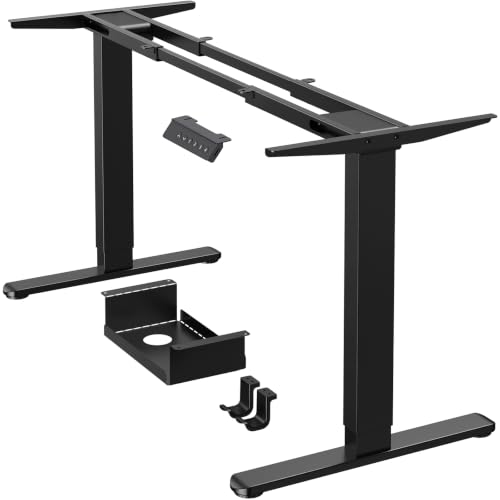
Crossbar vs. no-crossbar frames matter here too. Single-motor frames with a crossbar are usually 10-15% cheaper but the bar sits a few inches off the floor and can clip storage bins or a cat bed. Dual-motor frames without a crossbar cost more but tuck closer to the wall and tolerate more weight without racking (that side-to-side wobble you feel when you lean on one corner).
Footprint: the actual constraint
A 40 x 24 inch top is the realistic floor for a usable sit-stand setup, enough for a laptop, one monitor arm, and a notebook. Go narrower than 40 inches and monitor arms start fighting with your keyboard tray for space. Go shallower than 22 inches deep and a monitor arm’s clamp mount will overhang the back edge, which isn’t dangerous but looks bad and limits how far back you can push the monitor.
If your room is genuinely tiny, a corner desk is worse than people assume. Corner units need two full walls clear of outlets and trim, and the diagonal brace frames many manufacturers use block knee room on both sides at once. A straight desk against one wall, with a slim rolling cart beside it for the printer or extra storage, almost always works better in under 80 square feet.
Frame types compared
| Frame type | Typical footprint impact | Weight capacity | Best for |
|---|---|---|---|
| Single-motor, crossbar | Crossbar sits low, 2-3″ ground clearance | 150-175 lbs | Light laptop setups, tightest budgets |
| Dual-motor, no crossbar | Can sit flush to wall, no floor obstruction | 225-275 lbs | Dual monitors, small apartments where the desk backs onto a walkway |
| Fixed-height converter on existing desk | Adds 4-6″ of depth to current desk | 20-35 lbs on the riser itself | Renters, anyone unsure they’ll stick with standing |
The converter row matters more than it looks. If you’re not sure you’ll actually stand regularly, a riser on top of a desk you already own is the honest starting point. You can browse standing desk converters and spend a fraction of what a full electric frame costs, with zero footprint change since it sits on furniture you already have room for.
The 40-inch vs. 48-inch decision
This is the trade-off that actually matters in a small room. A 48-inch top gives you real elbow room and a second monitor without crowding, but it eats 8 extra inches of wall, which in a bedroom-office is often the difference between fitting beside a dresser or not. A 40-inch top forces single-monitor-plus-laptop discipline but fits where 48 inches physically can’t.
If you’re deciding between the two, measure the wall segment with a tape measure, not by eye. People consistently overestimate how much wall they have free by 4-6 inches because they forget baseboard heaters, outlet covers, or a door swing arc. If the measured space is under 44 inches, buy the 40-inch top and don’t negotiate with yourself about it.
Cables are a small-space problem specifically
In a larger office, a cable mess sits under a desk nobody walks past. In a small room, that same mess is six inches from your desk chair and visible from the bed or the kitchen table. A desk-mounted cable tray (most frames include basic clip hooks, not a real tray) and a single power strip mounted to the underside of the top solves 90% of this. The failure mode to avoid: letting cables hang loose near the lifting mechanism itself. Scissor-lift and dual-column frames both have pinch points during travel, and a loose HDMI cable can get caught and strained over months of raising and lowering, eventually shorting at the connector.
When the cheap option is actually fine
If you work from a laptop only, don’t run two monitors, and stand for under two hours a day, a single-motor crossbar frame in the $180-250 range is not a compromise, it’s the right tool. The extra weight capacity and quieter motors on $400+ dual-motor frames solve problems you don’t have. Spend the savings on a decent monitor arm or anti-fatigue mat instead; both do more for daily comfort than a faster motor.
Where it’s worth paying up is monitor count and daily usage. Two monitors on arms plus a keyboard tray regularly pushes past the 175 lb capacity ceiling of budget frames once you add the desk’s own top weight, and underpowered single motors on heavier loads are the single biggest cause of frames that stall or tilt slightly over time. If that’s your setup, look at dual-motor standing desks rated for 225 lbs or more, and check the actual depth-at-full-extension spec, not just the folded height, before you buy.
For anyone still unsure the desktop size will work in the room, a roll of painter’s tape outlining the footprint on the floor for a day is a better test than any spec sheet. If you keep stepping on the taped line while making coffee or opening a closet, the desk is too big for the room regardless of what the measurements say on paper.









