
Our Top Picks
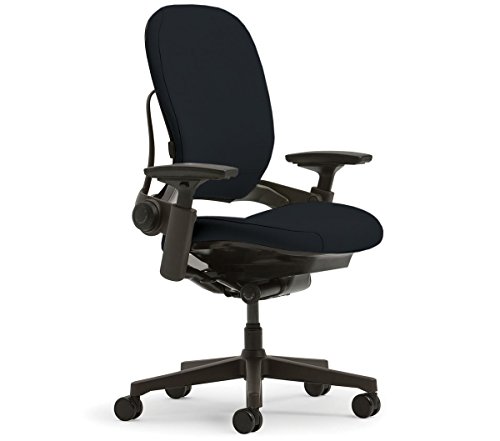 Steelcase Leap Chair V2 In Black Fabric25D x 25W x 25H in25 x 25 x 25 inches50 PoundsCheck on Amazon
 CHAIRORAMA Certified Refurbished Leap Black Chair V218.75 x 27 x 43.5 inches49 PoundsCheck on Amazon
The Steelcase Leap V2 task chair is still one of the most adjustable ergonomic chairs you can buy in 2026, and one of the very few that genuinely fits bodies from about 5’0″ to 6’4″ without aftermarket parts. Its real weaknesses are a firm seat pan some users find hard past the six-hour mark, urethane arm pads that wear out before anything else, and a new-chair price — usually $900–$1,400 depending on options — that pushes many buyers toward the healthy remanufactured market, where a fully serviced Leap V2 typically runs $300–$500.
Steelcase Leap V2 at a Glance
| Spec | Detail |
|---|---|
| Seat height range | 15.5 in – 20.5 in (stool/drafting version roughly 22 in – 30 in) |
| Seat depth | Adjustable, roughly 3 in of slide (about 15.75 in – 18.75 in) |
| Width between arms | About 19 in |
| Weight capacity | 400 lb |
| Chair weight | Roughly 48 lb |
| Base | Nylon standard; polished aluminum upgrade |
| Backrest | LiveBack flexible shell, about 25 in tall; optional headrest |
| Warranty (new) | 12 years from Steelcase |
Every Adjustment Point, Explained
The Leap V2’s reputation comes from how many things move independently. Here’s what each control actually does:
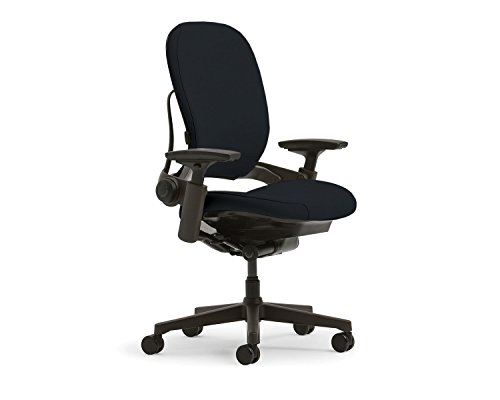
Steelcase Leap Office Chair, Ergonomic Back Support, Onyx
Chosen because it specifies Ergonomic Back Support and Onyx.
View on Amazon
Steelcase Leap Chair Black Base - Hard Floor Casters - Black Fabric V2
Chosen because it specifies Hard Floor Casters and Black Fabric V2.
View on AmazonCHAIRORAMA Certified Refurbished Leap Black Chair V2 | LiveBack Spine Support, Natural Glide Seat, 4D Arms, Adjustable Lumbar | Honeycomb Fabric, Heavy-Duty 400 lbs Rating, 12Yr Service Warranty
Chosen because it specifies LiveBack Spine Support and Natural Glide Seat.
View on Amazon- Seat height (pneumatic lever): A 5-inch travel from 15.5 to 20.5 inches. The low end matters — most chairs bottom out around 17 inches, which is too tall for shorter users at standard 29–30 inch desks.
- Seat depth (slider under front edge): Pulls the seat pan in or out over roughly 3 inches. The goal is two to three fingers of clearance between the seat edge and the back of your knees.
- 4D arms: Height, width, depth, and pivot. The height range is about 4 inches, and the pads swing inward roughly 30 degrees — useful for bringing support closer when typing on a narrow keyboard tray.
- Lumbar height (slider on back shell): Moves the lumbar pad about 4 inches up or down to sit in the curve of your lower back.
- Lower back firmness (dial): Increases or decreases lumbar pressure without moving the pad.
- Upper back force / recline tension (dial): Sets how hard the backrest pushes back when you recline.
- Variable back stop (lever): A five-position tilt limiter, from fully upright lock to free recline.
- Natural Glide system: As you recline, the seat glides forward a couple of inches so you stay in reach of your keyboard instead of drifting away from the desk.
Fit by Body Height
| Your height | Expected fit | Setup notes |
|---|---|---|
| 5’0″ – 5’4″ | Good — rare for a task chair | Seat at the 15.5 in minimum, depth fully retracted; add a footrest if your desk is a fixed 29 in+ |
| 5’5″ – 5’11” | Ideal — the sweet spot | All adjustments land mid-range |
| 6’0″ – 6’4″ | Good | Depth fully extended, seat near the top of the cylinder; consider the optional headrest |
| 6’5″+ | Marginal | Backrest may end mid-shoulder; look at taller-back alternatives |
| 350 – 400 lb | Within rating | Above 400 lb, the Leap Plus is rated to 500 lb |
What about a Steelcase Leap V2 drafting chair?
People searching for a Steelcase Leap V2 drafting chair are almost always looking for the Leap stool — Steelcase’s factory tall variant with an extended cylinder and a height-adjustable footring, reaching roughly 22 to 30 inches of seat height for drafting tables and standing desks. It keeps the same LiveBack and arm adjustments. Third-party drafting kits that swap a taller cylinder onto a standard Leap chair do exist, but they add weight high on the column, can affect stability, and aren’t covered by Steelcase’s warranty — the factory stool is the safer route.
Fabric and Frame Durability: the Real Trade-Offs
| Upholstery option | Feel | Breathability | Long-term wear |
|---|---|---|---|
| Buzz2 (woven polyester) | Soft, textured | Moderate | Very high abrasion resistance; best choice if pets claw the seat |
| Cogent Connect (3D knit) | Springy, mesh-like | Highest airflow — best for warm rooms | Can snag on sharp objects; knit may relax slightly at the seat edge over years |
| Leather upgrade | Smooth, premium | Warm — traps heat on long sits | Durable but shows creasing; needs occasional conditioning |
The frame trade-off is simpler: the standard base is nylon, the upgrade is polished aluminum. Functionally the nylon base holds up extremely well — the aluminum option is mostly cosmetic and adds cost. Where construction genuinely matters is the back shell and mechanism, which are the parts that almost never fail on a Leap V2. The flexible LiveBack shell has no foam to compress, which is a major reason decade-old chairs still recline correctly.
What Wears First: Real-World Longevity Insights
Because the Leap V2 has been sold since 2006 and dominates office liquidation channels, refurbishers have a long, consistent record of what ages on it:
- Arm pads (first to go, roughly years 3–6 of heavy use): The urethane pads compress, crack, and peel. Replacement pads are an inexpensive screw-on swap, and buying a used chair with worn pads is normal, not a red flag.
- Seat fabric at the front edge: Friction from legs wears the upholstery where your knees bend. Cogent Connect shows it as slight loosening; Buzz2 as surface fuzz.
- Gas cylinder (years 8–10+): Slow height sag. The cylinder is replaceable with common parts.
- Seat foam: Gradual firming loss rather than collapse; most 10-year-old seats are still serviceable.
- Almost never: The back shell, tilt mechanism, and frame. This is why the refurbished market is so strong — the expensive parts don’t die.
On moving and delivery: the chair weighs about 48 lb and ships roughly 65 lb boxed, fully or nearly assembled. It passes through standard 30–32 inch doorways without disassembly — a real advantage over big-and-tall chairs that arrive in pieces.
Who Should Buy It — Decision Matrix
| Your situation | Verdict |
|---|---|
| 8+ hours a day at a desk, or existing lower-back pain | Strong yes — the lumbar slider plus firmness dial is the core selling point |
| Under 5’4″ | Yes — the 15.5 in minimum seat height and retracting seat depth are the reason |
| Over 6’4″ or 400 lb | Look at the Leap Plus or a tall-back chair instead |
| Drafting table or standing-desk setup | Buy the factory Leap stool, not a conversion kit |
| Budget under $400 | Buy remanufactured — sellers like Crandall Office or BTOD rebuild them with new pads, casters, and cylinders, often with their own multi-year warranties |
| Hot room or runs warm | Choose Cogent Connect fabric |
| Household with cats or dogs | Choose Buzz2 — the tight weave resists claw snags better than knit |
FAQ
How can I tell a Leap V2 from the original Leap (V1)?
Check the manufacture date sticker under the seat — V2 production began around 2006. Visually, the V2 has a slimmer, more tapered back shell and different arm caps. On the used market, “Leap” listings older than 2006 are usually V1, which has a shorter backrest and less refined recline.
Is a refurbished Leap V2 worth it over a new budget chair?
In most cases, yes. A remanufactured V2 at $300–$500 gives you a 400 lb rating, a steel-and-nylon mechanism with a proven 15+ year lifespan, and replaceable wear parts — none of which is true of most new chairs at that price. Verify the seller actually replaces the arm pads, casters, and cylinder rather than just cleaning the chair.
Does it need a headrest?
Not for upright task work — the backrest supports the shoulders, not the head. A headrest only pays off if you recline for calls or reading; Steelcase and third-party options both exist, so it’s easy to add later rather than paying for upfront.









