
Our Top Picks
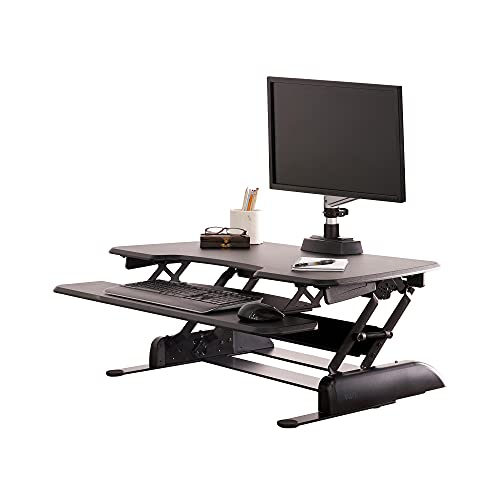


A desktop converter (also called a riser) sits on top of your existing desk and lifts your monitor and keyboard up when you want to stand, then collapses back down when you want to sit. It’s the fastest way into sit-stand work without buying a new desk, dealing with cable grommets, or convincing facilities to approve a $600 purchase order. It’s also the option most likely to disappoint you if you buy the wrong size or shape for your setup. Here’s what actually matters.
How these converters actually work
Most riser converters use a spring-assisted or gas-strut lift mechanism, the same idea as a car hatch. You squeeze two handles or pull a lever, and the platform rises or drops in one motion, usually locking into 4 to 10 height stops. Cheaper models use a simple pneumatic piston with no intermediate stops, just up or down. The good ones hold position smoothly across a 15 to 20 inch range of travel, enough to go from a seated keyboard height of about 26 inches to a standing height of 42 to 46 inches depending on your own height.
There are three basic shapes:
Single-surface risers lift one flat platform that holds everything, monitor, keyboard, mouse. They’re cheap and simple but your keyboard ends up too high relative to your eyes once you factor in a laptop or monitor stand sitting on the same deck.
Two-tier risers have a separate lower tray for the keyboard and a raised upper deck for the monitor. This is the shape most ergonomists actually recommend, because keyboard height and monitor height are different ergonomic problems and a single flat surface can’t solve both.
Freestanding monitor arms with an attached keyboard tray are really a mini two-tier riser, just mounted on a pole instead of a scissor lift. They tend to have a smaller footprint on the desk, which matters if your desk is already crowded.
What to check before you buy
Weight capacity is the number people skip and regret. A 27-inch monitor plus a mechanical keyboard and a mouse easily hits 20-25 lbs. Dual monitors can push 35-40 lbs. Cheap risers rated for 20 lbs will sag or drift down under that load within a few months, especially the pneumatic ones. Check the rating against your actual gear, not your guess.
Footprint is the second thing. Measure your desk’s usable depth before ordering. A lot of these converters are 24-30 inches deep when extended, and if your desk is only 28 inches deep total, the riser will hang off the back edge or push your monitor uncomfortably close to your face. If you work against a wall with outlets or a monitor arm already mounted, that depth problem gets worse.
Stability at full height matters more than people expect. Some single-surface risers wobble noticeably when you type at the top of their range, because the lift mechanism isn’t braced well at full extension. If you can, check reviews specifically mentioning wobble or sway, not just overall star ratings.
Lift effort is a real daily friction point. If raising the thing requires a two-handed shove and a grunt, people stop switching positions after the first week, which defeats the entire point of owning one. Gas-strut designs are generally smoother than basic spring designs at the low end.
Riser vs. a full standing desk
| Desktop riser/converter | Full electric standing desk | |
|---|---|---|
| Typical cost | $80-$250 | $300-$700 |
| Setup time | 5-15 minutes, no tools usually | 30-90 minutes, two people helps |
| Desk depth needed | Needs existing desk depth plus riser footprint | Replaces desk, no stacking issue |
| Height range | Limited, often 15-20 inch travel | Full range, roughly 22-48 inches |
| Good for renters/shared offices | Yes, no permanent change | Only if you can take it with you |
| Stability at max height | Variable, some wobble | Generally solid, four-leg base |
If you’re renting, sharing a desk, or just not sure you’ll stick with standing part of the day, a riser is the right call. If you already know you want long stretches standing and you have the floor space, a full desk is worth the jump eventually, but there’s no reason to start there.
When the cheap option is genuinely fine
If you have a single monitor under 24 inches, a standard keyboard and mouse, and you mostly want the option to stand for an hour here and there rather than half your workday, a basic single-surface riser in the $80-120 range is fine. You don’t need a two-tier model with independent height adjustment for keyboard and monitor if you’re not standing for hours at a stretch. Save the money and put it toward a decent anti-fatigue mat instead, which matters more than people expect once you’re actually standing for extended periods.
Where the cheap option fails you is multi-monitor setups, mechanical keyboards (taller profile changes your wrist angle), or anyone standing more than 2-3 hours a day. In those cases the sag, wobble, and wrist strain from a flat single-tier surface add up and you end up replacing it within a year anyway.
What to actually look for
For most people, start by browsing two-tier standing desk converters and filter by weight capacity above your actual gear weight, not the minimum listed. If your desk is shallow or you work in a tight cubicle, look at compact standing desk converters built for smaller footprints rather than squeezing a full-size riser onto a desk that can’t fit it. And if you’re running two monitors, a dedicated dual monitor standing desk converter will handle the extra weight and width far better than a single-monitor model stretched past its intended use.
Whatever you pick, measure your desk depth and weigh your gear before you order. Those two numbers eliminate most of the returns people end up making with this category.









