
Our Top Picks
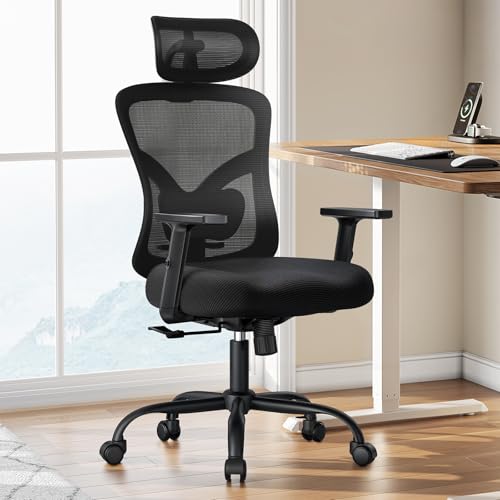 Marsail Ergonomic Office Chair with Lumbar Support andOversized27.6 x 19.7 x 51.4 Inches34.83 poundsCheck on Amazon
Pros & cons
- 2D headrest tilts and adjusts height for neck support
- Supports up to 300 pounds on a metal base
- 3.15-inch cushion adds extra seat comfort
- At nearly 35 pounds, it is heavier than basic task chairs
- Oversized sizing may not fit smaller workspaces
Pros & cons
- S-shaped backrest curve supports natural spine posture
- Meets SGS and BIFMA certification for stability
- Flip-up armrests let the chair slide under the desk
- PU leather surface needs wiping to avoid sweat buildup
- 300-pound capacity trails some heavier-duty chairs
 Marsail Ergonomic Office Chair: Office Desk Chair with46.9" x 24.8" x 24.4"46.9 x 24.8 x 24.4 inches30.42 PoundsCheck on Amazon
Pros & cons
- 3D armrests adjust for multiple working postures
- Supports up to 330 pounds for a wide user range
- Adjustable lumbar moves to match height and body shape
- At over 30 pounds, it is heavier to move around
- Multiple adjustment points add setup complexity
A computer chair with adjustable arms matters for one straightforward reason: your elbows need support at exactly desk height with your shoulders relaxed, and fixed armrests almost never land there. Each of your arms weighs roughly 8–12 pounds, and when armrests sit too high they push your shoulders toward your ears; too low or too far apart and your neck and trapezius muscles carry that weight all day. Over a 40-hour week, that’s a difference you genuinely feel. The good news is you don’t need the most expensive mechanism — you need the right range of adjustment for your body and your desk.
2D vs 3D vs 4D Armrests: What the Labels Actually Mean
The “D” refers to directions of movement, but here’s the catch most listings don’t mention: there’s no industry standard for which directions count. One brand’s “3D” includes width adjustment; another’s swaps it for pivot. Always read the spec sheet for the actual movements rather than trusting the label.
Marsail Ergonomic Office Chair with Lumbar Support and 2D Headrest | Adjustable armrests, contoured seat cushion, breathable design, smooth-rolling wheels, reclining function, height adjustment
Picked as a relevant option in this category.
View on Amazon
Office Chair Ergonomic Desk Chair, Computer PU Leather Home Office Chair, Swivel Mesh Back Adjustable Lumbar Support Flip-up Arms Executive Task Chair
Chosen because it specifies Computer PU Leather Home Office Chair.
View on AmazonMarsail Ergonomic Office Chair: Office Desk Chair with High Back Mesh and Adjustable Lumbar Support Rolling Work Swivel Task Chairs with Wheel 3D Armrests and Headrest
Picked as a relevant option in this category.
View on Amazon
Ergonomic Office Chair, Mesh Computer Desk Chairs with BIFMA X5.1 Certified, Adjustable Lumbar Support, 3D Arm, Tilt Back, Wide Seat, Comfy Swivel Work Task Chair for Company and Home (Obsidian Black)
Chosen because it specifies Mesh Computer Desk Chairs with BIFMA X5.1 Certified and Adjustable Lumbar Support.
View on Amazon| Type | What adjusts | Typical price tier (2026) | Best for |
|---|---|---|---|
| Fixed / 1D | Nothing, or height only | Under ~$200 | Short sessions, guest chairs |
| 2D | Height + one axis (usually pivot or depth — varies by brand) | ~$100–$300 | Part-time desk work, tight budgets |
| 3D | Height + two axes (commonly depth + pivot, or width + depth) | ~$250–$600 | Full-time desk work |
| 4D | Height, width, depth (fore/aft), and pivot | ~$300 budget to $1,500+ premium | Shared chairs, long hours, non-average frames |
Width is the axis most often sacrificed, and it’s the one many people need most. Premium examples of true all-axis arms include the Steelcase Gesture’s 360-degree arms and the magnetic-pad 4D armrests on the Secretlab Titan Evo; the Herman Miller Aeron’s “fully adjustable arms” option covers height, depth, and pivot but notably not width — proof that the spec sheet matters more than the badge.
The Height and Width Numbers That Decide Whether Armrests Fit You
Ergonomically, the target is simple: elbows bent at roughly 90–100°, shoulders unshrugged, forearms lightly supported. Translating that into specs:
- Armrest height range: Standard desks sit 28–30 inches high, so armrest tops typically need to reach 25–30 inches from the floor. Some brands list height above the seat instead (usually a 7–11 inch range is workable). Check the minimum height too — shorter users and anyone under about 5’4″ often needs pads that drop below 24 inches.
- Under-desk clearance: If you want the chair pushed fully under the desk, armrests at their lowest must clear the desk’s underside, which is often only 24–26 inches on desks with a drawer or apron. This is a common, annoying miss on budget chairs.
- Pad spacing (width): Your elbows should hang close to your torso. Fixed pads are frequently spaced 19–21 inches apart, which forces narrower frames to splay their arms outward — a direct cause of shoulder fatigue. Width adjustment of ±1–2 inches per side lets smaller users bring pads in to ~17–18 inches and larger frames push out past 21 inches.
- Depth: Fore-aft sliding keeps support consistent when you recline or pull close to the keyboard, and helps shorter users who sit forward on the seat pan.
Which Armrest Mechanisms Last Longest Under Daily Use
Armrests take more abuse than almost any other chair component — you lean on them, pivot them, and push down with 50–100+ pounds every time you stand up. Here’s the realistic wear order:
- Arm pads wear first. Polyurethane-skin pads typically crack or peel after 2–4 years of daily use. Chairs with replaceable pads (the Titan Evo’s magnetic swap system, or spare pads sold by Herman Miller and Steelcase) sidestep this entirely.
- Pivot detents loosen next on 4D arms. Every added axis is another joint that develops play. Budget “4D” arms under ~$250 often develop visible wobble within a year; premium mechanisms are engineered to hold tolerance far longer.
- Height mechanisms: ratchet vs. button-lock. Ratchet systems (click up, release at the top) are simple and durable but offer limited positions and can release accidentally. Button or lever locks give finer control; their friction pads wear slowly but are rarely replaceable.
- Post material matters more than pad softness. Steel or aluminum uprights stay rigid; nylon/plastic posts flex, creak, and eventually develop permanent lean under repeated push-up loads.
Warranty length is a reliable proxy here: premium chairs carry 10–12 year warranties that explicitly cover arm mechanisms, while budget chairs typically offer 1–3 years and often exclude arm pads as “wear items.” If a brand won’t warrant the arms, expect to be the warranty.
Match the Armrest to Your Situation
| Your situation | Minimum spec to look for | Why |
|---|---|---|
| Petite frame (under ~5’4″) | 4D with low minimum height (~24″ from floor) and inward width adjustment | Fixed pads sit too high and too wide, forcing constant shoulder abduction |
| Broad shoulders / larger frame | Width adjustment + steel posts | Needs wider spacing plus structure that won’t flex under load |
| Full-time desk work, 8+ hours | True 3D or 4D, button-lock height | Fine positioning prevents cumulative shoulder strain |
| Gaming or frequent reclining | 4D with depth and pivot | Pivot keeps forearms supported at controller and angled-keyboard positions |
| Shared household or hot-desk chair | 4D with single-hand levers | Multiple body types need fast, tool-free readjustment |
| Budget under ~$200 | Height + width (2D) over advertised “4D” | Simple, well-built mechanisms outlast cheap multi-axis arms |
| Chair must tuck fully under desk | Minimum armrest height below ~25″ | Must clear the desk underside, typically 24–26″ from floor |
A 60-Second Spec-Sheet Checklist
- Armrest height range stated in inches (reject “adjustable” with no numbers)
- Pad spacing: minimum and maximum width between pads
- Post material: steel or aluminum preferred over nylon
- Pads: replaceable, or at minimum hard-wearing molded PU rather than thin-skinned foam
- Warranty: does it explicitly cover armrest mechanisms, and for how long?
- If buying in person: push down hard on each arm and twist — noticeable creak or flex in a new chair only gets worse
FAQ
Are 4D armrests worth the extra money?
Yes if you sit 6+ hours daily, share the chair, or fall outside average body dimensions — the width and pivot axes earn their cost. For under 4 hours a day, a solid 2D chair with the right fixed geometry serves most people fine.
Should my arms rest on the armrests or the desk?
Armrests, set level with or just below desk height. Resting forearms on a hard desk edge creates wrist pressure points and encourages forward hunching.
Why do my armrests wobble?
A few millimeters of play is normal on multi-axis arms — the joints need clearance to move. Progressive looseness, clicking when weighted, or pads that won’t hold position signal worn detents or a failing height lock, which is worth a warranty claim on mid-range and premium chairs.
Can I just remove the armrests instead?
Most task chairs let you unbolt them, but going armless eliminates forearm support entirely — fine for short stints, tiring for full workdays. Better to choose arms that drop low enough to stay out of the way.









