
Our Top Picks
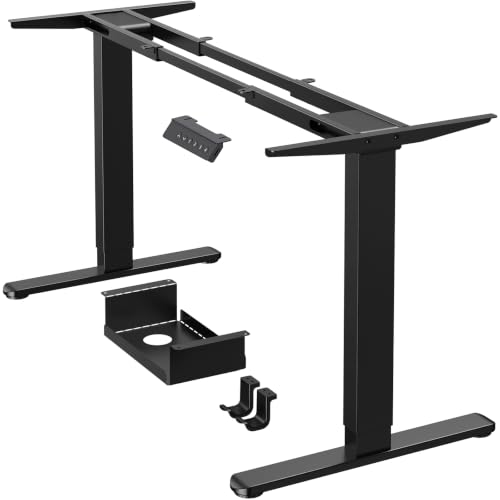


What Actually Matters in a WFH Adjustable Desk
Most people shopping for a sit-stand desk fixate on height range and ignore the two things that actually cause problems later: weight capacity and motor noise. If you’re running two monitors, a laptop dock, and maybe a small printer, you’re pushing 40-50 lbs before you even add a desk-mounted light or monitor arm. A desk rated for 220 lbs with a single motor will struggle, sag over time, or trip its overload protection mid-raise. Look for dual-motor frames if you’re over 35 lbs of gear, and don’t trust the manufacturer’s “max capacity” number at face value since it’s often tested at the lowest point of travel, not fully extended.
Noise matters more than people expect, especially if you’re on video calls or sharing a room. A decent frame runs around 45-50 dB, which is library-quiet. Cheap single-motor units can hit 65 dB, loud enough that your cat leaves the room and your Zoom mic picks it up. If a listing doesn’t mention dB rating at all, assume it’s loud.
Height Range and Who It’s For
Standard adjustable desks run roughly 28″ to 48″. That covers most adults, but if you’re under 5’2″ or over 6’4″, check the low end and high end specifically. A desk that bottoms out at 28″ is still too tall for a lot of petite users to type comfortably with elbows at 90 degrees. Taller users need the full 48″ for standing without hunching. This is the single most common return reason, more than any motor or build quality issue, so measure your own ideal sitting and standing elbow height before buying rather than assuming “adjustable” means “fits everyone.”
Desktop Material: Where the Price Actually Goes
Laminate MDF tops are fine. I don’t say that as a consolation prize, I say it because for 90% of home office setups, a 1″-thick laminate top with a decent edge banding will outlast the frame’s warranty. Bamboo and solid wood tops look better and resist dents slightly better, but they also cost $100-200 more and can warp in humid climates if the underside isn’t sealed. Steel tops exist for a reason (durability, no warping) but they’re heavy, cold to the touch, and overkill unless you’re doing something unusual like soldering at your desk.
Where the cheaper option is genuinely fine: if you’re buying a desk under $300, a laminate top with a basic steel frame will do the job for years as long as you’re not exceeding the weight rating. Where it’s not fine: if you plan to mount a heavy monitor arm or a treadmill base underneath, spend more on frame rigidity, not top material.
Frame Types Compared
| Frame Type | Typical Price | Weight Capacity | Noise | Best For |
|---|---|---|---|---|
| Single-motor, 2-leg | $180-280 | 150-200 lbs | 55-65 dB | Laptop + one monitor, budget setups |
| Dual-motor, 2-leg | $300-450 | 220-300 lbs | 45-50 dB | Multi-monitor, daily sit-stand users |
| Dual-motor, 3-leg (crossbar) | $450-700 | 300-350 lbs | 45-50 dB | Heavy gear, wide desktops over 60″ |
The 3-leg crossbar design matters more than people expect once your desktop exceeds 60″ wide. Without that center leg, you’ll get noticeable wobble at the far ends when typing, especially at full standing height. If you’re buying a wide desk, don’t skip it to save $50.
Common Failure Modes
Three things actually break on these desks, in order of frequency: the control panel’s memory buttons stop saving presets (annoying, not dangerous), one motor starts lifting slightly faster than the other causing the desktop to rack sideways over months (fixable with a reset procedure, but a sign of a cheap controller), and the anti-collision sensor becomes oversensitive and stops the desk every few inches (usually a firmware or sensor calibration issue). None of these are catastrophic, but they’re why I’d rather buy from a brand that answers support emails than save $40 on an off-brand frame with no support page.
If you want a reliable starting point, browsing dual motor standing desks on Amazon will surface the established brands with enough review volume to spot pattern failures before you buy. Read the 2-3 star reviews specifically, not the 1-star rants, since that’s where you’ll find the “worked fine for 8 months then started drifting” accounts.
What to Pair It With
An adjustable desk without a monitor arm is leaving height-adjustment flexibility on the table. If your monitor is bolted to a fixed stand, you still have to crane your neck differently at standing height versus sitting height. A basic gas-spring monitor arm mount runs $35-60 and solves this permanently. Similarly, if you’re standing more than an hour at a stretch, a cushioned anti-fatigue mat for $30-40 makes a real difference in foot and lower back comfort. These are the two accessories I’d actually spend money on; a desk-mounted cup holder or cable tray is nice but not something that changes your workday.
Who Should Spend More, Who Shouldn’t
If you’re sitting most of the day and standing for maybe 20 minutes here and there, a single-motor desk under $280 is genuinely enough. You’re not stressing the motor, you’re not pushing weight limits, and the noise only matters twice a day. If you’re alternating sit-stand every 30-45 minutes as part of an actual ergonomic routine, or running a dual-monitor setup with a dock and lamp, the dual-motor frame earns its extra $150 in reliability and quiet operation. The 3-leg frame is only worth it for wide desktops or genuinely heavy loads; don’t buy it just because it looks more substantial in photos.









