
Our Top Picks
Pros & cons
- Four memory presets simplify switching between heights
- Aerospace-grade lifting columns aim for long-term stability
- Low-VOC materials support a healthier indoor workspace
- 48 x 24 inch top limits room for larger multi-monitor setups
- At nearly 44 pounds, assembly needs some help
 Amazon Basics Gas Spring Single Monitor Arm DeskSingle18.7 x 4.25 x 18 inches4.18 poundsCheck on Amazon

What Actually Matters When You’re Buying One
Most of the differences between a $250 standing desk and an $800 one come down to three things: motor strength, frame stability at full height, and how the controller handles presets. Everything else — colors, cable trays, drawer add-ons — is decoration. If you’re working from a spare bedroom or a corner of the living room, you don’t need a desk built for a trading floor. You need something that goes up and down reliably for a few years without wobbling when you type.
The biggest mistake people make is buying based on desktop size and ignoring the frame. A big 60-inch desktop on a cheap single-motor frame will shake visibly at 48 inches of height, especially if you’ve got a monitor arm clamped to the back edge. That wobble isn’t cosmetic — it’s annoying enough that people quietly stop using the standing function within a month.
Single-Motor vs Dual-Motor Frames
Single-motor desks drive both legs through a shared crossbar. They’re cheaper, usually $200-350 for a decent one, and fine for desktops under 48 inches wide with a light load — laptop, one monitor, maybe a desk lamp. Dual-motor frames drive each leg independently, which means better synchronization and far less lateral sway at height. If you’re running two monitors, a monitor arm, or a desktop wider than 55 inches, pay for dual motors. It’s the single upgrade that makes the biggest difference in daily use.
Weight capacity numbers on the box are usually best-case and measured with the desk at a lower height. A frame rated for 220 lbs at 25 inches might only comfortably handle 150 lbs at 48 inches before you notice flex. If you’re near the top of a desk’s stated capacity, go up a tier rather than maxing it out.
Frame Tiers Compared
| Tier | Typical Price | Motor | Good For | Where It Fails |
|---|---|---|---|---|
| Budget | $150-250 | Single | Laptop + one monitor, occasional standing | Wobble past 44″, slow transitions, limited height range |
| Mid-range | $300-450 | Dual | Two monitors, daily sit-stand use | Cable management often an afterthought |
| Premium | $500-900 | Dual, reinforced | Heavy monitor arms, wide desktops, all-day use | Price; overkill for light setups |
For most home office setups, mid-range is the sweet spot. You’re paying for stability you’ll actually notice, not for features you won’t use.
Height Range Is a Fit Problem, Not a Feature
Check the minimum height before anything else, especially if you’re under 5’5″ or you prefer a lower seated typing position. A lot of frames bottom out at 28-29 inches, which is already tall for shorter users once you add desktop thickness. The maximum height matters less than people think — most people topping out around 6’2″ rarely need more than 48 inches for standing — but if you’re taller, verify the max height clears your elbow line when standing with arms at 90 degrees.
If you’re shopping for a full setup rather than a bare frame, it’s worth browsing electric standing desks with your height range written down before you compare models, since the spec is buried differently on every listing.
Controllers and Presets
Three height presets is the realistic minimum — one for sitting, one for standing, one for a secondary task like reading. Cheaper controllers only remember one or two and require holding a button down, which gets old fast. Look for a controller with a clear digital height readout in inches or centimeters; without it, people eyeball their position and end up slouching into the same seated height they were trying to avoid.
Anti-collision sensors are worth having if you’ve got shelving, a window ledge, or anything the desk could hit on the way up. They stop the motor automatically. Not every budget frame includes this, so check the spec sheet rather than assuming.
Desktop Material: Don’t Overthink It
Laminate over particleboard is what most desks ship with, and it’s genuinely fine. It resists scratches and spills well enough for home use and won’t warp under normal conditions. Solid wood desktops look better and feel sturdier, but they’re heavier, which actually puts more strain on a cheap motor, and they cost 2-3x more for a benefit that’s mostly aesthetic. Bamboo is a reasonable middle ground — lighter than solid hardwood, decent durability, usually a $50-80 premium over laminate.
The Accessory That Actually Changes How You Stand
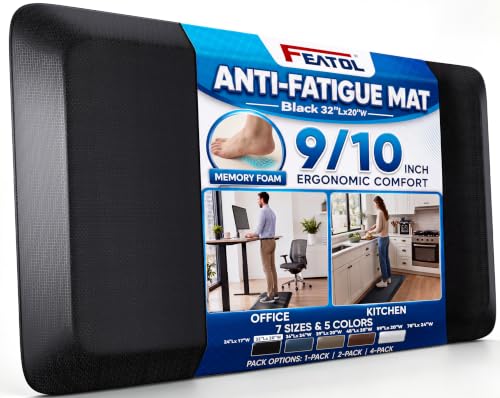
A standing desk without an anti-fatigue mat gets used less. Standing on hard flooring for more than 20-30 minutes starts to bother your feet and lower back, and that discomfort is the single biggest reason people quietly give up on sit-stand habits. A mat with some give — not memory foam soft, just enough cushion to shift weight — makes an hour of standing feel manageable. It’s a $30-40 add-on, not optional in practice. Browsing anti-fatigue standing desk mats and picking one with a slightly beveled edge will save you from tripping on the lip, which happens more than you’d expect with cheaper flat mats.
If you’re running a monitor arm, buy it separately rather than trusting a desk’s included mount — most bundled arms are weak and droop within months under a 24-inch monitor’s weight. A dedicated gas spring monitor arm holds position reliably and is a separate purchase worth making regardless of which desk you land on.
Where to Actually Spend the Money
If your budget is tight, spend it on the frame’s motor configuration first, the mat second, and skip premium desktop materials entirely — laminate holds up fine. If you’ve got more room to spend, a dual-motor frame with a digital controller and verified height range for your body will outlast and out-stabilize anything with a nicer-looking top. The desk itself is a commodity at this point; stability and fit are what separate a desk you use daily from one that becomes a very expensive shelf.









