
Our Top Picks
 Veken 55 Inch Large Electric Standing Desk55×23.6 Inch23.64 x 55.12 x 28.3 Inches42.1 poundsCheck on Amazon
Pros & cons
- Quiet motor runs under 52 decibels during height changes
- Built-in cable management keeps cords tidy
- 55-inch desktop fits multiple monitors and gaming gear
- Two-board desktop construction may show a center seam
- At over 42 pounds, assembly needs some help
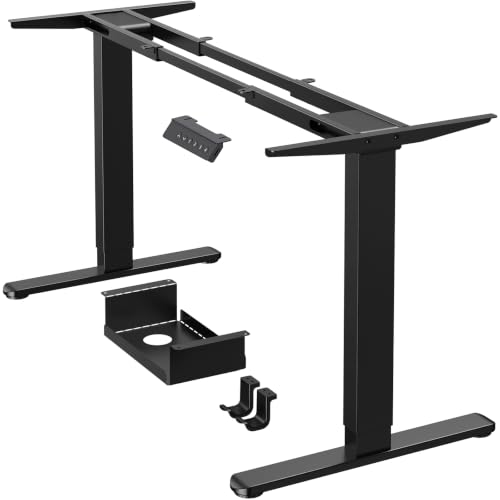

Dual-monitor setups are rough on standing desks in a way that single-screen setups aren’t. Two 24-27″ monitors on arms can add 15-25 lbs of load well above the desk surface, and that weight sits far from the legs, which is exactly the condition that exposes a weak frame. If you’ve ever seen a standing desk wobble when someone types hard, it’s usually a dual-monitor desk with too narrow a base or too light a motor.
This isn’t about finding the “best” desk in the abstract. It’s about matching frame stability, weight capacity, and surface size to the specific stress of two screens, plus whatever you’re running them on (laptop, dual GPU tower, dock).
Why dual monitors change the math
A single monitor on a desk is a centered, modest load. Two monitors are either two separate arms (double the clamp points and double the leverage) or one dual-monitor crossbar arm, which concentrates 20+ lbs at one mounting point and transmits torque into the desktop every time you adjust height. Either way, you’ve turned a simple load-bearing problem into a leverage problem.
The practical failure modes to watch for:
Wobble at height: cheap single-motor desks flex more as they extend, and the sway shows up most at 44-50″, which is where dual monitors on arms usually sit for taller users. Motor strain: dual-motor desks split the lifting load across two legs, which matters more with monitor arms than with a static heavy object, because arms add shock loads during adjustment. Desktop flex: if the surface itself is thin (under 1″ particleboard), the monitor arm clamp can bow the desktop slightly over time, especially at the back edge where most clamps grip.
What actually matters for spec-shopping
Weight capacity numbers on spec sheets are usually tested as a static, centered load. They don’t account for monitor arms placing weight at the edges. As a rule of thumb, don’t buy a desk rated below 150 lbs if you’re running two monitors on arms, even though your actual equipment weight might be 40-50 lbs total. That buffer isn’t marketing fluff, it’s margin for the leverage effect.
Frame width matters more than most buyers expect. A 48″ wide top with two monitor arms mounted 12″ apart from center is a very different stability situation than the same arms on a 60″ top with more spread. Wider desks resist twisting better, assuming the frame crossbeam is rigid, not just the legs.
Desktop thickness is the detail people skip. Look for at least 1″ (25mm) thick tops if you’re clamp-mounting arms. Thinner tops work fine with grommet-mounted arms that pass through a hole rather than clamping the edge, since that avoids the leverage point entirely.
| Factor | Minimum for dual monitors | Why |
|---|---|---|
| Weight rating | 150+ lbs | Buffer for leverage, not just raw weight |
| Motor config | Dual motor | Reduces wobble and uneven lift under side load |
| Desktop thickness | 1″ (25mm)+ | Resists clamp-point flex |
| Frame width | 55″+ for two arms | Spreads load, resists twisting |
| Crossbar/brace | Present | Adds torsional rigidity dual-motor alone doesn’t give |
Single motor vs. dual motor: when the cheap one is actually fine
If you’re running one monitor plus a laptop, or two monitors that together weigh under 25 lbs and sit on a desk 48″ or narrower, a single-motor frame is genuinely fine. The wobble people complain about mostly shows up with heavier loads, wider desks, or arms mounted off-center. A lot of single-monitor-plus-laptop users buying dual-motor desks are paying $150-250 extra for stability margin they’ll never use.
Where dual motor earns its price: two monitors on independent arms, any desk over 55″ wide, or anyone who adjusts height multiple times a day (shared desks, sit-stand switching every hour). The second motor isn’t really about lifting more weight, it’s about lifting it evenly, which matters a lot once your load isn’t centered.
For most dual-monitor home office setups, a mid-range dual motor standing desk in the 55-60″ width range covers the actual failure modes above without overbuying.
The monitor arm matters as much as the desk
A great desk with a bad monitor arm will still wobble. Single-arm dual-monitor crossbars are the worst offenders because all the weight funnels through one clamp, usually at the back center of the desk, right where height-adjustable desks flex the most during motion. Two independent arms, each rated for your specific monitor weight (check VESA compatibility and the arm’s listed range, usually 4.4-19.8 lbs per monitor), distribute the load and let you position each screen without re-balancing the whole rig.
If you’re buying arms separately, gas-spring arms are easier to adjust but drift over time and sag with heavier monitors (over 9 lbs per screen). Mechanical/spring-tension arms hold position longer but need manual tension adjustment when you change monitors. For most 24-27″ monitors, either works, but checking the weight rating against your actual monitor spec (not just “fits most monitors” marketing copy) avoids slow sag over 6-12 months. A decent set of dual monitor arm mounts rated above your actual monitor weight is worth the $20-30 premium over the cheapest option.
The actual decision
Buy based on your real load, not the desk’s maximum rating. Two 24″ monitors on independent arms (roughly 25-30 lbs total plus a laptop or small PC) need a 150+ lb rated, dual-motor frame at least 55″ wide with a 1″ top. Two 27-32″ monitors, or anything with a heavier dual-arm crossbar, push you toward 200+ lb rated frames and a braced frame design, not just dual motors.
If your budget is tight, spend it on the frame width and desktop thickness before the motor count. A sturdy single-motor desk with a thick top and good arm placement will outperform a wobbly dual-motor desk with a thin top every time. For anyone shopping without a specific brand in mind yet, browsing a 55-inch height adjustable standing desk and filtering by weight capacity and width first, rather than price, will narrow things down faster than reading spec sheets one by one.









