
Our Top Picks
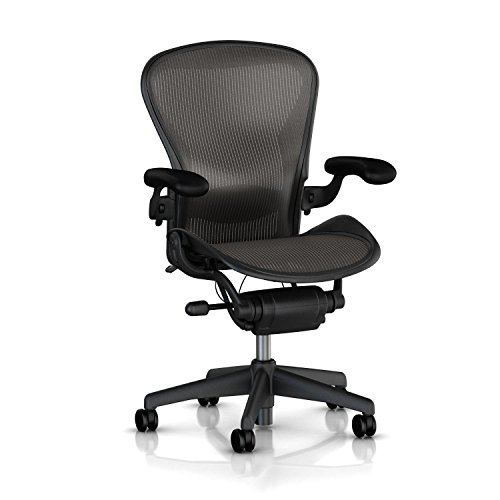 Herman Miller Aeron Executive Office Chair-Stainless SteelSize B (Medium)17 x 27 x 42 inches48 poundsCheck on Amazon
 Herman Miller Embody Ergonomic Office Chair28D x 27W x 38.25H in28 x 27 x 38.25 inches51 poundsCheck on Amazon
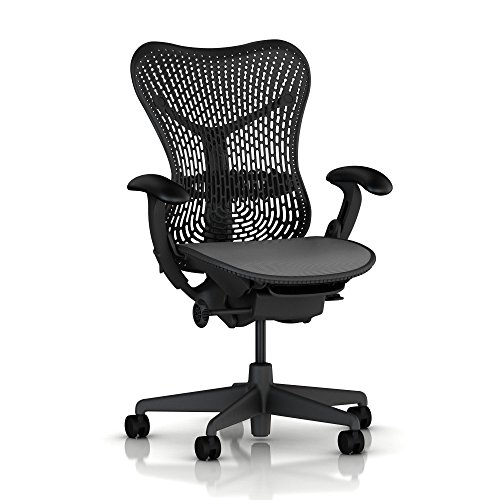 Mirra Chair by Herman Miller: Fully Featured w/Forward21 x 22 x 24 inches54.45 poundsCheck on Amazon
The best desk chair for neck pain is one where the headrest actually reaches your head at a neutral gaze, the backrest supports your shoulder blades without pushing your head forward, and the armrests hold your forearms level with the desk so your shoulders and neck aren’t compensating all day. Most “ergonomic” chairs fail on at least one of these three points, and that’s usually why the pain doesn’t go away even after buying a nicer chair.
Why neck pain persists even in a good chair
Neck strain at a desk rarely starts in the neck. It starts lower. If your armrests are too low or too far apart, your shoulders round forward and your neck tilts to compensate. If your monitor sits below eye level, you tip your chin down for hours, loading the back of the neck and upper traps. A headrest can’t fix either of those problems on its own, which is why chair shopping for neck pain has to look at the whole chain: seat, backrest, armrests, and headrest together, not the headrest in isolation.

Herman Miller Classic Aeron Chair - Size B, Posture Fit
Chosen because it specifies Size B and Posture Fit.
View on AmazonHerman Miller Aeron Executive Office Chair-Stainless Steel, Size B-Fully Adjustable Arms-lumbar Support Open Box
Chosen because it specifies Size B-Fully Adjustable Arms-lumbar Support Open Box.
View on AmazonHerman Miller Embody Ergonomic Office Chair | Fully Adjustable Arms and Carpet Casters | Black Rhythm
Chosen because it specifies Fully Adjustable Arms and Carpet Casters and Black Rhythm.
View on AmazonMirra Chair by Herman Miller: Fully Featured w/Forward Tilt - Adjustable Arms - FlexFront Seat - Tilt Limiter - Lumbar Support - Hard Floor Casters - Graphite Frame/Graphite Seat
Chosen because it specifies Adjustable Arms and FlexFront Seat.
View on AmazonThe three measurements that matter most
- Headrest height and tilt range: it should adjust at least 3-4 inches vertically and tilt forward/backward roughly 15-30 degrees so it meets the base of your skull, not your upper back.
- Backrest height relative to your shoulder line: the lumbar-to-shoulder curve of the backrest should reach just below your shoulder blades; if the whole backrest tops out below shoulder height, the “headrest” is really just a taller backrest bent backward, and it will push your head down instead of supporting it.
- Armrest adjustability: height, width (pivot), and ideally depth. Forearms should rest flat with elbows at roughly 90-100 degrees and shoulders relaxed, not shrugged or reaching.
How to check headrest fit before you buy
Sit with your eyes level with the top third of your monitor. In that position, the headrest pad should touch the back of your skull, not your neck or your upper back. If you have to crane backward to reach it, the headrest is mounted too low for your torso length, which is common on chairs sized for shorter users.
- Measure your seated height from seat to the base of your skull (usually 24-28 inches for most adults).
- Compare that to the chair’s listed headrest adjustment range, not just “adjustable headrest” in the description.
- If you’re above 6 feet, look for a separate “tall” or “big and tall” version rather than assuming the standard frame stretches far enough.
Backrest height and the shoulder line
A backrest that stops right at or just below your shoulder blades gives your upper back something to push against, which keeps your spine from rounding forward. If the backrest is too short, your shoulders have nothing behind them and drift forward under their own weight, pulling the neck with them. If it’s too tall without a separate headrest, the top edge can press into your neck rather than your head.
| Backrest height (seat to top) | Best fit | Neck pain risk if mismatched |
|---|---|---|
| 18-20 in | Shorter torsos, task chairs | Low, but no head support at all |
| 24-27 in (mid-back) | Average torso, desk work 4-6 hrs/day | Moderate if shoulders aren’t reaching backrest |
| 28-32 in (high-back with headrest) | Long desk hours, existing neck/upper back pain | Low when headrest tilt is adjustable |
Armrests: the part people underrate
Unsupported forearms are one of the most common and most fixable causes of desk-related neck strain. When arms hang unsupported or armrests sit too low, the trapezius muscles along the neck and shoulders stay slightly contracted for hours to hold the arms up, which is a direct line to neck soreness by afternoon.
- Height range: look for at least 4-5 inches of adjustment so the armrest matches desk height, not just chair height.
- Width/pivot: armrests that rotate inward let your elbows sit closer to your body, useful for narrower desks or keyboard trays.
- Depth/slide: less common but helpful for typing versus mousing positions.
- Padding: firm foam holds shape over years; soft gel pads feel nice on day one but compress and go lopsided within a year or two of daily use.
Material and mechanism trade-offs
The frame and upholstery don’t fix neck pain directly, but they affect how long the adjustments actually hold and how the chair feels over an 8-hour day.
| Feature type | Pro | Trade-off |
|---|---|---|
| Mesh backrest | Breathable, doesn’t sag as fast as foam over years | Less plush; can feel firm on bony upper backs |
| Foam-padded backrest | More cushioned, better for a molded headrest shape | Foam compresses and softens after 2-4 years of daily use |
| Metal armrest frame with PU pads | Holds height adjustment without drift | Cheap PU pads crack and peel within 1-2 years |
| Nylon/plastic armrest frame | Lighter, lower cost | More flex under weight, adjustment levers wear out sooner |
| Synchro-tilt mechanism | Backrest and seat move together, keeps head/monitor distance steadier while reclining | Costs more, adds weight to the base |
Matching the chair to your situation
| Your situation | What to prioritize |
|---|---|
| Neck pain plus lower back pain | High-back mesh chair with adjustable lumbar support and a separate headrest; don’t rely on headrest alone to fix a slouched lower back |
| Tall (6’2″+) or long torso | Manufacturer’s “tall” or extended-frame model with a headrest range of 5+ inches, not the standard version |
| Short torso (under 5’4″) | Chairs with a low minimum headrest position; many standard headrests sit too high even at their lowest setting |
| Shared or hot-desk setup | Simple pneumatic height plus quick-release armrest levers so it’s fast to reset per user |
| Budget-limited | Skip the headrest gimmick on cheap chairs; put the budget into adjustable armrests and a proper lumbar curve instead |
| Reclining/video-call heavy day | Wide headrest tilt range (25-30 degrees) so it still supports the head when leaned back |
What wears out first, and what that means for neck support
The headrest tilt mechanism and armrest height levers are usually the first adjustable parts to loosen, typically somewhere between 18 months and 3 years of daily use depending on build quality. A headrest that used to lock firmly and starts drifting downward under light pressure will quietly stop giving you support without you noticing right away, since the change happens gradually. When shopping, a metal-reinforced tilt mechanism and a longer warranty (5+ years on the mechanism specifically, not just the frame) are reasonable proxies for how long the adjustability will actually last, since spec sheets can’t tell you that directly.
Setup checklist once the chair arrives
- Set seat height so knees are level with or slightly below hips, feet flat.
- Raise armrests until forearms rest flat with shoulders down, not shrugged.
- Adjust backrest/lumbar so it fills the curve just above your belt line.
- Tilt the headrest until it touches the base of your skull when you look straight ahead at your screen’s top third.
- Recheck monitor height. Even a well-adjusted chair won’t fix a monitor that sits too low, which pulls the neck forward regardless of headrest quality.
A chair usually runs $250-$500 for a solid ergonomic mesh model with adjustable armrests and headrest, and $500-$900 for higher-end synchro-tilt versions with finer-grained tilt tension and 4D armrests. Spending more only helps neck pain if that extra cost goes into the adjustment range and mechanism durability, not just upholstery.









