Our Top Picks
The best under desk printer stand with wheels for a small home office is a low-profile, 2-tier metal or engineered wood cart that is 18 to 22 inches wide, 14 to 16 inches tall, holds at least 50 lbs, and has at least two locking casters so it stays put under a standard 29 to 30 inch high desk.
What Actually Fits Under a Standard Desk?
Buying a small printer stand under desk is mostly a measurement problem, not a style problem. A standard home office desk is 29 to 30 inches high, but the usable clearance underneath is less. With a typical 1-inch thick desktop and crossbars or cable trays underneath, you often have only 25 to 27.5 inches of open height. Add a keyboard tray and that drops to 24 inches.

Safco Underdesk Multi Functional Stand - 1855BL, Powder Coated Steel, Swivel Wheels, Holds 100 lb - Home Orginization Solutions
Chosen because it specifies 1855BL and Powder Coated Steel.
View on Amazon
Safco Onyx Rolling Cart Printer Stand, Under-Desk Mobile Utility Table for Home Office with Steel Shelf, Black
Chosen because it specifies Black.
View on Amazon
Safco Onyx Rolling Cart Printer Stand, Under-Desk Mobile Utility Table for Home Office with Steel Shelf, Gray
Chosen because it specifies Gray.
View on Amazon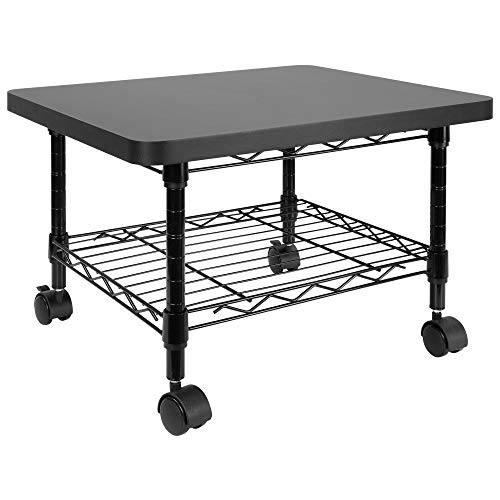
Mount-It! Under Desk Printer Stand with Wheels | Mobile Printer and Fax Cart with Storage Shelf for Office and Home Use, 2 Tiers (Black)
Chosen because it specifies 2 Tiers (Black).
View on AmazonMeasure three numbers before you shop:
- Available height: From the floor to the lowest obstruction under your desk. Your stand for printer under desk needs to be at least 2 inches shorter than this to slide in and out without scraping. For most desks, that means choosing a stand 13 to 16 inches tall. An under desk printer table that is 19 inches or taller will not fit under most standard desks and is better described as a side cart.
- Available width and depth: Measure the inside distance between your desk legs or pedestals. A typical small desk offers 42 to 48 inches between legs. A printer stand that is 20 inches wide leaves you room for your chair base (usually 24 to 26 inches wide) and your legs. In a 10×12 ft room where a 48-inch desk already takes up 4 feet of wall, a stand wider than 24 inches will crowd the leg area and force you to sit off-center.
- Printer footprint plus clearance: A compact laser printer is about 14 to 16 inches wide and 12 to 15 inches deep. An inkjet all-in-one is often 22 to 23 inches wide with the tray extended. Add 2 inches on each side for ventilation and 3 to 4 inches behind for the power cable and paper output. Your stand’s top shelf should be at least as deep as your printer.
If you are considering a computer desk with printer stand built in versus a separate rolling under desk printer stand, the built-in saves floor space but locks the printer position. A separate rolling cart lets you pull the printer out to change ink, clear jams, or load paper, then tuck it back. That matters when the desk is against a wall.
Key Specs Compared: Width, Height, Weight Capacity and Wheel Locks
These are the four specs that decide whether an under desk printer stand with storage will actually work in a small office. Weight capacity is especially important because paper is heavy. A full ream of paper is about 5 lbs, and a small laser printer weighs 20 to 35 lbs.
| Type | Typical Width x Depth | Height | Top Shelf Capacity | Total Capacity | Casters | Best For |
|---|---|---|---|---|---|---|
| Compact 2-Tier Metal Cart | 18″ W x 14″ D | 14″ to 15.5″ | 50 to 70 lbs | 70 to 100 lbs | 4 wheels, 2 locking | Tight under-desk fit, laser printers |
| Engineered Wood Cart with Drawer | 20″ W x 16″ D | 15″ to 17″ | 40 to 55 lbs | 60 to 80 lbs | 4 wheels, 2 locking | Hidden storage, inkjet all-in-ones |
| 3-Tier Open Metal Cart | 17″ W x 13″ D | 24″ to 26″ | 33 to 45 lbs | 66 to 90 lbs | 4 wheels, often 2 locking | Vertical storage if used beside desk, not under |
| Low Wood Printer Table with Shelf | 22″ W x 17″ D | 13″ to 14.5″ | 60 to 80 lbs | 80 to 110 lbs | 4 wheels, 4 locking optional | Heavy printers, stable base |
| Slim Plastic Utility Cart | 18″ W x 12″ D | 15″ to 16″ | 25 to 35 lbs | 50 to 60 lbs | 4 wheels, usually no locks | Very light inkjets only |
For an under desk printer stand with wheels to stay in place on hard floors, you want at least two locking casters on the front. On carpet, all four wheels should lock or the cart will creep when you lean on the desk. Look for 1.5-inch to 2-inch diameter casters. Smaller 1-inch casters jam on carpet and chair mats.
Also check shelf spacing. An under desk printer stand with storage needs 9 to 11 inches of clearance between shelves to store paper reams flat (a ream is 11.7″ x 8.5″ x 2.2″). If the lower shelf is only 6 inches high, you will not fit paper or a large output bin underneath.
Material and Construction Trade-Offs
The material affects weight, stability, and what fails first. This matters if you plan to move the stand daily on wheels.
| Material | Weight of Stand | Stability Under Load | Durability Reality | Price Range |
|---|---|---|---|---|
| Steel Tube Frame + MDF Shelves | 12 to 18 lbs | Very good, low flex | Metal frame lasts, MDF edges swell if wet, screw inserts can strip if over-tightened | usually $45 to $90 |
| All Engineered Wood (Particleboard/MDF with Laminate) | 18 to 28 lbs | Good if braced, can sag over 20″ spans | Laminate chips at corners, heavier to move, holds up well in dry rooms | usually $60 to $130 |
| Solid Wood / Bamboo | 15 to 22 lbs | Excellent | Most durable, resists sagging, costs more | usually $110 to $220 |
| Molded Plastic | 6 to 10 lbs | Low, flexes with heavy printers | Lightest, easiest to roll, scratches fast, casters often non-locking | usually $30 to $60 |
For small home offices, a steel frame with engineered wood shelves is the most common sweet spot. It keeps the cart light enough to roll with one hand but rigid enough that the printer does not vibrate during printing. All-plastic carts are fine for a 12 lb inkjet but will bow and wobble with a 30 lb laser printer.
Which Type Should You Choose? Pick by Your Situation
Use your room and workflow, not just printer size, to decide.
1. You have a 10×12 ft bedroom office and need to save every inch
Choose a compact 2-tier metal cart, 18 inches wide and under 15.5 inches tall. It slides fully under the desk and the lower shelf holds one ream and toner. This is the best rolling under desk printer stand when floor space is tighter than storage space. It also works if you use an under desk printer table primarily to free up the desktop.
2. You have a large inkjet all-in-one and need closed storage
Choose an engineered wood cart with a drawer or cabinet, about 20 inches wide and 16 inches deep. The drawer hides paper and keeps dust off supplies. Make sure the top is at least 22 inches wide so the paper output tray does not hang off the edge. This type doubles as an under desk printer stand with storage for envelopes, label packs, and cables.
3. You print from a standing desk or share the printer
A computer desk with printer stand underneath is not ideal if you alternate sitting and standing, because the printer ends up too low when standing. A separate 3-tier cart used beside the desk (24 to 26 inches tall) is better. You can roll it to where you are working. Do not try to force a 26-inch cart under a standard desk.
4. Kids, pets, or uneven floors
Choose a low wood table with four locking casters and a total capacity over 80 lbs. Lower height means a lower center of gravity, and four locks prevent a child or pet from pushing the cart. Avoid lightweight plastic carts here.
5. Heavy laser printer or all-in-one over 30 lbs
Pick any stand rated for at least 60 lbs on the top shelf alone. Check that the top shelf is supported by a metal frame, not just wooden dowels. Center the printer over the frame, not over an overhang.
Assembly, Moving, and Durability Realities
Most stands ship flat in a 20 to 28 lb box that is 22 to 24 inches long. You will need a 30-inch doorway clearance to carry the box inside, which is standard, but apartment elevators and narrow hallways can be tight for wider wood models. Assembly is usually 15 to 30 minutes with a Phillips screwdriver and included Allen key. Metal carts often have 8 to 12 bolts, wood carts have 16 to 24 screws and cam locks.
What wears first: casters and shelf coating. Cheap casters flatten and stop rolling after 6 to 12 months of daily use on hard floors with a heavy printer. Caster stems that push in rather than bolt in loosen over time. On wood shelves, the laminate around caster plates cracks if you roll with the locks on. To extend life, lock the wheels when printing, unlock only to move, and do not drag the cart sideways.
Cable management is often missing. Leave a 4-inch gap behind the stand for the power brick and USB cable. If the stand has a back panel, run cables through a corner cutout so they do not get pinched when you push the cart under the desk. A power strip mounted under the desk keeps the printer plug from pulling out when rolling.
A final fit check takes 30 seconds: with the chair pushed in, try to pull the cart out and open the printer’s front door or paper tray fully. Many printers need 14 to 18 inches of front clearance to open. If the desk’s modesty panel or leg blocks that, you will need to pull the cart completely out each time, which makes wheels and locks even more valuable.
Frequently Asked Questions
Will a printer stand damage wood floors?
Small hard plastic casters can dent soft wood and leave marks on vinyl. Choose rubber-tread casters or add adhesive felt caps over the wheels if the stand will stay in place most of the time. Locking the wheels also prevents rolling scratches.
How much weight can I put on the bottom shelf?
Most bottom shelves are rated for 20 to 35 lbs even if the top is rated higher. One ream plus a storage box of toner is usually 12 to 15 lbs, which is safe. Do not stack two reams and a heavy shredder on the lower shelf of a light-duty cart.
Can I use a rolling cart for a 3D printer under a desk?
Not recommended. 3D printers need minimal vibration and often exceed 35 lbs, and they need ventilation around the frame. Use a dedicated heavy, low table beside the desk instead of an enclosed under desk space.