
Our Top Picks
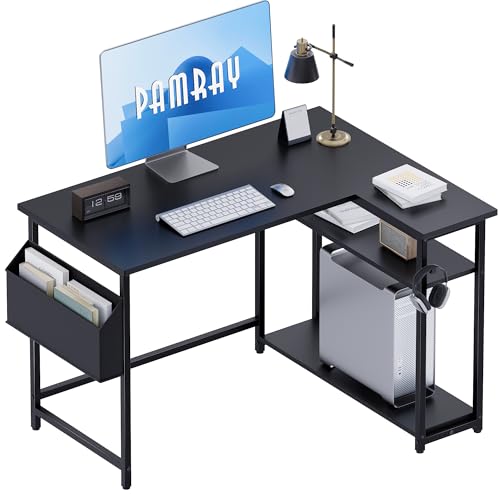

A small corner desk sounds like free square footage, but in practice most of them are awkward. Either the corner is dead space you cannot reach, the desk is too deep to sit close to a wall, or the L-shape eats more room than a straight desk would. If you measure well and pick the right shape for your work, though, a corner is the best place in a small bedroom, dorm, or apartment office for a real setup with a monitor and keyboard.
Before you buy, tape it out on the floor. Most “small” corner desks are still 42 to 55 inches wide on each side. That fits a corner, but it leaves you about 20 inches of legroom in the middle once you add a PC tower or drawers. Sit in your chair in the corner and check that you can pull in without hitting the side panels, and that your elbows are not jammed against the walls when you type.
The three shapes that actually work
1. Compact L-shape (two rectangles, not a giant triangle). This is the safest pick for most people. You get one arm for your monitor and keyboard, and a short return for a laptop, notebook, or printer. Look for each wing around 40-47 inches long and 18-22 inches deep. Anything deeper pushes you too far from the wall and makes the corner hard to clean and cable.
Failure mode: wobble at the joint. Cheap L-desks join two thin particleboard panels with a small metal plate underneath. Put a monitor arm plus a leaning arm on it and the seam flexes. If you use a monitor arm, mount it over a leg or frame rail, not in the middle of the span, and check the desktop thickness – under 0.6 inches will crush or bow under a heavy clamp. A basic small L shaped computer desk is fine for a single monitor on its included stand, but not ideal for dual monitors on one arm.
2. True corner triangle. These are the small footprint desks with a diagonal front edge that sits across the corner, often 32 to 42 inches wide overall. They look space-saving because they use almost no floor, but the usable depth in front of you is very shallow. Fine for a laptop, Chromebook, or homework station. Bad for a 27-inch monitor plus a full-size keyboard – the screen ends up 14 inches from your face.
Who it suits: kids, dorms, or a second spot for bills and laptop work. If this is your main work-from-home desk for 8 hours, skip it and get a compact L instead.
3. Corner standing desk. You have two options here: a full L-shaped sit-stand frame, or a small straight standing desk pushed into a corner. The full L-shaped lifting frames are stable and great if you genuinely need two monitors plus paperwork, but even the “small” versions need about a 50 x 50 inch corner. Measure door swing and closet clearance – people forget the desk gets taller, not smaller, when raised. For most small rooms, a 40- or 48-inch straight standing desk turned sideways into a corner wastes less space and wobbles less than a cheap L-lift frame. Browse corner standing desk options in small sizes and check the minimum width spec, not the marketing photos.
Quick comparison
| Type | Typical footprint | Best for | Trade-off |
|---|---|---|---|
| Compact L-shape, fixed height | 42 x 42 in to 51 x 51 in | One monitor + laptop, small rooms | Joint can flex; corner space is hard to reach |
| Triangle / diagonal corner | 32 x 32 in to 42 x 42 in | Laptop, homework, secondary desk | Too shallow for large monitor; little legroom |
| Straight desk in corner | 31 to 48 in wide, 20-24 in deep | Tightest rooms, renters | No return space; need separate storage |
| L-shape sit-stand | 50 x 50 in and up | Dual monitors, all-day work | Expensive, heavy, needs clearance to lift |
What to check before you buy
Depth matters more than width. For desktop work with an external monitor, you want at least 20 inches of depth where your keyboard sits, ideally 24. Many small corner desks taper to 15 inches at the sides. That is okay for a mug and phone, but your keyboard and wrists will hang off if you try to work there.
Check the back edge. A lot of corner desks sit flush to two walls, which means there is nowhere for cables and power bricks to go. You end up with cables pinched behind the desk or a power strip balanced on the floor in the corner. Leave a 2-inch gap from the wall or choose a model with a rear notch or cable hole near the corner. If you already own the desk, a stick-on cable tray under the back edge helps more than drilling holes.
Leg and panel placement will decide your chair fit. Desks with full side panels look tidy, but they lock you into a narrow knee hole, usually 22-25 inches wide. If you use a larger office chair with armrests, you will hit the panels every time you push in. Open C-legs or metal frames are better for rolling chairs and for cleaning. They are also easier to add a small filing cabinet or PC tower beside you without blocking the corner.
Material honesty: under $150, almost everything is particleboard with foil wrap. That is fine for a laptop and light writing. It is not fine for clamping two monitor arms, sitting on the edge, or moving apartments twice a year – the cam locks strip and the top sags. If you run a real PC setup, spend up for thicker top panels, a steel frame, and a crossbar under the back. You do not need solid wood, you just need not-paper-thin board.
Setups that work in a corner
For a study / laptop setup, put the laptop or a single 24-inch monitor centered on the long side, not jammed into the exact corner. Use the actual corner for a lamp, power strip, or vertical dock. A wall shelf 12 inches above the desk holds headphones and books without taking desk depth, which is precious on desks under 20 inches deep.
For a work-from-home setup with one 27-inch monitor, angle the monitor slightly and pull the keyboard tray or keyboard 6-8 inches from the front edge. If your shoulders are rounded or your neck feels strained, it is often because the screen is too close on a shallow corner desk, not because you need a new chair. Try pushing the monitor back into the corner on a simple riser first. Evidence on posture products is limited, and persistent pain is worth bringing to a clinician rather than fixing with accessories.
For gaming in a corner, do not buy the smallest triangle and expect a full tower, 32-inch monitor, and speakers to fit. You need a compact L with at least one 47-inch wing for mouse travel. Keep the tower on the floor on the open side where it can breathe, not sealed in the corner against two walls. If you want LEDs and shelving, buy them separately – built-in hutch shelves on cheap corner desks bounce when you type and block monitor placement.
If no corner desk fits your measurements, the cheaper option is often better: a plain 40-inch straight desk pushed into the corner. It leaves one wall free for storage, costs less than most L-shapes, and you can add a small side table later. A simple compact small corner desk only makes sense if you will actually use both wings daily.
FAQ
What size is best for a small bedroom?
In most 10×10 bedrooms, a 42 to 47 inch L on each side is the limit if you still want to open drawers and push your chair back. Measure from the corner out along both walls, then subtract 30 inches for chair pull-out in front. If you have less than that, use a straight 36 to 42 inch desk instead.
Can I put two monitors on a small corner desk?
Yes on a compact L, usually no on a triangle. You need about 45 inches of straight width for two 24-inch monitors side by side, plus depth for the stands. Use monitor arms mounted near the frame and keep total weight under the desk limit, which is often only 50-100 lbs spread across the whole top.
Do corner desks wobble more?
L-shapes can, especially at the inside joint and on carpet. Tighten all bolts after the first week, keep heavy items over the legs, and avoid pulling yourself up by the front edge. If it still sways, a small L-bracket tying one side to a stud solves most of it for renters with permission.
Is a corner desk good for working from home full-time?
It can be if you get enough depth and legroom. Shallow triangle desks get uncomfortable after a few hours because you cannot get the screen far enough away and your wrists hang off. For full-time work, prioritize a 20+ inch deep main surface and an open knee space over extra shelves.









