
Our Top Picks

A split top is a specific trade-off. Instead of one continuous 48×24 slab, you get two panels with a seam running down the middle, usually with a small gap or a center support rib underneath. That gap matters for anyone who clamps on monitor arms, dual-arm mounts, or a keyboard tray with a center-mounted bracket. If your hardware needs to straddle the middle of the desk, check its clamp range against the gap before you buy. Most split tops have a seam between 1/8 and 1/2 inch, which is fine for C-clamps but can be annoying for grommet-style mounts that expect solid wood underneath.
Why buy split top at all instead of a one-piece 48×24? Two reasons, honestly. First, shipping and handling: a split top packs flatter and is easier to carry up stairs alone, since each half is lighter and narrower than a single 48-inch board. Second, some frames are designed around a split top because the crossbar or cable channel sits in that center gap, which lets the manufacturer shave a bit of height off the understructure. Neither reason is about desk quality. A one-piece top is structurally stiffer at the same thickness, so if cable management and portability aren’t concerns for you, there’s no ergonomic upside to split top.
Who the 48×24 size actually fits
48×24 is the compact end of standing desks that still feel usable for a monitor-and-laptop setup. It fits a 27-inch monitor plus a laptop stand without crowding, but it won’t comfortably hold dual 27-inch monitors side by side with keyboard space left over. If you’re running two monitors, 60×30 or 60×24 is the more realistic minimum. For a single monitor, a laptop, and maybe a notebook and lamp, 48×24 is genuinely enough desk, and buying bigger just eats floor space you’ll resent in a small home office or bedroom corner.
Depth (24 inches) is the more common regret than width. 24 inches is workable but tight if you want the monitor at a proper 20-24 inch viewing distance while also having room for a keyboard and mouse in front of it. People with monitor arms do better here because the arm lets you push the display back against the wall-facing edge. People who want to put the monitor on a riser or box at the back of the desk often find themselves bumping the screen with the keyboard.
Frame stability at this size
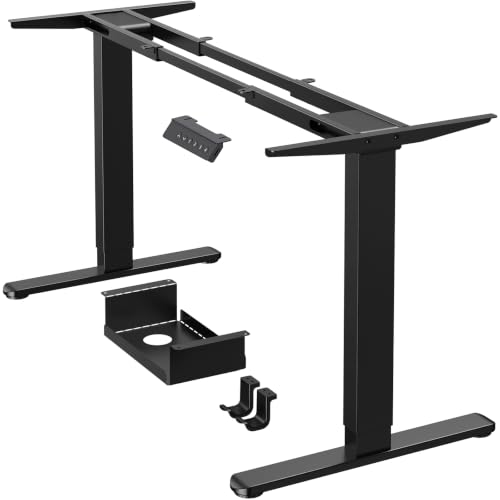
A 48×24 top is light enough that a dual-motor frame isn’t strictly necessary for stability the way it is on a 72-inch top, but motor count still affects lift speed and weight capacity, not just wobble. Single-motor frames on a desk this size are usually fine for monitors, a laptop, and basic desk accessories. Where single-motor frames struggle is with heavier loads: a dual-monitor arm with two 27-inch screens, a small CPU on a mount, or a weighted desk lamp can push you toward the 100-125 lb capacity ceiling that budget single-motor frames often have.
| Spec | Single-motor frame | Dual-motor frame |
|---|---|---|
| Typical weight capacity | 100-150 lbs | 150-275 lbs |
| Lift speed | 0.9-1.3 in/sec | 1.3-1.6 in/sec |
| Wobble at full height (48″ top) | Noticeable with 2 monitors on an arm | Minimal |
| Typical price premium | Baseline | +$80-150 |
For a 48×24 top with a single monitor and modest accessories, single-motor is a legitimate money-saver, not a compromise you’ll regret. If you’re adding a monitor arm with two displays, or you work standing most of the day and will be adjusting height often, the dual-motor jump is worth it for the wobble reduction alone. You can browse dual-motor standing desk frames to compare capacity ratings directly against single-motor options in the same price band.
Top material and what actually fails
Most split tops in this size are MDF or particleboard core with a laminate or veneer skin, sometimes bamboo. The failure mode to watch for isn’t the surface, it’s the edge banding lifting after a year or two of coffee rings and elbow contact, and screw holes in particleboard stripping out if you remove and reattach brackets more than a couple times. If you plan to swap monitor arms or add a keyboard tray later, pilot the new holes rather than reusing worn-out ones, or add a mounting plate to spread the load.
Bamboo tops cost more but resist moisture better and hold screws more reliably over time, which matters more on a smaller desk since you’re more likely to be adding accessories to make up for the limited surface. If budget is tight, laminate MDF is genuinely fine for a monitor-and-laptop setup with minimal accessory changes; the extra durability of bamboo mostly pays off if you’re a frequent re-arranger.
Accessories worth adding at this size
Because 24 inches of depth is tight, a monitor arm is the single highest-value add-on for a 48×24 desk. It reclaims desk depth that a stand or riser would otherwise consume, and it lets you push the display closer to the wall. A clamp-mount arm works on most split tops as long as the clamp throat clears the seam gap; check that spec before ordering. If you want to compare options, monitor arm desk mounts vary widely in clamp depth and weight rating, so match the arm’s capacity to your actual monitor weight rather than buying the cheapest one.
A sliding keyboard tray is the other accessory that pays off disproportionately on a compact desk, since it moves the keyboard and mouse off the main surface entirely and gives you back several inches for notebooks or a drink. Skip it if you already type comfortably with the keyboard on the desktop; it’s not a necessary upgrade, just a space-reclaiming one.
What to actually check before buying
Measure your current monitor’s base footprint and your keyboard length, lay them out on painter’s tape at 48×24 on the floor, and see if it actually fits the way you imagine. Confirm the seam gap width against any center-mounted hardware you already own. And unless you’re running dual monitors on an arm, don’t pay the dual-motor premium just because it sounds like the safer choice. For most single-monitor setups at this size, it isn’t buying you anything you’ll notice day to day.









