
Our Top Picks
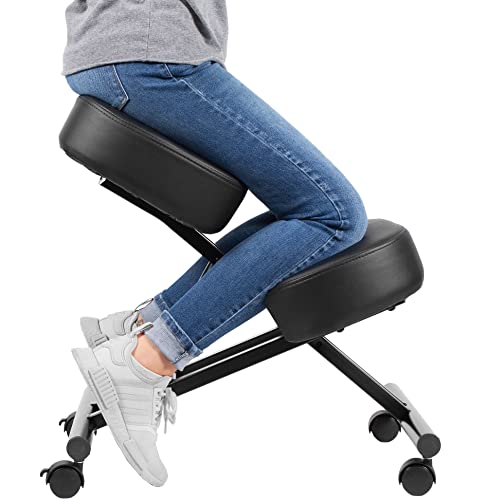 DRAGONN by VIVO Ergonomic Kneeling Chair for Home26.2D x 18.7W x 8H in26.2 x 18.7 x 8 inches18.4 PoundsCheck on Amazon
 DRAGONN by VIVO Ergonomic Adjustable Kneeling Chair w/Back13D x 27.13W x 21H in24.3 PoundsCheck on Amazon
 TinyHaven Ergonomic Kneeling Chair with Wooden Frame31.5 x 21.65 x 19.69 Inches20.28 PoundsCheck on Amazon
An ergonomic chair with knee rest — the design most retailers label a kneeling chair — moves 30–40% of your body weight off the seat and onto a padded shin support, tilting the seat forward so your torso-to-thigh angle opens from roughly 90° to 110–130°. That open hip angle is the entire point: it stops the backward pelvic roll that flattens your lumbar curve on a flat seat. It works best for people whose lower back aches from slouching and who sit in focused blocks of 30–90 minutes; it is not a straight swap for a full task chair across an eight-hour day.
One clarification worth making before you shop: a knee rest is a weight-bearing pad your shins press into (the kneeling-chair design covered here). A retractable leg rest on a reclining office chair is a different thing — it supports calves and feet but changes nothing about your hip angle.
DRAGONN by VIVO Ergonomic Kneeling Chair for Home & Office
Picked as a relevant option in this category.
View on Amazon
NYPOT Ergonomic Kneeling Chair with Adjustable Seats - Knee Chair for Posture Correction & Kneel Rocking Stool for Desk - Back Pain Relief for Home and Office, Supports 250 pounds - 5 Years Warranty
Chosen because it specifies Back Pain Relief for Home and Office and Supports 250 pounds.
View on AmazonDRAGONN by VIVO Ergonomic Adjustable Kneeling Chair w/Back Support | Black, Stool for Home & Office, Improve Posture with Angled Seat, Thick Comfortable Moulded Foam Cushions, DN-CH-K02B
Picked as a relevant option in this category.
View on AmazonTinyHaven Ergonomic Kneeling Chair with Wooden Frame, Wood
Chosen because it specifies Wood.
View on AmazonCorrect Knee Angle and Seat Weight Distribution
The posture this chair creates has specific numbers attached, and getting them wrong is why some people find kneeling chairs uncomfortable:
- Torso–thigh angle: 110–130°, versus roughly 90° on a conventional chair. This is what keeps the pelvis from tucking under.
- Knee bend: close to a right angle — roughly 80–100° of flexion. If your knees are bent sharply past ~120°, the seat-to-pad spacing is wrong for your height.
- Weight split: about 60–70% on the seat through your sit bones, 30–40% through the shins. If more than ~40% is on the pad, you will feel shin pressure within the hour.
- Pad contact point: the flat of the shin, 2–3 inches below the kneecap. The kneecap itself should hover just past the pad’s top edge — kneecap-on-pad is the most common setup error and causes soreness fast.
- Seat tilt: 15–30° forward slope, so the thighs drop toward the pad and the pelvis rolls slightly forward rather than back.
How to Set Up an Ergonomic Chair With Knee Rest
- Step 1 — Start at the desk, not the chair. On a standard 28–30 inch fixed desk, adjust seat height until your elbows sit at 90–100° with shoulders relaxed. Under-desk keyboard trays cut thigh clearance — check you have roughly 25 inches from floor to tray underside for your thighs and shins.
- Step 2 — Set the drop. Your hips must sit clearly above the knee pad so the thighs slope down around 20–30°. If the pad is nearly level with the seat, you lose the hip-opening effect and just get a stool with a shin bar.
- Step 3 — Position your shins. Slide in so the pad catches mid-shin. The kneecap should not bear weight; if it does, lower the pad or raise the seat one notch.
- Step 4 — Do the lift test. You should be able to lift each shin off the pad for a second without your torso pitching forward. If you can’t, too much weight is on the pad — shift your hips further back on the seat.
- Step 5 — Check forward depth. The pad extends ahead of your hips, so you need roughly 26–28 inches of clear space under the desk. Push CPU stands, bins and cable trays out of that zone.
- Step 6 — Time-box your sitting. Start with 20–30 minute sessions and build to 60–90 minute blocks, alternating with standing or a standard chair. Most users settle at around half the day on the knee rest chair.
Pros and Cons
Pros
- Holds the lumbar curve. Seating studies consistently find kneeling postures preserve lumbar lordosis compared with flat seats, because the tilted seat makes slumping physically harder. (Long-term outcome evidence is thinner — see the FAQ.)
- Good for slouchers and perchers. There is no backrest to slump against or perch off, so the trunk stays stacked.
- Micro-movement on rocker bases. Sled-runner designs rock as you shift, which keeps subtle motion going while you work.
- Compact and cheap to enter. Wheeled models typically run $90–$250 and take up less floor area than a task chair’s five-star base.
- Pairs well with sit-stand desks. The higher seat position makes a reasonable half-way posture between sitting and standing.
Cons
- Shin pressure is cumulative. Most people feel pad discomfort somewhere between 45 and 90 minutes regardless of pad thickness — it limits session length, full stop.
- Mobility penalty. You park yourself rather than sit down. Swiveling to a side drawer, reaching a printer, or standing quickly for a call is clumsier than on a task chair.
- Hard rule-outs. Knee, shin or hip problems, circulation issues, post-surgical recovery and late pregnancy all argue against resting body weight on your shins.
- Fixed geometry. A seat-to-pad distance that fits someone 5’8″ can pinch a 6’3″ user or leave a 5’1″ user’s shins dangling.
- No recline, no armrests on classic designs; hybrid versions add a backrest but lose some of the posture-forcing benefit.
Room and Desk Fit: The Measurements That Matter
Knee rest chairs are genuinely small-room friendly — in a typical 10×12 ft home office with a desk against the wall, one fits comfortably with the standard ~30 inch pull-out zone behind the desk edge. The table below gives the numbers to check against your own space and body:
| Fit point | Typical spec | What to verify |
|---|---|---|
| Seat height | 21–28 in adjustable; ~20 in fixed on rocker types | Elbows at 90–100° on a 28–30 in desk |
| Seat forward tilt | 15–30° | Hips clearly above pad level |
| Seat-to-pad spacing | 10–14 in vertical drop | Pad hits mid-shin at your height |
| Footprint | ~20–24 in W × 26–32 in D | vs ~26–28 in diameter on a task chair base |
| Under-desk depth needed | ≥26–28 in clear | Pad plus shins project forward of your torso |
| Weight capacity | 220–265 lb standard; 300–350 lb heavy-duty | Check the listed rating — budget models are often low |
| User height range | Roughly 5’1″–6’2″ | Fixed-geometry models have a narrower real range |
| Rocker clearance | Runners extend footprint ~4–6 in front and rear | Watch desk legs and skirting boards behind you |
Knee Rest vs Standard Ergonomic Chair: Who Should Choose Which
The honest comparison: a knee rest chair is a posture variant to rotate into your day, not a universal upgrade. Match it to your situation:
| Your situation | Better choice | Why |
|---|---|---|
| Lower back tightens after 30–60 min of slouching; work in short focused blocks | Knee rest chair | Open hip angle holds the lumbar curve without a backrest |
| 8–10 hr continuous desk day with calls and reaching | Standard ergonomic chair | Armrests, recline and easy mobility; shin fatigue rules the knee rest out |
| Slumped posture a standard chair hasn’t fixed | Knee rest in rotation | Forces pelvic position rather than relying on lumbar support you slump around |
| Knee/shin injury, circulation problems, pregnancy | Standard chair or drafting stool | Weight on the shins plus difficult sit-to-stand |
| Under ~5’2″ or over ~6’2″ | Adjustable standard chair (or a height-adjustable knee rest model only) | Fixed pad spacing rarely fits the extremes |
| Small office or desk tucked in a corner | Knee rest chair | Narrower footprint; slides into a 24 in gap a task chair’s base won’t |
| Gaming, lounging, or leaning back to read | Standard chair with leg rest | No recline mechanism exists on a true knee rest design |
Construction: What You’re Actually Buying
Three formats dominate the market, and they wear differently:
| Type | Frame and pads | Typical price | Weight rating | What wears first |
|---|---|---|---|---|
| Wooden rocker (balans style — Varier’s Variable is the original, sold since 1979) | Laminated beech/birch runners, upholstered foam pads | $180–$450 | ~240–260 lb | Knee pad foam compresses; felt glides wear on hard floors |
| Wheeled adjustable | Steel tube frame, casters, gas lift | $90–$250 | 220–300 lb | Casters and gas lift; thin vinyl covers crack |
| Hybrid with backrest | Steel frame with mesh or PU backrest, sometimes armrests | $180–$400 | 250–350 lb | Upholstery seams and armrest pads |
Practical realities listings gloss over: wheeled models ship in a flat box of roughly 18–30 lb and assemble in 15–25 minutes with the included hex key — easy solo, and everything fits through a standard 30–32 inch doorway. Knee pad foam is the durability weak point across all types; look for pads at least 3 inches thick in molded or higher-density foam (~2.5 lb/ft³ or better), because cheap thin foam bottoms out within 6–12 months of daily use and shin discomfort follows immediately.
FAQ
Can I use a knee rest chair for a full workday?
Not comfortably for most people. Even well-fitted chairs produce shin pressure after 60–90 minutes. Plan it as one of two or three postures in your day — kneeling chair, standard chair, standing — not the only seat you own.
Is a knee rest chair good for sciatica or a disc problem?
Mixed. Reducing lumbar flexion helps some people whose pain is triggered by slumping; others find the fixed posture aggravates symptoms. Try short 20–30 minute sessions before committing, and treat it as an experiment rather than a treatment.
Will it permanently fix my posture?
No strong evidence supports lasting carry-over once you stand up. What it reliably does is change your position while you’re in it — which is still useful, since position variety itself is what most sedentary workers lack.
What if I’m outside the average height range?
Skip fixed-geometry wooden rockers entirely. Choose a wheeled model with independent seat and pad height adjustment, and confirm the seat-to-pad drop can reach 12–14 inches if you’re over six feet tall.









