
Our Top Picks
 FLEXISPOT 35 inch Electric Standing Desk Converter35"16.3 x 35 x 19.7 inches38 poundsCheck on Amazon
An adjustable height desk with a keyboard tray works best for shorter users and anyone who wants monitors higher than their hands, because the tray drops the keyboard 3–6 inches below the desktop; for tall users, that same drop means the desk must rise 3–6 inches higher at standing height, which can exceed a single-stage frame’s limit. So before buying, do the height math for both sitting and standing, then confirm the tray track can mount under your frame without hitting a crossbar.
This guide walks through that math, the mounting compatibility checks, and the clearances that decide whether a desk-and-tray combination is comfortable or just crowded.
FLEXISPOT 35 inch Electric Standing Desk Converter, Motorized Stand up Desk Riser, Monitor and Laptop Workstation with Wide Keyboard Tray, Black
Chosen because it specifies Motorized Stand up Desk Riser and Monitor and Laptop Workstation with Wide Keyboard Tray.
View on Amazon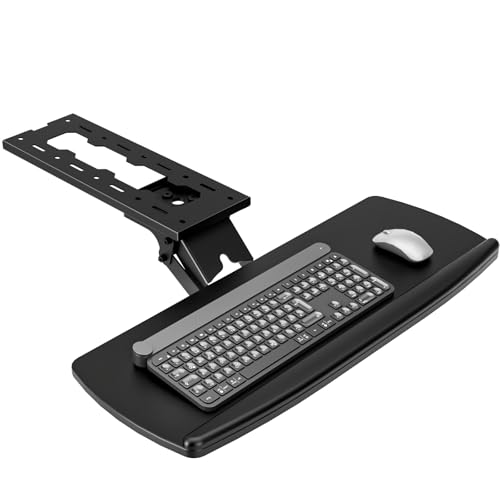
AX WABER Keyboard Tray Under Desk with Storage Drawer, Height Adjustable Keyboard Tray Slide Out 360° Swivel Tilt, Ergonomic Under Desk Mount Keyboard & Mouse Holder for Gaming Home Office, Black
Chosen because it specifies Height Adjustable Keyboard Tray Slide Out 360° Swivel Tilt and Black.
View on Amazon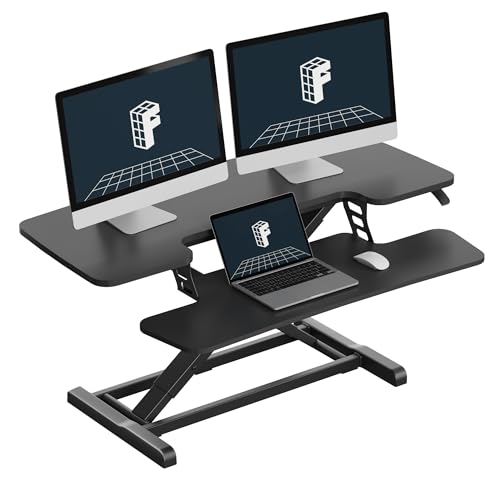
FLEXISPOT Standing Desk Converter, 40", Black
Chosen because it specifies 40" and Black.
View on Amazon
VIVO Black Clamp-on 23” to 30” x 11" Adjustable Keyboard Tray, Mount-KBST1
Chosen because it specifies Mount-KBST1.
View on AmazonStep 1: Find Your Keyboard Height
Your keyboard should sit at roughly elbow height with shoulders relaxed, or up to an inch lower. Approximate elbow heights (with shoes, standard office chair):
| User height | Seated keyboard height | Standing keyboard height |
|---|---|---|
| 5’0″ | about 22–23 in | about 37–38 in |
| 5’4″ | about 24 in | about 39–40 in |
| 5’8″ | about 25–26 in | about 42 in |
| 6’0″ | about 27 in | about 44–45 in |
| 6’4″ | about 28–29 in | about 47–48 in |
Long torsos, thick shoes and chair height all shift these figures by an inch or two, so measure your own elbow height while seated and standing for the most accurate number.
Step 2: Add the Tray Drop to Get Desk Height
A tray’s keyboard surface usually sits 3–6 inches below the desktop, depending on the track thickness, mechanism and how far you lower it. Desk height needed = keyboard height + tray drop.
| User height | Desk height seated (with 4 in drop) | Desk height standing (with 4 in drop) | Frame type that covers it |
|---|---|---|---|
| 5’0″ | 26–27 in | 41–42 in | Most frames; a tray avoids needing a very low minimum |
| 5’4″ | 28 in | 43–44 in | Single-stage or dual-stage |
| 5’8″ | 29–30 in | 46 in | Single-stage or dual-stage |
| 6’0″ | 31 in | 48–49 in | Dual-stage recommended (many single-stage frames top out around 46–48 in) |
| 6’4″ | 32–33 in | 51–52 in | Tall-range dual-stage frame, or raise the tray to desktop level when standing |
Typical ranges: single-stage frames roughly 28–47 inches, dual-stage frames roughly 25–50 inches, with some extended models going higher. The key insight: a tray lets short users avoid hunting for a desk that goes down to 22 inches, while tall users must check the maximum height more carefully than they would without a tray.
The tall-user workaround
Many articulating trays can be raised close to the desktop height or tilted. When standing, you can raise the tray to near-flush, reducing the drop to an inch or less. If your tray cannot do that, plan on a frame that reaches at least 50 inches.
Step 3: Check Mounting Compatibility
Keyboard trays mount on a track screwed into the underside of the desktop. Most problems happen here, not with the tray itself.
- Track length vs desk depth: tracks are commonly 17–22 inches long. On a 24-inch deep top, a 22-inch track leaves almost no room; 27–30 inch deep tops are much easier.
- Crossbar position: many electric frames have a center beam running side to side under the top. Measure from the front edge to the beam; the track must fit in front of it, or the frame must allow a gap. Frames with a rear-positioned beam are easiest.
- Control panel and cables: the height switch usually sits under the front right or left edge. Center the tray so its swing arc does not hit the switch, and keep cable trays and power strips clear of the track.
- Top thickness and material: tracks need solid screw purchase. A 1-inch engineered wood or solid wood top is fine; thin 5/8-inch particleboard tops and glass tops are poor candidates. Use the shortest screws that fully engage without breaking through the surface.
- Built-in vs added tray: some desks ship with a simple slide-out tray. These are usually fixed in height and angle, which limits their ergonomic benefit compared with an articulating tray.
Step 4: Leave Enough Leg and Chair Clearance
| Clearance | Target | Why it matters |
|---|---|---|
| Tray underside to top of thighs (seated) | at least 1–2 in | Prevents thighs lifting the tray or blocking leg movement |
| Tray assembly thickness | usually 2–4 in including mechanism | Eats into knee space, so shorter users may need a footrest |
| Chair armrests vs tray | armrests 1 in below tray edge, or swing tray past them | Avoids armrests colliding with the tray when lowering the desk |
| Tray width vs keyboard plus mouse | 25–28 in platform for keyboard plus mouse | Keeps the mouse at the same height as the keys |
On electric desks, set a lower memory position that stops before the tray reaches chair armrest height. Collision detection on many frames responds to resistance, but relying on it to stop against your armrest is hard on both the tray and the motor.
Tray Types Compared
| Tray type | Typical price range | Adjustments | Best for |
|---|---|---|---|
| Fixed slide-out drawer tray | $30–$80 | In/out only | Light use; hiding the keyboard |
| Clamp-on tray (no drilling) | $40–$120 | In/out, sometimes tilt | Renters; desks you cannot drill |
| Articulating tray with lever height | $150–$350 | Height, tilt (including negative), swivel, retract | Daily typists, shared desks |
| Premium articulating systems (Humanscale and similar) | $300–$600+ | Fine height and tilt, smooth retract, wide platforms | Heavy typists, offices with multiple users |
Negative tilt (the back of the keyboard lower than the front) helps keep wrists straight, especially when standing. It is the most useful adjustment the cheaper trays lack.
Who Should Skip the Tray
- Users over about 6’3″ with a single-stage frame: the extra height needed at standing can exceed the frame’s maximum.
- Shallow desks (24 inches or less) with a center crossbar: mounting is likely to conflict.
- Laptop-only setups: use a laptop stand plus external keyboard on the desktop instead.
- People who mostly stand: a desktop set to elbow height with monitors on arms achieves the same result without a tray.
Do the two calculations (keyboard height plus tray drop, sitting and standing), compare them with the frame’s published range, and confirm the track will fit in front of any crossbar. Those checks prevent nearly every disappointing desk-and-tray pairing.









