
Key takeaways
- PU leather over foam: easy to wipe, warm in summer, can peel at edges after a few years.
- Memory foam with fabric cover: soft and breathable but compresses; the cover may need washing.
- Gel: cool and firm, keeps shape; can feel slick under bare arms.
A computer arm rest for desk use is worth adding when your forearms hang off the front edge while you mouse or type, and the best type depends on the gap you need to fill: a clamp-on forearm platform extends a shallow desk and supports the whole forearm, a padded wrist or palm rest fills a small height gap at the keyboard, and adjustable chair armrests work only if they can rise to desk height and slide close enough. Pick by measuring that gap first; the wrong support moves the pressure point rather than removing it.
Why Forearm Support Matters at a Desk
When your arms hang unsupported, the shoulder and upper trapezius muscles hold the weight of each forearm and hand, roughly 2 to 3 percent of body weight per arm. Over a full workday that static load is a common cause of neck and shoulder fatigue. Support under the forearm, not under the wrist bone, lets those muscles relax. The goal is a neutral posture: elbows bent around 90 to 110 degrees, shoulders down, wrists straight.

VIVO Clamp-on Adjustable Arm Rest, 360° Rotation
Included for 'Computer Arm Rest for Desk: Clamp-On Forearm Supports vs Wrist Rests vs Chair Arms' because the listing specifies 360° Rotation, details this guide uses to compare options.
View on Amazon
VIVO Black Clamp-on Adjustable Arm Rests, 2 Pack, MOUNT-ARM02P
Included for 'Computer Arm Rest for Desk: Clamp-On Forearm Supports vs Wrist Rests vs Chair Arms' because the listing specifies 2 Pack and MOUNT-ARM02P, details this guide uses to compare options.
View on Amazon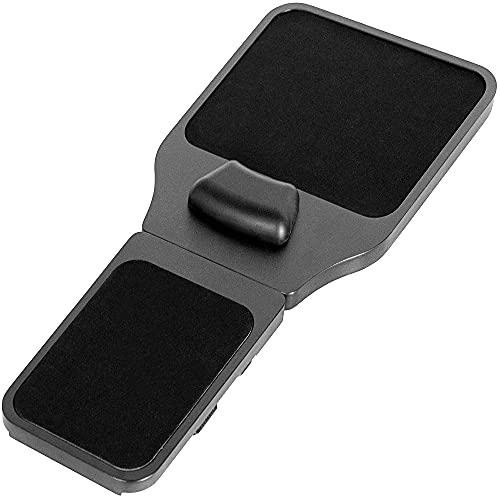
VIVO Black Wooden Arm Rest Mouse Pad with Wrist Cushion, MOUNT-MS02D
Included for 'Computer Arm Rest for Desk: Clamp-On Forearm Supports vs Wrist Rests vs Chair Arms' because the listing specifies MOUNT-MS02D, details this guide uses to compare options.
View on AmazonThree Types of Arm Support Compared
| Type | What it supports | Typical size | Best for | Usual price |
|---|---|---|---|---|
| Clamp-on forearm platform (arm rest extender) | Forearm from elbow to wrist | Pad 8–11 in long, 4–6 in wide; clamps fit desks 0.4–2.4 in thick | Shallow desks, heavy mouse users, shoulder pain | $20–$70 |
| Rotating arm support on a clamp | Forearm, moves with the arm | Swing arm 6–12 in reach | Users who switch between mouse and keyboard often | $25–$90 |
| Wrist / palm rest (gel or memory foam) | Heel of the palm during pauses | 0.75–1 in tall, 17–18 in long for keyboards, 3–4 in for mice | Deep desks where the forearm already rests on the surface | $10–$35 |
| Full-width desk edge extension | Both forearms across the desk front | Adds 6–12 in of depth | Very shallow desks, laptop-on-desk setups | $40–$150 |
| Chair armrests (3D/4D) | Elbow and forearm | Height range typically 7–10 in above seat | Desks at the right height where the chair can roll close | Part of chair |
Measure the Gap Before You Buy
Sit at your normal working posture and take three measurements:
- Elbow height vs desk height: with shoulders relaxed and elbow at 90 degrees, measure from the floor to the underside of your forearm. Compare with your desk surface. If the desk is 1 inch or more above elbow height, the fix is a keyboard tray or lower desk, not an arm rest.
- Forearm overhang: with your hand on the mouse, measure how much forearm extends past the desk edge. Under 2 inches, a wrist rest is enough. Over 4 inches, you want a clamp-on platform or a desk extension.
- Desk edge thickness and lip: clamp-on arm rests need a straight edge with clear space underneath. Measure the top thickness and check for drawers, modesty panels, keyboard trays or frame rails within about 3 inches of the edge.
| Your measurement | Recommended fix |
|---|---|
| Desk 20–24 in deep, forearm overhang 4+ in | Clamp-on forearm platform on the mouse side, or full-width extension |
| Desk 28–30 in deep, keyboard pushed back, forearms on desk | Low gel or foam palm rest only |
| Desk higher than elbow by 1–3 in | Raise chair plus footrest, or keyboard tray; then reassess |
| Chair arms adjustable and reach desk height | Set chair arms level with desk; no accessory needed |
| Laptop used directly on desk | Laptop stand plus external keyboard; arm support second |
Clamp-On Forearm Rests: What to Look For
Clamp range and grip
Most clamps open to between roughly 0.4 and 2.4 inches. Glass desks are a poor match because the clamp pressure concentrates on a small area; if you must, use the rubber pads supplied and tighten only until snug. Rounded or beveled desk edges reduce grip; look for a clamp with a deep jaw so more surface is gripped.
Pad material
- PU leather over foam: easy to wipe, warm in summer, can peel at edges after a few years.
- Memory foam with fabric cover: soft and breathable but compresses; the cover may need washing.
- Gel: cool and firm, keeps shape; can feel slick under bare arms.
Fixed vs swivel
A fixed pad suits users who keep the mouse in one place. A swiveling or multi-joint arm follows the forearm as you move between keyboard and mouse, which helps if you work with large spreadsheets or design software. The trade-off is a little play in the joints; check that it can be locked.
Height
The pad should sit level with or no more than about half an inch above the desk surface. A pad set noticeably higher pushes your shoulder up and defeats the purpose.
Hand Rest for Computer Desk: Wrist and Palm Rests
A hand rest for computer desk keyboards and mice is the simplest add-on, and widely available from office brands such as Fellowes and 3M in gel and foam versions. Use it correctly: rest the heel of the palm on it during pauses, not while actively typing. Pressing the underside of the wrist onto a rest while typing compresses the area over the carpal tunnel. Keep the rest height level with the front edge of your keyboard, usually 0.75 to 1 inch for standard keyboards and lower for low-profile ones.
When Chair Armrests Are the Better Answer
If your chair has height-adjustable arms that can reach desk level and the arms do not stop the chair rolling close, set them flush with the desk surface and you have continuous forearm support with no accessory. Chairs with 3D or 4D arms (height, depth, width, pivot) make this easier. Fixed-height arms that sit above the desk are worse than none: they block the chair from tucking in, forcing you to reach.
Installation and Durability Notes
- Clamp arm rests usually install in under 10 minutes with a hand knob, no tools.
- Re-tighten the clamp after the first week; foam pads under the jaw settle.
- On laminate or veneer desks, keep the protective pad under the clamp to avoid crushing the edge.
- Foam pads typically flatten noticeably within one to three years of daily use; replaceable covers or pads extend the life of the frame.
Decision Summary
- Shoulder pain from mousing on a shallow desk: clamp-on forearm platform on the mouse side.
- Both arms hang off a small desk: full-width desk edge extension.
- Desk is deep but wrists ache: lower the keyboard, add a low palm rest.
- Desk is too high: fix height first; arm rests will not solve it.
- Good adjustable chair: set chair arms flush with the desk.




