
Key takeaways
- Lumbar curve at about 6 to 10 inches above the seat.
- Head and neck once you lean back, which requires a headrest that reaches the base of your skull.
- Arms that hold a book or tablet without your shoulders lifting, so armrests about 7 to 10 inches above the seat.
The best ergonomic chair for reading is one that lets you recline about 100 to 115 degrees with your head supported and your feet up or flat, which usually means either a reclining task chair with a headrest and lockable tilt, or a lounge-style recliner with adjustable headrest and lumbar support; a standard upright office chair is built for typing, not for long reading sessions. Below is how to choose between those types by where and how you read.
Why Reading Needs a Different Chair Than Typing
Typing keeps your arms forward and your torso upright, so office chairs are tuned for 90 to 100 degrees of back angle. Reading works differently: you hold a book or tablet closer to your chest, your eyes look down, and over an hour your neck tends to drift forward. A slight recline moves the weight of your head back onto the backrest and reduces the load on your neck and lower back. The chair has to support three things at once:

SIHOO M18 Ergonomic Office Chair, Mesh Back Desk Chair with Headrest
Included for 'Best Ergonomic Chair for Reading: Recline, Headrest and Footrest Picks by Situation' because the listing specifies Mesh Back Desk Chair with Headrest, details this guide uses to compare options.
View on Amazon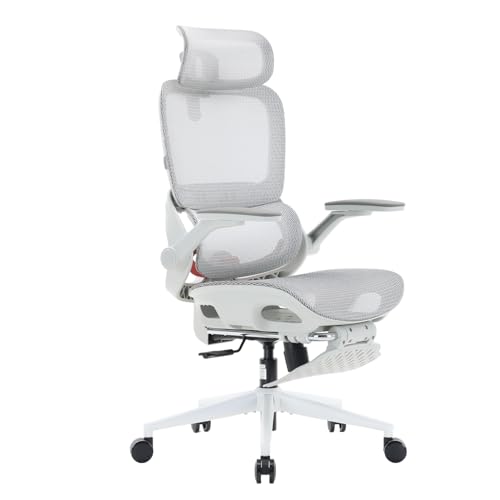
SIHOO B100 PRO Ergonomic Mesh Office Chair with Footrest
Included for 'Best Ergonomic Chair for Reading: Recline, Headrest and Footrest Picks by Situation' as a relevant option in this category; details come from the product listing.
View on Amazon
SIHOO Doro C300 Pro V2 Ergonomic Office Chair, Full-Body Adaptive Support
Included for 'Best Ergonomic Chair for Reading: Recline, Headrest and Footrest Picks by Situation' because the listing specifies Full-Body Adaptive Support, details this guide uses to compare options.
View on Amazon- Lumbar curve at about 6 to 10 inches above the seat.
- Head and neck once you lean back, which requires a headrest that reaches the base of your skull.
- Arms that hold a book or tablet without your shoulders lifting, so armrests about 7 to 10 inches above the seat.
Chair Types Compared for Reading
| Type | Back angle range | Headrest | Footrest | Usual price | Best reading use |
|---|---|---|---|---|---|
| Ergonomic task chair with headrest | About 95–125° with tilt lock | Adjustable on most models | Add-on or none | $200–$1,600 | Reading at a desk, mixing reading and computer work |
| Task chair with pull-out footrest | Up to 135–150° | Usually fixed or pillow | Built in | $150–$400 | Budget, relaxing reading breaks at a desk |
| Ergonomic recliner with ottoman | Infinite recline, 100–140° | Adjustable on better models | Ottoman | $1,200–$4,500 | Long reading in a living room or den |
| Power recliner with adjustable headrest | 100–160° | Power or manual | Built-in legrest | $700–$2,500 | Reading plus napping, easy to get up for seniors |
| Lounge chair with high back | Fixed 105–115° | Back is tall enough to rest head | Optional ottoman | $300–$1,500 | Reading nooks, shorter sessions |
Measurements to Check
| Feature | Good range for reading | Why |
|---|---|---|
| Seat height | 16–20 in, or adjustable | Feet flat with thighs level; lower for petite users |
| Seat depth | 16–18 in (15–17 in for petite users) | 2–4 fingers of gap behind the knee to keep circulation |
| Back height | At least 30 in from seat for headrest-free designs | Supports head when reclined |
| Recline | Lockable at 100–115° | The main reading posture; deeper recline makes holding a book tiring |
| Armrest height | 7–10 in above seat | Elbows supported while holding a book |
| Weight capacity | 250–300 lb standard, 350+ lb heavy-duty | Reclining puts more stress on the mechanism |
Picks by Situation
Reading at a desk (studying, research, long documents)
Choose an ergonomic task chair with a synchronized tilt that locks at several angles and an adjustable headrest. The Steelcase Gesture and Humanscale Freedom (with its headrest option) are well-known high-end examples built around reclined postures; they usually cost $1,000 or more. Mid-range brands such as Branch offer ergonomic chairs with adjustable lumbar and tilt in the $400 to $600 range. For studying, this is the most versatile choice because you can sit upright to write and lean back to read.
Best ergonomic chair with footrest
Task chairs with pull-out footrests, often from budget brands like Hbada or Sihoo, cost about $150 to $400. They allow a near-lounge position at a desk. The trade-off is that the recline mechanisms and footrests on cheaper models are the first parts to loosen, and footrests usually support the calves rather than the heels, so taller users may find them short.
Best ergonomic chair with headrest for long reading
If you read for two hours or more at a time, an ergonomic recliner with an adjustable headrest is better than any desk chair. Ekornes Stressless recliners are a well-established example, with a headrest that tilts forward so your eyes land on the book instead of the ceiling. They are expensive, typically $1,500 to $4,500 with ottoman, but they are designed to support the neck in a reclined reading posture.
Budget ergonomic desk chair
Under about $250, look for adjustable lumbar, a headrest with height adjustment and a tilt lock. Expect thinner seat foam that compresses within one to three years and simpler mechanisms. A separate lumbar pillow and a footrest can bring a basic chair close to a mid-range one for reading.
For women and petite readers
Many standard chairs have seat depths of 18 to 20 inches and seat heights that do not go below 17 inches. Petite readers should look for seat depth adjustment or a seat depth under 17 inches, and a minimum seat height around 15 to 16 inches; otherwise a footrest is essential.
Decision Matrix
| Your situation | Best type | Must-have feature |
|---|---|---|
| Read and work at the same desk | Ergonomic task chair with headrest | Multi-position tilt lock |
| Reading breaks between computer tasks | Task chair with footrest | Sturdy footrest, 250+ lb rating |
| Long evening reading sessions | Ergonomic recliner with ottoman | Forward-tilting headrest |
| Neck pain while reading | Recliner or task chair with adjustable headrest | Headrest height and angle adjustment |
| Lower back pain | Chair with adjustable lumbar | Lumbar height range covering 6–10 in above seat |
| Seniors | Power recliner or high lounge chair | Seat height 18–20 in, firm arms for standing up |
Top Ergonomic Chair Brands Worth Knowing
- Herman Miller and Steelcase: premium task chairs with long warranties, typically 12 years on many models.
- Humanscale: minimal-adjustment designs that react to body weight, useful for people who dislike fiddling with knobs.
- Branch: mid-range chairs with good adjustability for the price.
- Sihoo and Hbada: budget-friendly chairs with headrests and footrests.
- Ekornes Stressless: ergonomic recliners designed for reading and relaxing.
Setting Up Any Chair for Reading
- Recline to about 105 degrees and lock it.
- Raise the headrest until it meets the base of your skull, not your upper neck.
- Rest a book on a pillow on your lap or use a book stand, so you do not bend your neck down more than about 15 to 20 degrees.
- Put a light over your shoulder on the side opposite the hand you turn pages with.
- Stand and move every 30 to 45 minutes; even good chairs do not replace movement.




