Key takeaways
- No minimum weight listed on a gas-spring arm. You cannot know if a light monitor will float.
- Capacity stated only as a total on a dual arm, with no per-arm figure.
- Screen size range up to 34 or 49 inches paired with a 19.8 pound rating; most panels that size exceed it.
- Plastic VESA plate or plastic elbow joint on any arm rated above 22 pounds.
- Clamp pad under 3 x 3 inches on an arm rated above 26 pounds.
- Warranty that excludes tension loss.
- Reviews describing sag within the first two months; the cylinder is undersized for the claimed rating.
- Marketing that lists “holds up to” weight but no screen size range, which usually means limited reach.
What's inside
- Decide These 3 Things First
- Size: Capacity Range, Not Ceiling
- Material: What Capacity Tells You About Construction
- Construction: Counterbalance Type and Adjustment Range
- Performance: What Happens at the Edges
- Price Tiers: Capacity Is Cheap Now
- Warranty: Cylinder Coverage Is the Tell
- Delivery and Assembly: 15 to 30 Minutes
- Spec Checklist
- Red Flags
- FAQ
- Related Guides
The most common monitor arm mistake is reading the capacity number and stopping there. A 19.8 pound arm will hold a 19 pound monitor, technically, but it will hold it at the very top of its spring range, where tension adjustment is coarse, drift is likely, and the gas cylinder wears fastest. The second mistake is the opposite: buying a 37 pound heavy-duty arm for a 7 pound 24 inch monitor, then discovering the arm floats upward because the screen is below the spring’s minimum load. Both problems come from treating capacity as a single ceiling rather than a range with a floor and a comfortable middle.
- Decide These 3 Things First
- Size: Capacity Range, Not Ceiling
- Material: What Capacity Tells You About Construction
- Construction: Counterbalance Type and Adjustment Range
- Performance: What Happens at the Edges
- Price Tiers: Capacity Is Cheap Now
- Warranty: Cylinder Coverage Is the Tell
- Delivery and Assembly: 15 to 30 Minutes
- Spec Checklist
- Red Flags
- FAQ
- Related Guides
The third mistake is using the wrong weight. Shipping weight on the box includes the stand, packaging, and cables, and overstates the panel by 3 to 8 pounds. The number you need is the monitor’s weight without stand, listed in the manufacturer’s spec sheet. This guide covers how to find that number, how much margin to add, and what the capacity figure implies about the rest of the arm.
As an Amazon Associate we earn from qualifying purchases at no extra cost to you. Product prices and availability are accurate as of the date shown and are subject to change.



Decide These 3 Things First
1. The monitor’s weight without stand. Typical figures: 24 inch office panel, 6 to 9 pounds; 27 inch, 9 to 14 pounds; 32 inch flat, 12 to 18 pounds; 32 inch curved gaming, 15 to 25 pounds; 34 inch ultrawide, 14 to 22 pounds; 43 to 49 inch super ultrawide, 25 to 35 pounds. If you cannot find the spec, weigh the monitor on a bathroom scale with the stand removed.
2. Whether you will upgrade within three years. A monitor arm lasts 5 to 10 years; a monitor gets replaced every 3 to 5. If a 32 inch or ultrawide is in your future, buy the arm for that screen now. The difference between a 19.8 pound arm at $24 to $36 and a 37.4 pound arm like the ErGear heavy duty at around $36 is small.
3. Gas spring or mechanical spring. Gas springs have a firm minimum load, typically 4.4 pounds on light arms and 8 to 12 pounds on heavy ones, and can lose pressure over years. Mechanical springs, like the MechaSpring design in the FlowLift Pro at around $30, have a lower effective minimum and do not lose pressure, at the cost of slightly stiffer movement.
Size: Capacity Range, Not Ceiling
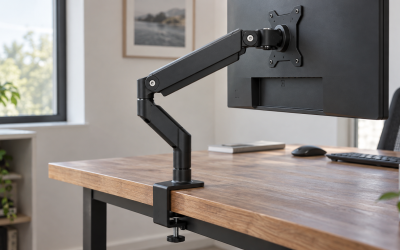
Every arm has a working range. Light arms are typically 4.4 to 19.8 pounds; the HUANUO FlowLift single mount at around $36 lists exactly that. Heavy-duty single arms run 8 to 37 or 44 pounds. Your monitor should sit in the middle 60 percent of the range: for a 4.4 to 19.8 pound arm, that means 7 to 16 pounds; for an 8 to 37 pound arm, 13 to 30 pounds.
The rule of thumb is a rating at least 20 percent above the monitor’s weight and a minimum at least 20 percent below. A 14 pound 27 inch monitor is comfortable on a 19.8 pound arm. An 18 pound 32 inch monitor is at the edge of a 19.8 pound arm and belongs on a 26 pound or heavier one. A 22 pound ultrawide needs 30 pounds or more.
Screen size range on the listing, such as 13 to 32 inches or 13 to 49 inches, refers to the arm’s reach and VESA plate, not its strength. A 13 to 34 inch arm rated 19.8 pounds will hold a 34 inch ultrawide only if that specific panel weighs under about 16 pounds, which many do not.
Material: What Capacity Tells You About Construction
Capacity and materials track together. Arms rated to 19.8 pounds are usually die-cast aluminum arms on a steel pole, with a nylon or aluminum VESA plate. Arms rated 26 to 44 pounds add a thicker pole of 1.5 inches or more, a larger gas cylinder or a heavier coil spring, and a steel VESA plate. Any arm claiming over 26 pounds with plastic joints or a plastic VESA plate is misrated.
Clamp construction scales the same way. A 19.8 pound arm typically has a single C-clamp with a 3 x 3 inch pad. Heavy-duty arms use dual C-clamps or a wider single clamp with a 4 x 5 inch pad to spread the leveraged load, which at 37 pounds on an 18 inch arm is several times the monitor’s weight at the desk edge.
Construction: Counterbalance Type and Adjustment Range
Gas spring arms hold position through a pressurized cylinder tuned by a hex screw. They move with a fingertip and are the standard for 13 to 32 inch monitors. Their weakness is the minimum load: below it, the arm rises on its own and cannot be adjusted down. Their long-term weakness is pressure loss after 3 to 6 years.
Mechanical spring arms use a coil spring and cam. They are slightly stiffer, but they hold heavier loads per dollar, have no minimum load problem to speak of, and do not lose tension. Many heavy-duty single arms and most budget dual arms use this design.
Look for a tension screw with a wide travel, 10 or more turns, on any arm you plan to load above 60 percent of its rating. Fine adjustment matters most near the top of the range. Tool-free VESA plates, as on several arms in the $24 to $36 bracket, speed installation but have no effect on capacity.
Performance: What Happens at the Edges
An arm loaded near its maximum sags slowly over a workday, needs re-tensioning every few weeks, and wears the cylinder. An arm loaded near its minimum rises when released and cannot be positioned low without pressing it down. Both are fixable in the short term with tension adjustment and unfixable in the long term without changing the load or the arm.
Correctly matched, an arm should hold any position through its 12 to 20 inch vertical range without drift, tilt 15 degrees or more each way, swivel 180 degrees, and rotate 90 degrees to portrait. Movement should take one hand. Wobble when typing comes from the pole and clamp, not the spring, and gets worse as the monitor gets heavier; heavy-duty arms with dual clamps are noticeably stiffer.
Price Tiers: Capacity Is Cheap Now
From $20 to $40, single arms rated 17.6 to 19.8 pounds are the standard, and this bracket also includes heavy-duty single arms rated 37 pounds, such as the ErGear at around $36. The price difference between a light arm and a heavy one is now $10 to $15, which is why buying for your next monitor makes sense. From $40 to $80, you get premium gas springs with wider tension ranges, longer reach of 20 to 24 inches, and 26 to 44 pound capacity with cable channels. From $80 to $200, commercial-grade arms add precision joints, 10 to 15 year warranties, and capacity to 44 pounds with an extended pole for 49 inch screens.
Warranty: Cylinder Coverage Is the Tell
Budget arms carry 1 to 3 years. Better arms in the $30 to $80 range offer 3 to 5 years, and some manufacturers extend to 10 years on registration. Read the exclusions: a warranty that excludes “loss of gas spring tension” is telling you the cylinder is expected to weaken. For an arm you plan to load at 70 percent or more of capacity, cylinder coverage of at least 3 years is worth prioritizing over a lower price.
Delivery and Assembly: 15 to 30 Minutes
Single arms ship in a box about 18 x 10 x 5 inches, weighing 5 to 12 pounds depending on capacity; heavy-duty arms are at the top of that range. Assembly is clamp to desk, pole into clamp, arm onto pole, VESA plate onto monitor, monitor onto arm, then tension adjustment. Plan 15 minutes for a light arm and 30 for a heavy one, plus 10 minutes of tension tuning with the monitor in place. Have a second person for panels over 20 pounds; hanging a 25 pound ultrawide one-handed while aligning a plate is how screens get dropped.
Spec Checklist
| Spec | Budget | Mid | Premium |
|---|---|---|---|
| Price | $20 to $40 | $40 to $80 | $80 to $200 |
| Capacity range | 4.4 to 19.8 lb | 6 to 26 lb or 8 to 37 lb | 8 to 44 lb |
| Screen size range | 13 to 32 in | 13 to 34 in or 13 to 49 in | 17 to 49 in |
| Counterbalance | Gas spring or mechanical | Gas spring, wide tension range | Gas spring, precision cam |
| Reach | 14 to 18 in | 18 to 22 in | 20 to 26 in |
| Pole diameter | 1.2 to 1.4 in | 1.5 in | 1.5 to 2 in |
| Clamp | Single C-clamp, 3 x 3 in pad | Dual C-clamp or wide single, grommet included | Dual C-clamp, grommet, plate |
| VESA | 75 x 75, 100 x 100 | 75 x 75, 100 x 100 | 75, 100, 200 x 100 adapter |
| Warranty | 1 to 3 years | 3 to 5 years | 5 to 15 years |
Red Flags
- No minimum weight listed on a gas-spring arm. You cannot know if a light monitor will float.
- Capacity stated only as a total on a dual arm, with no per-arm figure.
- Screen size range up to 34 or 49 inches paired with a 19.8 pound rating; most panels that size exceed it.
- Plastic VESA plate or plastic elbow joint on any arm rated above 22 pounds.
- Clamp pad under 3 x 3 inches on an arm rated above 26 pounds.
- Warranty that excludes tension loss.
- Reviews describing sag within the first two months; the cylinder is undersized for the claimed rating.
- Marketing that lists “holds up to” weight but no screen size range, which usually means limited reach.
FAQ
Should I buy an arm rated exactly for my monitor’s weight?
No. Choose a rating at least 20 percent above the panel’s weight without stand. A 16 pound monitor should be on a 19.8 pound arm at minimum and is more comfortable on a 26 pound one. Running at the ceiling causes drift and shortens cylinder life.
What if my monitor is lighter than the arm’s minimum?
The arm will rise when released. Either choose an arm with a lower minimum, such as a 4.4 pound floor, or add weight to the VESA area with a small steel plate or a soundbar bracket. Do not try to fix it by cranking the tension screw past its stop.
Does a heavy-duty arm hold a light monitor worse?
Only if the monitor is below the arm’s minimum load, typically 8 to 12 pounds on 37 to 44 pound arms. A 12 pound 27 inch panel on a 37 pound arm is fine; a 7 pound 24 inch panel is not. Check both ends of the range.
How much weight does the VESA plate and cables add?
Roughly 0.5 to 1 pound for the plate and hardware, plus 0.2 to 0.5 pounds for cables hanging from the monitor. A soundbar or webcam adds 1 to 3 pounds. Include all of it in your total before comparing to the rating; in 2026 most arms already account for the plate, but not for accessories.