The Short Answer
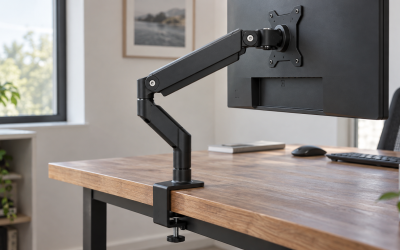
A typical dual monitor arm holds 17.6 to 22 pounds per arm, or roughly 35 to 44 pounds total, and fits screens from 13 to 32 inches with a 75 x 75 or 100 x 100 mm VESA pattern. Budget mechanical-spring dual mounts in the $35 to $60 range, such as the VIVO STAND-V002 rated at 22 pounds per arm, cover almost every pair of 24 to 27 inch monitors, which weigh 8 to 15 pounds each without their stands. Heavy-duty gas-spring dual arms rated 26 to 33 pounds per arm start around $80 to $150 and are needed only for 32 inch and larger panels, curved gaming displays, or older monitors with thick backs.
The number that matters is the weight of the monitor with its stand removed, and it is usually 20 to 40 percent lower than the shipping weight on the box. Check the spec sheet for “weight without stand” before comparing to the arm’s rating.
Our top picks
 VIVO Dual Monitor Stand
- Screen Compatibility: Universally compatible with most 17-inch to…
- Mechanical Spring Adjustment: Toolless monitor placement with perfect…
- Articulation, Swivel, & Tilt: The mounting brackets offer…
 VIVO Dual Monitor Desk Mount
- Fits 13" to 30" Screens - Dual monitor…
- Articulation & Height Adjustment - Adjustable arm offers…
- Heavy Duty C-Clamp - Mounts to the back…
| Product | Key specs | |
|---|---|---|
| VIVO Dual Monitor Stand | Screen Compatibility: Universally compatible with most 17-inch to… Mechanical Spring Adjustment: Toolless monitor placement with perfect… Articulation, Swivel, & Tilt: The mounting brackets offer… | Check price |
| VIVO Dual Monitor Desk Mount | Fits 13" to 30" Screens - Dual monitor… Articulation & Height Adjustment - Adjustable arm offers… Heavy Duty C-Clamp - Mounts to the back… | Check price |
 HUANUO Dual Monitor Mount for 2 Monitors HUANUO Dual Monitor Mount for 2 Monitors | Check price | |
 VIVO Freestanding Dual Monitor Stand with Sleek VIVO Freestanding Dual Monitor Stand with Sleek | Check price |
As an Amazon Associate we earn from qualifying purchases at no extra cost to you.
Standard Sizes
Dual monitor arms fall into three capacity classes. The table gives the range each class handles, with the monitor sizes that typically fit.
| Arm class | Rated load per arm | Screen size range | VESA pattern | Arm reach from pole | Typical price |
|---|---|---|---|---|---|
| Light-duty mechanical spring | 13 to 19.8 lb (6 to 9 kg) | 17 to 27 in (43 to 69 cm) | 75 x 75, 100 x 100 mm | 14 to 18 in (36 to 46 cm) | $30 to $45 |
| Standard mechanical or gas spring | 17.6 to 22 lb (8 to 10 kg) | 17 to 32 in (43 to 81 cm) | 75 x 75, 100 x 100 mm | 16 to 20 in (41 to 51 cm) | $35 to $70 |
| Heavy-duty gas spring | 26 to 33 lb (12 to 15 kg) | 24 to 35 in (61 to 89 cm) | 75 x 75, 100 x 100 mm | 18 to 24 in (46 to 61 cm) | $80 to $150 |
| Ultra-heavy single arm used as pair | 35 to 44 lb (16 to 20 kg) | 32 to 49 in (81 to 124 cm) | 100 x 100, some 200 x 100 mm | 20 to 26 in (51 to 66 cm) | $90 to $130 each |
Freestanding dual stands with a weighted glass or steel base, like the VIVO STAND-V002FG at around $60, match the standard class at 22 pounds per arm but do not clamp to the desk. Their base plates run 14 to 18 inches wide and add 8 to 12 pounds of ballast, so total load on the desk is 50 to 60 pounds with monitors attached.
How to Measure Your Space
- Find each monitor’s weight without stand. Look in the manufacturer’s spec sheet. A 24 inch office monitor is typically 6 to 9 pounds; a 27 inch is 9 to 14 pounds; a 32 inch flat is 12 to 18 pounds; a 34 inch ultrawide is 14 to 22 pounds; a 32 to 34 inch curved gaming panel is 15 to 25 pounds.
- Add a safety margin. Choose an arm rated at least 20 percent above the heavier monitor. For a 14 pound 27 inch panel, that means a 17 pound or higher rating; a 22 pound arm is comfortable.
- Check the VESA pattern. Measure the distance between mounting holes on the monitor’s back. Most 24 to 32 inch monitors use 100 x 100 mm; some small or thin panels use 75 x 75 mm. Screens over 32 inches sometimes use 200 x 100 mm, which requires an adapter plate.
- Measure combined screen width. Two 27 inch monitors side by side span about 48 inches with bezels. Each arm needs enough horizontal reach to place its screen at the correct spot. Arms with 16 to 20 inches of reach from the center pole handle two 27 inch screens; two 32 inch panels at 56 inches combined need 20 inches of reach or more.
- Measure desk thickness and rear clearance. C-clamps fit desktops 0.4 to 3.5 inches thick on most models, and the clamp needs 2 to 3 inches of clear space behind the desk edge. Grommet mounts need a hole of 0.4 to 2.4 inches diameter.
- Check desk strength at the clamp point. A dual arm with two 27 inch monitors puts 40 to 50 pounds of leveraged load on a 4 inch strip of desk edge. Particleboard under 0.75 inches thick needs a reinforcement plate; glass needs a dedicated glass-desk clamp.
- Confirm height range. The center of each screen should sit at or slightly below eye level, about 44 to 48 inches from the floor when seated at a 29 inch desk. Standard dual arms provide 12 to 18 inches of vertical adjustment on a 14 to 17 inch center pole.
By Room or Use Case
Home office with two 24 inch monitors
Two 24 inch panels weigh roughly 14 to 18 pounds combined without stands. Any dual arm rated 17.6 pounds or more per arm is ample, including light-duty mechanical mounts around $35 to $45. Tension on mechanical spring arms is set by a hex screw at each joint; set it once and the screens stay put.
Two 27 inch office or gaming monitors
This is the most common dual setup. Each 27 inch screen weighs 9 to 14 pounds, so a 22 pound per arm rating, as on the HUANUO dual mount at around $40 or the VIVO STAND-V002 at around $35, gives 8 to 13 pounds of headroom per side. Reach of 16 to 20 inches from the pole positions both screens edge to edge with a slight inward angle.
Mixed sizes: one 32 inch plus one 24 inch
Uneven loads are fine as long as each arm is independently rated for its screen. A 32 inch flat monitor at 15 to 18 pounds fits a 22 pound arm; the 24 inch on the other arm is light. Set spring tension independently on each arm. If the 32 inch is curved and over 20 pounds, step up to a heavy-duty dual mount rated 26 pounds or more per arm.
Two 32 inch or 34 inch ultrawide panels
Combined weight often reaches 35 to 45 pounds, and each screen may exceed 20 pounds. Standard 22 pound arms are at their limit. Look for gas-spring dual mounts rated 26 to 33 pounds per arm in the $80 to $150 range, with reach of 20 inches or more so the panels do not collide at the center pole.
Glass or thin laminate desks
Use a freestanding dual stand with a weighted base instead of a clamp. The base spreads 50 to 60 pounds over 200 square inches or more, which glass and thin tops handle easily. The trade-off is that the base occupies 14 to 18 inches of desk width at the back.
Standing desks
Weight limits are the same, but the desk’s own capacity matters. Two monitors on a dual arm total 35 to 50 pounds including the mount; on a frame rated 110 to 180 pounds that leaves room for a PC and accessories. Position the clamp near a frame leg rather than the center of the span to limit desktop flex at standing height.
Common Sizing Mistakes
- Using the shipping weight instead of the panel weight. Boxes include the stand, cables, and packaging and overstate the load by 3 to 8 pounds.
- Ignoring the minimum weight. Gas-spring arms have a floor of about 4 to 6 pounds; a very light monitor will drift upward and cannot be adjusted down.
- Assuming the total rating is per arm. A stand labeled “holds 44 pounds” means 22 per arm; it will not hold one 30 pound monitor and one 14 pound monitor.
- Skipping VESA verification. Some budget monitors have no VESA holes at all and need an adapter bracket of $15 to $25.
- Choosing insufficient reach for large screens. Two 32 inch panels on 14 inch arms overlap at the center.
- Clamping to a desk with a lip, drawer, or apron directly behind the edge. C-clamps need 2 to 3 inches of flat surface top and bottom.
- Forgetting the leveraged load. Fifty pounds at the end of a 16 inch arm applies far more force to the clamp than 50 pounds sitting on the desk.
FAQ
Can a 22 pound dual monitor arm hold a 27 inch curved monitor?
Usually yes. Most 27 inch curved monitors weigh 11 to 16 pounds without the stand, leaving 6 to 11 pounds of margin. Check the specific model; a few 27 inch gaming panels with thick chassis reach 18 pounds, which is still within rating but leaves little headroom.
What happens if I exceed the weight limit?
The arm sags and will not hold its position, the tension screw bottoms out, and over months the gas spring or mechanical spring weakens permanently. The clamp can also slip or crush a soft desktop. Stay under the rating with at least 15 to 20 percent to spare.
Do dual arms with a mechanical spring hold less than gas spring arms?
Not necessarily. Rated capacity depends on the design, not the spring type. Mechanical spring arms in the $35 to $45 range routinely carry 19.8 to 22 pounds per arm. Gas springs are smoother to adjust and cost more; capacity is a separate spec.
How much can the desk itself take?
A 0.75 to 1 inch particleboard or MDF desktop supports a clamped dual arm with 40 to 50 pounds of monitors without damage if the clamp pad is at least 3 x 4 inches. Below 0.6 inches thick, use a reinforcement plate. In 2026 most dual mounts ship with a steel plate for the underside, and a $10 to $15 aftermarket plate solves it if yours does not.