The phrase “heavy duty” on a dual monitor arm listing means almost nothing on its own. Some arms labeled heavy duty hold 19.8 pounds per side, which is the same as a standard mount; others hold 26 to 44 pounds and genuinely handle a pair of 32 inch curved panels or a 49 inch ultrawide stacked over a 27 inch. Buyers see the label, skip the per-arm rating, and end up with a mount that sags under a 24 pound gaming monitor within a week.
The second mistake is buying for the monitors you have today. People upgrade from 27 to 32 inch panels, add a soundbar, or swap to a curved ultrawide, and the arm that was fine at 15 pounds is now 5 pounds over its limit. The third is ignoring the desk: a dual arm carrying 50 pounds of glass and aluminum at the end of 20 inch levers puts a bending load on the rear edge of the desktop that a 0.6 inch particleboard top cannot take. This guide walks through the numbers that separate a real heavy-duty dual arm from a relabeled budget one.
Our top picks

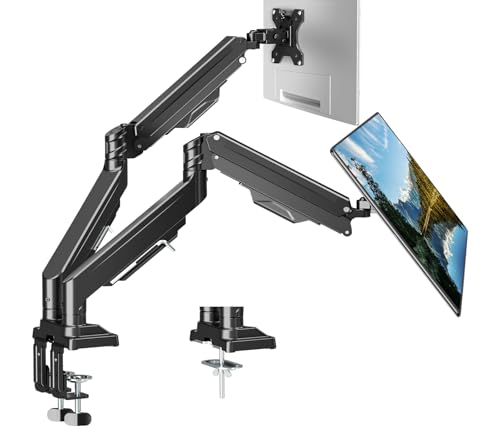
 HUANUO FlowLift™ Dual Monitor Stand
- Compatible with Wide Screens - To ensure compatibility…
- Regarding the compatibility with desks - Your desk…
- Dual C-Clamp Hold - Worried your dual monitors…

As an Amazon Associate we earn from qualifying purchases at no extra cost to you.
Decide These 3 Things First
1. The weight of each monitor without its stand, plus 20 percent. A 32 inch flat office monitor is 12 to 18 pounds; a 32 inch curved gaming monitor is 15 to 25 pounds; a 34 inch ultrawide is 14 to 22 pounds; a 43 to 49 inch super ultrawide is 25 to 35 pounds. If either screen is over 18 pounds, you need a per-arm rating of at least 22 pounds, and 26 pounds or more is safer. Arms like the HUANUO HNDS7 at 26.4 pounds per arm or vertical-stack heavy-duty arms rated 44 pounds cover the heavy end; a 19.8 pound per arm gas-spring model like the FlowLift is for 32 inch and smaller screens under 18 pounds each.
2. Side by side or stacked. Two screens next to each other need horizontal reach of 18 to 24 inches per arm so 32 inch panels do not collide at the pole. Stacked vertically, they need a pole of 20 inches or more and an upper arm that can hold the top screen at 30 to 35 inches above the desk.
3. What the desk can take. Measure desktop thickness at the rear edge. C-clamps on heavy-duty arms fit 0.4 to 3.5 inches on most models, but a top under 0.75 inches thick needs the included steel plate. Glass desks need a grommet mount or a freestanding base.
Size: Per-Arm Capacity, Screen Range, and Reach
Capacity is stated per arm and is the only number that matters for strength. Standard dual arms run 17.6 to 22 pounds per arm; heavy duty starts at 26 pounds and tops out around 44 pounds per arm on premium models. Total capacity, the number often shown in big type, is just double the per-arm figure and is not transferable; a 44 pound total arm cannot carry a 30 pound screen on one side.
Screen size range is a proxy for width, not weight. A 13 to 40 inch range means the arm’s reach and VESA plate accommodate panels that wide. A 17 to 49 inch range means the arm is built for ultrawides, with longer reach and often a 200 x 100 mm VESA option.
Reach from the center pole to the VESA plate should be at least 18 inches for two 32 inch monitors and 20 to 24 inches for a 34 inch ultrawide beside a 27 inch. Height adjustment range is typically 12 to 20 inches on the pole; for a stacked setup, look for 20 inches or more.
Material: Aluminum Arms and Steel Clamps
Heavy-duty arms should use die-cast aluminum for the arm segments and steel for the pole, clamp, and internal cam or gas cylinder housing. All-steel arms exist but weigh 15 to 20 pounds themselves and are overkill unless you are mounting 40 pound screens. Plastic appears on covers and cable channels only; any listing where the joints or the VESA plate are plastic is a budget arm regardless of its label.
Clamp pads should be at least 3 x 4 inches with rubber facing on both top and bottom jaws. Smaller pads concentrate the load and dent laminate. The included reinforcement plate should be steel, roughly 4 x 6 inches and 2 to 3 mm thick.
Construction: Gas Spring vs Mechanical Spring vs Fixed Pole
Gas-spring arms move with a fingertip and hold position via a pressurized cylinder with a tension screw. They are smooth, but each cylinder has a minimum load, often 4 to 8 pounds, and they lose pressure over years. For heavy screens, look for a cylinder rated at least 20 percent over your load.
Mechanical spring arms use a coil spring and cam. They are stiffer to move but hold heavier loads at a lower price and do not lose pressure. Many 26 to 44 pound per arm dual mounts use this design.
Fixed-pole dual mounts with articulating arms but no counterbalance rely on friction joints; you loosen a bolt, position the screen, and retighten. They hold the most weight per dollar but are not adjustable on the fly. For screens over 30 pounds, this is often the most reliable option.
Joint count matters too. A two-segment arm with three pivot points offers more positioning freedom but has more places to sag. For heavy loads, one-segment arms or arms with a locking elbow are stiffer.
Performance: Adjustment Range and Stability
A dual arm holding two heavy screens should offer at least 15 degrees of tilt each way, 180 degrees of swivel, and 360 degrees of rotation for portrait use. It should hold any position without drifting for at least a workday after tension is set. Wobble when typing is the most common complaint on cheaper heavy-duty arms; it comes from a thin pole or a clamp with too little contact area. Poles of 1.5 inch diameter or greater and clamps with dual contact points reduce it substantially.
Built-in USB ports, as on the HNDS7, add convenience but add nothing to capacity; treat them as a bonus, not a reason to pay more.
Price Tiers: What Heavy Duty Costs
From $40 to $70 you get standard dual arms rated 17.6 to 22 pounds per arm, sometimes marketed as heavy duty. They are fine for two 27 inch panels. The $70 to $110 range is where true heavy-duty dual arms live: 26 to 44 pounds per arm, aluminum construction, longer reach, and support for screens to 43 or 49 inches. Examples include heavy-duty dual mounts at around $80 for screens to 43 inches, vertical-stack arms at around $90 for 49 inch panels, and premium gas-spring models with USB at around $110. Above $150, you are buying commercial-grade arms with 10 to 15 year warranties and precision joints, worthwhile for 40 pound screens or professional use.
Warranty: Look for 3 Years or More
Budget arms carry 1 year. Heavy-duty arms in the $70 to $110 range typically offer 3 to 5 years, and some manufacturers extend to 10 years on request. The gas cylinder is what fails, so check that the warranty covers it explicitly rather than only the “frame.” A warranty that excludes “normal loss of tension” is a warning that the cylinder is marginal.
Delivery and Assembly: 30 to 45 Minutes
Heavy-duty dual arms ship in boxes of about 20 x 12 x 6 inches weighing 10 to 18 pounds. Assembly involves attaching the clamp to the desk, sliding the pole in, mounting each arm, and attaching the VESA plates to the monitors before hanging them. Budget 30 to 45 minutes, plus another 10 to 15 for tension adjustment with the monitors in place. You will want a second person to lift a 25 pound screen onto the plate. The included hex keys are usually adequate, but a 6 mm ball-end hex key makes tension adjustment far easier.
Spec Checklist
| Spec | Budget | Mid | Premium |
|---|---|---|---|
| Price | $40 to $70 | $70 to $110 | $110 to $250 |
| Per-arm capacity | 17.6 to 22 lb | 26 to 33 lb | 33 to 44 lb |
| Screen size range | 13 to 32 in | 17 to 43 in | 17 to 49 in |
| Reach per arm | 14 to 18 in | 18 to 22 in | 20 to 26 in |
| Height range on pole | 10 to 14 in | 14 to 20 in | 18 to 24 in |
| VESA | 75 x 75, 100 x 100 | 75 x 75, 100 x 100 | 75, 100, 200 x 100 with adapter |
| Arm material | Steel and plastic | Die-cast aluminum | Aluminum and steel |
| Counterbalance | Mechanical spring | Gas or heavy mechanical spring | Gas with wide tension range |
| Clamp range | 0.4 to 2.4 in | 0.4 to 3.5 in | 0.4 to 3.5 in plus grommet |
| Warranty | 1 year | 3 to 5 years | 5 to 15 years |
Red Flags
- “Heavy duty” in the title with a per-arm rating under 22 pounds. That is a standard arm.
- Only a total capacity given, no per-arm figure.
- No minimum weight listed on a gas-spring arm. Light screens will float up on a heavy cylinder.
- Plastic VESA plates or plastic joints anywhere in the load path.
- Clamp pad smaller than 3 x 3 inches, or no reinforcement plate in the box for a 26 pound or higher rating.
- Reach under 16 inches on an arm marketed for 32 inch or larger screens.
- Warranty excluding tension loss or the gas cylinder.
- Reviews mentioning sag within the first month; that is a cylinder undersized for the advertised rating.
FAQ
Do I need a heavy-duty dual arm for two 27 inch monitors?
Usually not. Two 27 inch panels weigh 9 to 14 pounds each without stands, well within a 19.8 or 22 pound per arm standard mount. Step up to heavy duty when either screen exceeds 18 pounds, when either is 32 inches or larger, or when you plan to upgrade within a couple of years.
Can a heavy-duty dual arm hold one 49 inch ultrawide and one 27 inch?
Yes, if the per-arm rating on the ultrawide side is at least 20 percent above the screen’s weight, typically 30 to 35 pounds, and the reach is 22 inches or more so the two screens do not overlap. Vertical-stack heavy-duty arms rated 44 pounds are designed for exactly this, with the ultrawide on the lower arm.
Will a heavy-duty arm damage my standing desk?
Not if the desktop is at least 0.75 inches thick and you use the reinforcement plate. The clamp applies a leveraged load of roughly 3 to 4 times the monitor weight at the rear edge. Mount the clamp near a frame leg rather than mid-span to limit flex at standing height, and verify the desk frame’s total capacity covers the 50 to 70 pounds of arm plus monitors.
Is a freestanding heavy-duty dual stand as strong as a clamp?
Freestanding bases with a 14 to 18 inch steel or glass plate hold the same per-arm rating as clamp versions, but they tip more easily when both screens are extended forward. In 2026 most heavy-duty dual arms ship with both a C-clamp and a grommet option in the box, and either is more stable than a freestanding base for screens over 20 pounds.