
Our Top Picks
 Sauder Steel River Commercial Office HutchL: 66.14" x W: 14.06" x H: 38.5"66.14 x 14.06 x 38.5 inches97.46 poundsCheck on Amazon
The Sauder Steel River L-shaped desk is a solid pick for a home office corner if you want an industrial look, a real file drawer and a footprint of roughly 60 by 57 inches, but its 19-inch-deep work surfaces and engineered-wood top make it a better fit for a laptop-plus-one-monitor setup than for a heavy multi-screen workstation.
What the Steel River L-Desk Actually Is
Steel River is Sauder’s industrial-style collection: a textured, powder-coated black metal frame with corner accents, paired with engineered-wood panels in a woodgrain finish. The standard L-shaped desk is sold in two finishes, Carbon Oak and Milled Mesquite, both with the black frame. Sauder also sells a larger Steel River L-desk with a lateral file cabinet, which is a different piece with a bigger footprint, so it pays to read the dimensions before you order.
Sauder Steel River Commercial Office Hutch, Carbon Oak Finish
Chosen because it specifies Carbon Oak Finish.
View on Amazon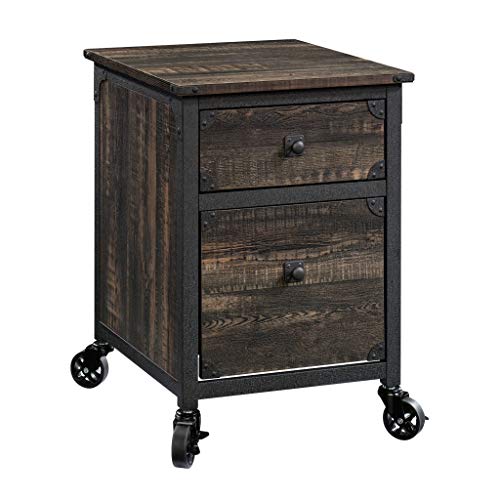
Sauder Steel River File Pedestal, L: 20.87" x W: 23.86" x H: 26.58", Carbon Oak Finish
Chosen because it specifies L: 20.87" x W: 23.86" x H: 26.58" and Carbon Oak Finish.
View on Amazon| Spec | Standard Steel River L-desk | Larger L-desk with lateral file |
|---|---|---|
| Overall width | about 59.8 in | about 66 in |
| Overall depth (return side) | about 57.3 in | about 66 in |
| Height | about 29.5 in | about 29.6 in |
| Work surface depth | 19 in on each wing | deeper main wing |
| Drawers | 1 small utility drawer, 1 letter-size file drawer | 3 drawers incl. lockable letter/legal file |
| Assembled weight | roughly 105–120 lb depending on listing | heavier |
| Materials | engineered wood, powder-coated steel | engineered wood, powder-coated steel |
| Warranty | 5-year limited | 5-year limited |
Both wings of the standard model share the same 19-inch depth, which is the single most important number in this review. Most general-purpose computer desks run 24 to 30 inches deep.
Where It Does Well
Storage that is actually useful
The lower drawer runs on full-extension slides and takes letter-size hanging files, which is unusual at this price. The small top drawer runs on metal runners with safety stops, so it will not fly out and land on your foot. For someone who keeps tax papers, warranties and bills at home, a built-in file drawer can replace a separate two-drawer file cabinet and free up 2 to 3 square feet of floor.
Cable management
Two desktop grommets give you a clean path for monitor and charger cables. Place the monitor near a grommet when planning your layout so the power brick can sit on the floor rather than on the desktop.
Looks and finish
The black steel frame with woodgrain panels reads as warmer than an all-metal desk and more substantial than thin tube-frame budget L-desks. The textured powder coat hides fingerprints and light scuffs better than gloss black.
Where It Falls Short
The 19-inch depth
Ergonomic guidance generally places a monitor about an arm’s length away, roughly 20 to 30 inches from your eyes. On a 19-inch surface, a monitor on its stock stand sits about 12 to 15 inches from the front edge once you account for the stand’s foot. Add a keyboard and your wrists, and many people end up closer to the screen than they would like. Workarounds:
- Use a clamp-on monitor arm mounted at the back edge to reclaim 6 to 8 inches.
- Put the monitor in the corner of the L, where the diagonal distance is much greater, about 26 to 27 inches from corner to the inside edge.
- Stick to a 24- or 27-inch screen; a 34-inch ultrawide on a 19-inch-deep wing feels cramped.
Engineered-wood top
The top is engineered wood with a laminate finish, not solid wood. That keeps the price and weight down, but it means the surface does not like standing water, and screw holes do not survive repeated disassembly well. Retail listings commonly cite a desktop load around 50 lb, so dual heavy monitors, a desktop tower on the surface and a printer together can exceed what it is designed for. Keep the tower on the floor.
Assembly takes time
Sauder flat-pack furniture is known for detailed, step-heavy instructions with cam locks and many small fasteners. Plan on 2 to 4 hours for one person, less with a helper. Carton weight is well over 100 lb in total, so plan to open boxes in the room where the desk will live.
Room Fit: Will It Fit Your Corner?
The desk itself needs about 60 by 57 inches. Add chair clearance: a rolling office chair needs about 36 inches behind the front edge to back out and turn comfortably. That means the desk plus working zone occupies roughly 60 by 76 inches on the main wing.
| Room size | Fit with standard Steel River L-desk |
|---|---|
| 9 x 10 ft spare room | Fits in a corner with room for a bookcase or futon on the opposite wall |
| 10 x 12 ft bedroom (shared with a queen bed) | Tight; the queen bed (60 x 80 in) plus desk leaves walkways near the 24-in minimum |
| 11 x 12 ft office | Comfortable, with space for a printer stand or reading chair |
| Living room nook | Works if the corner has at least 5 ft of wall on each side |
Before you build, decide which corner the desk goes into and read the instruction sheet for which side the return and drawers attach, since drawer cabinets on L-desks are often built for one orientation. Doorways are rarely a problem because the desk ships flat in cartons.
Who Should Buy It and Who Should Skip It
| Your situation | Steel River L-desk? | Why |
|---|---|---|
| Hybrid worker, laptop plus one 24–27 in monitor | Good fit | Enough space, file drawer for paperwork |
| Student or home-paperwork desk | Good fit | Drawers and industrial look without office-furniture bulk |
| Gamer with ultrawide and tower | Skip | Shallow wings, modest load rating |
| Dual 27 in monitors | Only with a monitor arm | Depth is the bottleneck |
| Renter who moves every year | Think twice | Engineered wood weakens with repeated teardown |
| Need a deeper L under the same look | Consider the lateral-file version | Larger footprint, more storage |
How It Compares With Similar L-Desks
Against thin tube-frame budget L-desks, the Steel River gives you real drawers, heavier construction and a finish that looks like furniture rather than a gaming station. Against full-size laminate executive L-desks from office-furniture lines, it is lighter, shallower and cheaper, and it gives up keyboard trays, hutch options and the 24- to 30-inch depth those desks offer. In the market, the Steel River L-desk usually sits in the roughly $250–$450 range depending on finish and promotions, while the larger lateral-file version runs higher.
Durability: What Wears First
- Drawer slides: the file drawer carries the most load; avoid overstuffing past what a letter-size hanging rail can hold.
- Front edge of the top: forearm and wrist rub shows first on laminate; a desk mat delays it.
- Cam-lock joints: re-tighten after the first few weeks as the panels settle.
- Leveling: on carpet, the long L can rock slightly; adjust floor glides or shim the corner leg.
Bottom Line
The Sauder Steel River L-shaped desk is a good-looking, storage-friendly corner desk for moderate setups. Buy it for its file drawer, industrial style and manageable 60-by-57-inch footprint. Skip it, or plan a monitor arm, if you work on large or multiple screens, because the 19-inch depth is the limit you will notice every day.









