Upgrading your home office desktop with large curved displays can completely transform how you work and game, but it also creates a major physical headache. As multi-display setups become larger and heavier in 2026, standard monitor mounts simply fail under the load. Heavy ultrawide screens—ranging from 34-inch panels up to 49-inch and 57-inch behemoths—exert massive leverage on mounting brackets. Generic single or dual arms frequently sag forward, slide down center poles, or tip over completely, leaving your high-end display resting awkwardly against your desk surface.
Finding the best dual monitor arm for heavy ultrawide screens requires careful attention to load mechanics, desk attachment methods, and tilt mechanism rigidity. Beyond simple weight ratings, aggressive screen curves shift the display’s center of gravity forward, placing extreme tension on the VESA tilting joint. A proper heavy-duty arm reclaims precious desk space, holds heavy panels rigidly at eye level, and offers smooth height adjustments without threatening to crush your tabletop.
Our top picks


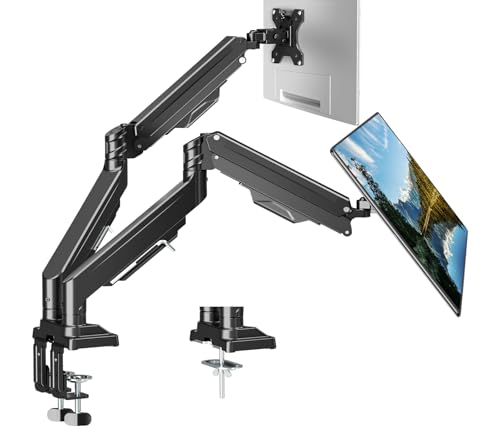
 HUANUO TitanLift Heavy Duty Monitor Arm for
- Fits up to 49" Ultrawide Screens: Ensure your…
- Maximum Support: Crafted from high-strength aluminum alloy, reinforced…
- Fully Adjustable: This ultrawide monitor arm enables precise…



As an Amazon Associate we earn from qualifying purchases at no extra cost to you.
Quick Picks
| Product | Best For | Price |
|---|---|---|
| VIVO Pneumatic Arm Dual Ultrawide Extra Tall Desk Mount (STAND-V120K) | Best Overall Tall/Stacked Setup | $149.99 |
| Dual Ultrawide Monitor Mount 24-57” | Best Extreme Load Capacity | $79.99 |
| HUANUO TitanLift Heavy Duty Monitor Arm | Best Aluminum Build & Clamp Security | $97.99 |
| MOUNT PRO Dual Monitor Arm | Best Mid-Range Side-by-Side Mount | $94.98 |
| WALI Vertical Dual Monitor Mount | Best Vertical Alignment Setup | $94.99 |
| VIVO Freestanding Dual Ultrawide Stand (STAND-V038FG) | Best No-Drill / Glass Base Option | $69.99 |
| MOUNTUP Dual Monitor Stand | Best Value for Mid-Sized Ultrawides | $79.99 |
| ErgoFocus Dual Monitor Mount | Best Heavy-Duty Budget Choice | $79.99 |
How We Picked
To identify top-performing mounting systems for ultra-large displays, we evaluated essential hardware factors across structural rigidity, mounting security, and practical daily ergonomics. We focused primarily on heavy-duty load ratings, selecting models built to handle weights from 22 lbs up to 59.4 lbs per arm. We evaluated desk clamping mechanisms, prioritizing dual C-clamps and reinforced grommet systems capable of distributing force across thin or engineered wood desk surfaces.
Additionally, we evaluated tilt tension joints to ensure screens stay upright without sliding forward. We prioritized arms offering flexible movement, smooth gas spring or pneumatic lift mechanisms, standard VESA 75x75mm and 100x100mm mounting patterns, and effective integrated cable management channels to keep your workstation neat and functional.
The 8 Best Picks
1. VIVO Pneumatic Arm Dual Ultrawide Extra Tall Desk Mount (STAND-V120K)
Designed for power users seeking maximum vertical reach, this extra-tall VIVO desk mount handles two massive ultrawide displays with ease. Its pneumatic gas spring arms allow effortless vertical and horizontal adjustments, making it ideal for stacked configurations or side-by-side positioning of oversized panels.
- Pro: Supports two 49-inch ultrawide screens weighing up to 44 lbs each with smooth pneumatic elevation.
- Pro: Extra-tall center pole allows flexible vertical stacked monitor arrangements.
- Con: Top-tier price point of $149.99 makes it the most expensive option on the list.
When to skip: Skip this model if you only plan to mount small 24-inch screens or have a shallow desk with limited rear clearance.
2. Dual Ultrawide Monitor Mount for 24-57” Screens
Engineered for extreme performance, this heavy-duty mount is built to handle the largest super-ultrawide gaming and productivity displays on the market. With an impressive weight threshold per arm, it stabilizes giant monitors that typically overwhelm standard desk arms.
- Pro: Industry-leading weight capacity supporting up to 59.4 lbs per arm for massive displays up to 57 inches.
- Pro: Highly competitive $79.99 price point given its enterprise-grade weight handling.
- Con: Heavy steel construction occupies notable space behind the desk.
When to skip: Skip if your screens weigh under 15 lbs, as the high minimum spring tension can make lowering lightweight monitors difficult.
3. HUANUO TitanLift Heavy Duty Monitor Arm
Featuring a sleek aluminum construction and robust dual C-clamp mounting, the HUANUO TitanLift delivers exceptional stability for large premium setups. It provides precise height, tilt, and swivel movements while preventing high-end ultrawide panels from drooping.
- Pro: Premium aluminum body paired with a heavy-duty dual C-clamp setup to prevent desk twist.
- Pro: Easily supports up to 49-inch screens weighing up to 44 lbs without tilt slippage.
- Con: Native VESA mounting plate tops out at 100x100mm, requiring adapters for larger bracket standards.
When to skip: Skip if you need an out-of-the-box dual-arm crossbar solution attached to a single central pole.
4. MOUNT PRO Dual Monitor Arm
The MOUNT PRO Dual Monitor Arm offers smooth gas spring articulation, making side-by-side positioning of twin 49-inch ultrawides simple and reliable. Built-in cable management tracks keep power and display cables tucked away for a clean presentation.
- Pro: Accommodates two 49-inch ultrawide monitors up to 44 lbs per arm with full motion adjustment.
- Pro: Integrated cable pathways clean up wire clutter along both upper and lower arm segments.
- Con: Requires significant gap clearance behind the desk to push screens deep toward the wall.
When to skip: Skip if your desk sits completely flush against a back wall with no rear clearance.
5. WALI Vertical Dual Monitor Mount
For users who prefer a stacked vertical layout to preserve horizontal desktop real estate, WALI’s vertical mount offers dedicated center-pole stability. It keeps two curved panels perfectly aligned vertically directly in front of the user.
- Pro: Dedicated vertical stacked pole design holds curved screens from 17 to 49 inches centered perfectly.
- Pro: Supports up to 33 lbs per screen while dramatically reducing neck strain across dual-screen workflow.
- Con: Upper weight limit of 33 lbs per screen falls below the 44-lb capacity of top heavy-duty competitors.
When to skip: Skip if your monitor weighs between 34 and 44 lbs.
6. VIVO Freestanding Dual Ultrawide Stand (STAND-V038FG)
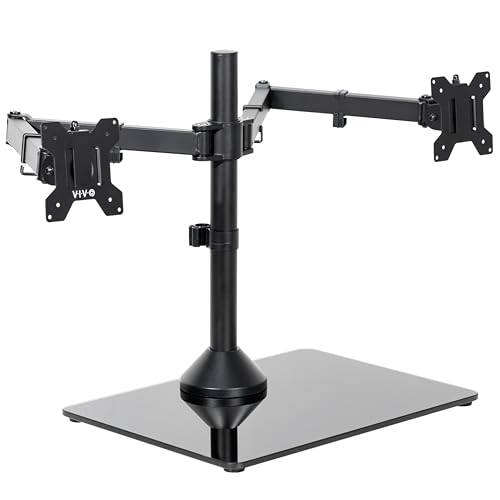
If your desk surface cannot accept a heavy C-clamp—such as thin glass, hollow-core composite, or rental furniture—this VIVO freestanding solution uses a thick tempered glass base to keep your dual-monitor array completely stable.
- Pro: Freestanding design with a sleek glass base eliminates the need for desk edge clamping or drilling.
- Pro: Affordable $69.99 price point for mounting two ultrawide displays up to 38 inches.
- Con: Lower overall load capacity capped at 22 lbs per monitor.
When to skip: Skip if you own extra-heavy 49-inch or 57-inch screens that exceed the 22-lb weight limit.
7. MOUNTUP Dual Monitor Stand
The MOUNTUP Dual Monitor Stand offers a broad adjustment range for mid-to-large ultrawide displays. Its gas spring mechanism allows precise balancing across various screen weights, delivering smooth, effortless articulation.
- Pro: Wide tension range supports monitors from 2.2 to 33 lbs with versatile full-motion extension.
- Pro: Full-motion articulation enables easy landscape-to-portrait rotation and smooth height tweaks at $79.99.
- Con: Maximum screen size recommendation stops at 43 inches rather than 49 inches.
When to skip: Skip if you plan to mount super-ultrawide 49-inch or 57-inch panels.
8. ErgoFocus Dual Monitor Mount
The ErgoFocus Dual Monitor Mount delivers dependable heavy-duty performance for standard and mid-sized ultrawide screens. It offers sturdy desk attachment options and firm tension controls to eliminate unwanted wobble during heavy typing.
- Pro: Sturdy structural framing keeps displays up to 43 inches completely steady during active work.
- Pro: Highly affordable $79.99 price tag offers great value for dual-screen desktop setups.
- Con: Dynamic arm movement feels somewhat stiff until spring tension screws are fully adjusted.
When to skip: Skip if you require stacked vertical screen positioning or displays larger than 43 inches.
Buying Guide
1. Weight Capacity vs. Screen Size Ratings
When selecting a monitor arm for heavy ultrawide screens, always prioritize actual weight capacity over advertised screen size dimensions. A 49-inch screen with an aggressive curvature (such as 1000R) shifts its center of gravity forward, placing up to twice as much torque on the tilt pivot as a flat panel of identical weight. Ensure the arm’s weight rating comfortably exceeds your monitor’s net weight without its original factory stand.
2. Desk Attachment Mechanics: Clamp, Grommet, or Base
Heavy-duty dual mounts place massive localized pressure on your desktop edge. Look for dual C-clamp systems or wide grommet mounts that distribute clamping forces across a large surface area. Solid wood desktops (0.8 to 3.0 inches thick) handle heavy dual arms best, whereas hollow-core honeycomb desks require reinforcement plates to prevent crushing under 80+ lbs of combined mount and screen weight.
3. Motion Range, Gas Springs, and VESA Patterns
Dynamic adjustability depends on quality counterbalancing systems. Gas springs and pneumatic arms allow smooth multi-axis movement, but require precise mechanical tension tuning via Allen key adjustments. Ensure your arm supports standard VESA 75x75mm and 100x100mm mounting patterns, and check if your specific ultrawide display requires a manufacturer-provided VESA adapter bracket before installation.
Our Verdict
For users running two massive 49-inch screens, the VIVO Pneumatic Arm Dual Ultrawide Mount (STAND-V120K) offers the best combination of height, flexibility, and vertical stacking capability at $149.99. If you are mounting super-heavy or 57-inch displays, the Dual Ultrawide Monitor Mount 24-57” provides unbeatable strength with its 59.4 lb per arm capacity at $79.99. For setups where clamping is impossible, the VIVO Freestanding Glass Base Stand (STAND-V038FG) delivers clean, secure desk positioning for screens up to 38 inches at $69.99.
FAQ
Can a single monitor arm hold two 49-inch ultrawide monitors?
Yes, but only if specifically engineered with dual heavy-duty arms or an extra-tall center pole rated for at least 40 to 44 lbs per arm. Standard dual monitor arms will collapse under the weight and forward center of gravity created by two 49-inch panels.
Why does my ultrawide monitor tilt downward on my monitor arm?
Downward screen tilting occurs when the arm’s VESA tilt joint tension screw is not tightened enough to counteract the forward leverage of a heavy or deeply curved display. Tighten the hex screw located directly behind the VESA mounting plate until the monitor holds its vertical angle firmly.
Are gas spring arms better than mechanical steel pole mounts for heavy screens?
Gas spring arms offer quick, toolless height adjustments on the fly, making them ideal if you regularly adjust screen height or stand while working. Fixed mechanical steel pole mounts are stiffer, slightly more durable over time, and ideal if you prefer a set-and-forget display configuration.
How do I know if my desk can support a heavy-duty dual monitor mount?
Solid wood, butcher block, or thick plywood desks easily handle heavy-duty clamps. If your desk is made of hollow paper-honeycomb particleboard or glass, avoid edge clamps and opt for a freestanding base mount or install a steel desk reinforcement plate under the clamp area to distribute force safely.