Our Top Picks
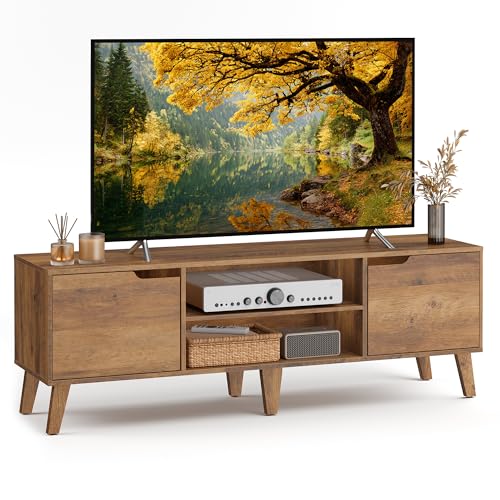

A 65 inch TV is bigger than people expect once it’s out of the box. The sets themselves run roughly 57-58 inches wide and weigh 30-45 pounds depending on panel type, which is enough to make a flimsy stand feel genuinely unstable. The good news is a stand that handles that size well doesn’t have to cost much. The bad news is most of the truly cheap options sold as “65 inch TV stands” are only rated for the TV’s width, not the TV’s weight plus everything you put under and around it. Here’s how to buy one for under $150 without ending up with a wobbly shelf.
What “cheap” actually means here
In this category, cheap breaks into two real price bands. Under $80 gets you particleboard construction with cam-lock assembly, usually from brands you won’t recognize, sold mostly through Amazon and Walmart. $80-150 gets you the same particleboard but with better edge banding, metal hairpin or trestle legs instead of plastic feet, and sometimes a tempered glass shelf. Above $150 you start seeing engineered wood with real veneer, which is nicer but not necessary for a TV stand that’s going to be covered in cable boxes and dust anyway.
The particleboard itself isn’t the problem. Particleboard holds a TV fine as long as the stand’s top surface spans the TV’s full footprint and the legs are wide enough to prevent tipping. The problem is corner-cutting on hardware: thin cam locks that strip after two or three disassemblies, or leg brackets held on with four tiny screws into particleboard that will eventually chew out if the stand gets moved a lot.
Sizing it right for a 65 inch TV
Don’t just match the stand width to the TV width. A 65 inch TV needs a stand at least 55-60 inches wide to look proportional and, more importantly, to keep the base wide enough that the TV’s center of gravity sits well inside the stand’s footprint. Go narrower than that and the TV overhangs the ends, which looks bad and becomes a real tip hazard around kids or pets who grab the bottom edge.
Weight capacity matters more than most listings make clear. Look for a stated top-surface capacity of at least 70-90 pounds. That sounds like overkill for a 40-pound TV, but you’re also setting a soundbar, streaming box, and maybe a game console on there, and particleboard shelves sag over time if they’re loaded near their rated limit. A stand rated for 50 pounds total will bow in the middle within a year under a 65 inch TV.
If you want a quick way to browse what’s actually available at this size, search 65 inch TV stands and sort by customer rating rather than price. The $60 and $90 options often look identical in photos but differ a lot in how the shelf is braced underneath.
Three realistic options compared
These are the three configurations you’ll actually run into shopping in this range, not specific products, since exact models rotate constantly.
| Type | Typical price | Weight capacity (top) | Where it fails |
|---|---|---|---|
| Basic particleboard, cam-lock, plastic feet | $50-80 | 40-60 lbs | Feet crack or go uneven on hard flooring within a year; shelf sags if overloaded |
| Particleboard with metal hairpin/trestle legs | $80-130 | 70-100 lbs | Leg bolts loosen over time, need occasional retightening; otherwise solid |
| Particleboard with tempered glass shelf | $100-150 | 60-90 lbs | Glass shows fingerprints and scratches fast; heavier to move; still just as prone to leg wobble if legs are plastic |
The middle option is the best value for most people. Metal legs cost the manufacturer very little more than plastic ones but make a bigger difference in stability than any other single upgrade at this price point. Glass shelves are mostly an aesthetic choice and don’t add functional capacity over wood.
Assembly and stability fixes that matter
Most instability complaints on cheap stands trace back to assembly, not design. Cam locks need to be fully seated and tightened with the included hex key, not just hand-pressed, and they should be checked again after a week once the particleboard settles slightly. If a stand comes with leg bolts into metal inserts, use a cordless driver on low torque rather than a hand screwdriver; under-tightened leg bolts are the single biggest cause of a “wobbly new TV stand” complaint.
If you’re on carpet, add felt or rubber pads under the feet even if the stand ships with its own pads, since cheap included pads are often too thin to compensate for an uneven carpet pad underneath. On hardwood, skip pads with adhesive backing that can peel paint or finish off the feet, and use stick-on felt instead.
For anyone nervous about tip-over risk, an anti-tip strap kit costs about $10-15 and takes ten minutes to install, anchoring the stand or the TV mount to the wall stud. This is worth doing regardless of how much you spent on the stand, since cheap and expensive stands fail the same way: the TV goes down, not the furniture. If you want to browse that hardware alongside your stand, search TV anti-tip straps while you’re ordering.
When the cheap stand is the wrong call
Skip the sub-$80 tier if you have small kids who climb on furniture, if your floor is uneven (a wobbly stand on uneven floor compounds badly), or if you’re putting a soundbar and a game console with their own power bricks on the same shelf, since cable clutter under a 65 inch TV adds up to real weight on narrow shelving. In those cases, spend the extra $30-50 for metal-leg construction with a rated capacity above 80 pounds; it’s a small jump in price for a meaningful jump in how long the thing stays solid. For a straightforward setup in a living room with no kids and reasonably level flooring, the basic $60-80 particleboard stand with metal legs is genuinely fine and not a compromise you’ll regret.