The Short Answer
Get a desk mat at least 28 by 12 inches (71 by 30 cm) if you use a full-size keyboard and a mouse, and 31 to 36 by 12 to 16 inches (79 to 91 by 30 to 41 cm) if you want the mouse to have real room or you rest your forearms on the mat. Compact and tenkeyless keyboards can go smaller: 24 by 10 inches (61 by 25 cm) covers a TKL board plus a mouse, and a 14 by 6 inch (36 by 15 cm) keyboard-only mat suits people who prefer a separate mouse pad. Whatever size you choose, leave 2 to 4 inches of bare desk on each side so the mat does not hang over the edge, and pick a thickness of 3 to 4 mm if you type on a hard laminate or glass top.
Standard Sizes
Desk mats are sold in a few repeating sizes. The table lists the common ones, what fits on each, and the minimum desk width that leaves a margin on both sides.
Our top picks


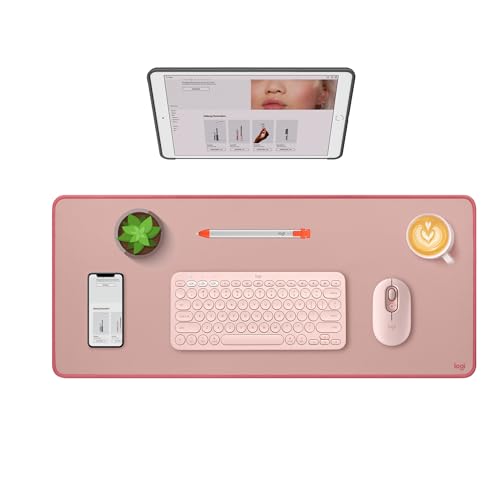 Logitech Studio Series Desk Mat Large 28x12
- Elevate your desktop: Add color, style and comfort…
- Spill-resistant & easy to clean: This extra-large desk…
- Effortless glide: The smooth, comfy cloth pad featuring…

As an Amazon Associate we earn from qualifying purchases at no extra cost to you.
| Mat size class | Inches | Centimeters | Fits | Minimum desk width | Typical price |
|---|---|---|---|---|---|
| Keyboard-only mat | 14 to 18 x 6 to 7 | 36 to 46 x 15 to 18 | 60% to TKL keyboard, no mouse | 24 in | $10 to $20 |
| Compact combo | 24 x 10 to 12 | 61 x 25 to 30 | TKL keyboard plus mouse | 32 in | $10 to $18 |
| Standard desk mat | 28 to 31.5 x 12 | 71 to 80 x 30 | Full-size keyboard plus mouse | 36 in | $12 to $25 |
| Extended | 35 to 36 x 16 to 18 | 89 to 91 x 41 to 46 | Full keyboard, mouse, forearm rest | 42 in | $15 to $35 |
| Extra-large / full desk | 47 x 20 to 24 | 119 x 51 to 61 | Everything on a 48-inch desk | 52 in | $25 to $50 |
Examples across the range include the GLORIOUS Gaming Sound Dampening Keyboard Mat at about $12.74, sized for tenkeyless boards; the Quick Key Keyboard Mouse Pad with an extended rubber base at about $8.82; the Logitech Studio Series Desk Mat at 28 by 12 inches for about $18.95, which is the standard size for a full-size keyboard and mouse; and the 31.5 by 11.8 inch Desk Pad with Keyboard Wrist Rest at about $19.99, which adds an attached wrist support to the standard footprint. Thickness across these classes is typically 2 to 4 mm; felt and leather mats run 2 to 3 mm, and rubber-backed cloth mats 3 to 4 mm.
How to Measure Your Space
- Measure your keyboard. Full-size boards are 17 to 18 inches wide and 5 to 6 inches deep; tenkeyless boards 14 inches; 60% boards about 11.5 inches. Write down the width.
- Add mouse room. A comfortable mouse zone is 10 to 12 inches wide for office work and 14 to 18 inches for low-sensitivity gaming. Add this to the keyboard width.
- Decide on forearm rest. If you rest your forearms on the desk, you need a mat 15 inches deep or more so your wrists and forearms sit on the same surface. Otherwise 10 to 12 inches of depth is enough.
- Measure the desk. Width edge to edge, and the depth from the front edge to where your monitor stand begins. The mat must fit inside this with at least 2 inches to spare on the sides and should never overhang the front edge.
- Check for obstacles. A monitor arm clamp, a desk lamp base, or a grommet hole limits how far back the mat can go. Measure to the nearest obstacle, not the wall.
- Tape it out. Mark the candidate size on the desk with painter’s tape and move your keyboard and mouse through a normal workday before ordering.
By Room or Use Case
Full-size keyboard on a 48-inch desk
A 31.5 by 12 inch or 35 by 16 inch mat leaves 6 to 8 inches on each side for a lamp, phone stand, or speakers. Center it under the monitor so the keyboard sits directly in front of the screen and the mouse zone runs to the right (or left) without reaching the edge.
Tenkeyless or 65% keyboard
Smaller boards suit a 24 by 10 or 28 by 12 inch mat, and the saved inches go to the mouse. Gamers on low sensitivity often step up to 35 by 16 anyway because the extra sweep room matters more than the keyboard’s footprint.
Small desk under 36 inches
Skip the desk mat and use a keyboard-only mat of 14 to 18 by 6 to 7 inches plus a separate 9 by 8 inch mouse pad. Two small pieces can be positioned around lamp bases and desk edges that a single wide mat would fight.
Noisy mechanical keyboard on a hollow desk
Thickness beats width here. A 3 to 4 mm rubber-backed or dense felt mat under a mechanical board cuts the hollow resonance of a laminate-over-particleboard top noticeably; a 2 mm leather mat looks nicer but damps less.
Common Sizing Mistakes
- Buying to the desk instead of to the gear. A 47-inch mat on a 48-inch desk hangs over the edges, curls, and traps crumbs against the wall. Leave a margin.
- Too shallow for forearm rest. A 12-inch-deep mat ends at your wrists if you sit close; forearms then rest half on the mat and half on a cold desk edge.
- Ignoring the monitor stand. Factory stands are 8 to 10 inches deep, so on a 24-inch desk only about 14 inches of depth is actually free for a mat.
- Thin mats on hard tops. A 1.5 to 2 mm mat on glass or laminate offers little cushioning and slides. Choose 3 to 4 mm with a rubber base.
- Seams under the mouse. Two-piece or stitched-panel mats can put a ridge exactly where the mouse travels. Buy one piece for the mouse zone.
- Forgetting the wrist rest height. Attached wrist rests add 0.5 to 1 inch and should match the front edge of your keyboard; a mismatch bends the wrist.
FAQ
What is the most common desk mat size?
Roughly 31.5 by 12 inches (80 by 30 cm), often listed as 800 by 300 mm. It fits a full-size keyboard and mouse on any desk 36 inches or wider and is the size most colors and materials are offered in.
Should a desk mat cover the whole desk?
No. Leave at least 2 inches of bare desk on each side and never overhang the front edge. A mat that covers the entire surface curls at the edges, collects dust against the wall, and blocks monitor arm clamps.
How thick should a desk mat be for a keyboard?
3 to 4 mm for cushioning and noise damping on hard tops; 2 mm if you prefer a firm typing feel or use a mat mostly for looks. Thicker than 5 mm makes the keyboard feel spongy.
Do I need a separate mouse pad with a desk mat?
Not usually. Cloth-top mats track fine for office and most gaming use. In 2026, hard-surface and glass mouse pads remain a niche for competitive players who want faster glide, and those sit on top of the desk mat.