Key takeaways
- Keeps you moving without noticing. Small constant corrections work calves, ankles, and hips, which is the movement that stops the aching that comes from standing still.
- Replaces the anti-fatigue mat. Padded boards do double duty, so you are not buying two products.
- Extends comfortable standing time. Many users go from 45-minute standing stints to 90 minutes or more once their weight is shifting instead of bearing down.
- Low learning curve. Office boards are stable enough to step onto in seconds and do not require fitness balance to use.
- Compact. At roughly 2 by 1 feet and 2 to 3 inches tall it slides under the desk or against a wall when not in use.
The Short Answer
Yes, if you already stand at your desk for at least two hours a day and find yourself locking your knees or shifting from foot to foot to stay comfortable. A balance board gives your legs and feet something to do, which is the whole reason standing beats sitting, and it turns a static stand into low-effort movement. The condition is that you must be a regular stander first. If you have a standing desk but rarely raise it, a $55 to $70 board will not change that habit; a $25 anti-fatigue mat and a timer will. And if you type precise, high-volume work all day, expect to step off the board for that part.
What You Actually Get
An under-desk balance board for office use is a rigid deck, usually 24 to 30 inches long and 12 to 16 inches wide, mounted on a curved or domed base that lets it rock a few degrees side to side, front to back, or both. Office boards are deliberately tame compared with fitness wobble boards: tilt is typically limited to 5 to 12 degrees, the deck sits 2 to 3 inches off the floor, and many have a textured top or a built-in cushion so you can stand in socks. Weight ratings run 250 to 350 pounds. The ZEALTOP Standing Desk Anti-Fatigue Balance Board in its large size costs about $54.99 and combines a padded top with a rocker base; the FEZIBO Standing Desk Mat Balance Board in Obsidian Black is about $69.99 and takes the same mat-plus-rocker approach with a firmer deck. Both are meant to live under a standing desk full time and be stepped onto without thinking. Heavier wood boards weigh 8 to 12 pounds and stay put on carpet; lighter plastic boards at 4 to 6 pounds slide more on hard floors unless they have rubber feet on the base.
Our top picks

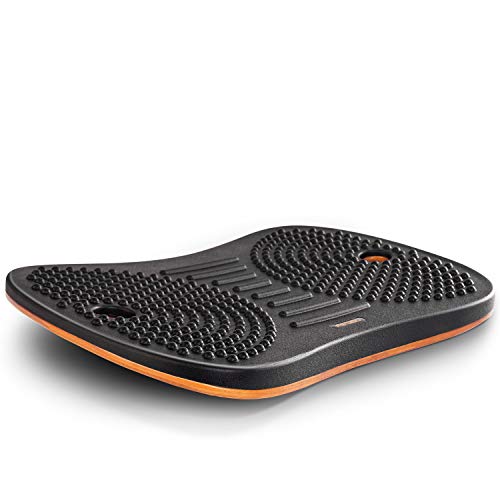
As an Amazon Associate we earn from qualifying purchases at no extra cost to you.
Pros
- Keeps you moving without noticing. Small constant corrections work calves, ankles, and hips, which is the movement that stops the aching that comes from standing still.
- Replaces the anti-fatigue mat. Padded boards do double duty, so you are not buying two products.
- Extends comfortable standing time. Many users go from 45-minute standing stints to 90 minutes or more once their weight is shifting instead of bearing down.
- Low learning curve. Office boards are stable enough to step onto in seconds and do not require fitness balance to use.
- Compact. At roughly 2 by 1 feet and 2 to 3 inches tall it slides under the desk or against a wall when not in use.
Cons
- Distracting for precision work. Fine mouse control and long typing passages suffer slightly when your base is moving; most people step off for those tasks.
- Raises your standing height. The 2- to 3-inch deck means your desk needs to rise that much higher, which can push shorter travel frames past their limit for tall users.
- Noise on hard floors. Plastic bases on tile or hardwood click and thump as you rock; a thin rug or the padded models fix it.
- Not a workout. The stabilizing effort is light. Anyone expecting core training will be disappointed.
- Trip hazard. A board left in the walkway behind the desk is easy to step on unexpectedly.
- Price versus a mat. $55 to $70 for a board against $20 to $40 for a good anti-fatigue mat.
Who Should Buy It
Buy a balance board if you stand two or more hours a day, already own an adjustable desk with at least 2 to 3 inches of unused travel at the top, and notice sore heels or a stiff lower back after long standing spells. It is also a good fit for people who fidget, who take a lot of calls or video meetings standing, and for anyone whose work alternates between reading, thinking, and typing rather than continuous keyboard input. Choose a padded rocker style if you want it to replace your mat, and a firmer deck if you prefer more feedback underfoot.
Who Should Skip It
Skip it if you sit most of the day, since a board does nothing while it sits under a lowered desk. Skip it if your desk already tops out at your ideal standing height, because the board will put your keyboard 2 to 3 inches too low. People with ankle instability, recent lower-limb surgery, or balance disorders should choose a flat mat instead. And if your job is data entry or design work that demands steady hands for hours, a board will cost you more in focus than it returns in comfort.
Cheaper Alternatives
| Option | Cost | Trade-off |
|---|---|---|
| Anti-fatigue standing mat, 3/4 in foam | $20 to $40 | Cushions but does not encourage movement; you still shift weight yourself |
| Contoured “active” mat with raised edges | $40 to $70 | Gives calf stretches and pressure points at similar cost, with no rocking, so it is steadier for typing |
| Foot rocker or rail | $15 to $30 | Lets one foot rest and move at a time; smaller footprint, less total movement |
| Fitness wobble board | $20 to $40 | Much cheaper but tilts 15 degrees or more, too unstable for typing and not padded |
| Timer plus walking breaks | Free | Five minutes of walking every half hour beats any board for circulation, but requires discipline |
FAQ
Can I type while standing on a balance board?
Yes for email and light work. For long typing sessions or precise mouse tasks, most people step off. Office boards with 5 to 8 degrees of tilt are far easier to type on than fitness boards with 15 degrees or more.
How much should the desk rise to compensate for the board?
Add the deck height, usually 2 to 3 inches, to your normal standing preset. Save it as a separate memory position if your desk has spare presets so you are not readjusting every time.
Do balance boards work on carpet?
Rocker-style boards work on low-pile carpet but feel sluggish on thick pile because the base sinks. Domed or ball-style boards fare worse. On plush carpet, put a thin hard mat or a piece of plywood under the board.
How long should I stand on a balance board each day?
Start with 15 to 20 minutes at a time and build up to about half of your total standing time. Alternating board, flat floor, and sitting across the day is more comfortable than any one position, and in 2026 most electric desks make that rotation a one-button affair.