Key takeaways
- Laptop-only workspace: measure the open laptop with any separate keyboard and mouse, rather than buying from the screen’s diagonal size.
- Monitor and laptop: include both bases, keyboard space and the position needed to read the screen comfortably. A screen arm still needs an approved mounting surface and room behind the desk.
- Two monitors: measure the actual screens and stands in the arrangement you intend to use. Two screens of the same diagonal size can have different base footprints.
The Short Answer
A standing desk for a small home office must fit your equipment, your seated and standing working heights, and the room while the chair is in use. Start by laying out the keyboard, mouse and monitor bases, then measure the space they occupy. A narrow top that fits against a wall can still be impractical if it blocks the door or cannot lower enough for seated work.
Compare the Complete Desk, Not Just Its Width
The product listings below show different formats to investigate. Check the exact model’s desktop, feet, height range and load rating before ordering; the listing order is not a measured performance ranking. Prices and availability can change.
Our top picks
 FEZIBO Standing Desk 48 × 24 Inch
FSC-certified wood supports a more sustainable build choice
Three memory presets simplify sit-stand height switching
Motor runs under 45 decibels during adjustment
176-pound load capacity trails some heavier-duty desks
48 x 24 inch top limits space for larger setups


As an Amazon Associate we earn from qualifying purchases at no extra cost to you.
Standing Desk Sizes for a Small Home Office
Compact desks do not share one standard size. For example, UPLIFT’s compact desk range includes 42-by-24, 42-by-30 and 48-by-24-inch configurations. These examples show why depth matters as well as width: the narrower 42-by-30 top occupies more floor depth than the 48-by-24 option. Check current configuration details because not every top or frame combination is offered.
- Laptop-only workspace: measure the open laptop with any separate keyboard and mouse, rather than buying from the screen’s diagonal size.
- Monitor and laptop: include both bases, keyboard space and the position needed to read the screen comfortably. A screen arm still needs an approved mounting surface and room behind the desk.
- Two monitors: measure the actual screens and stands in the arrangement you intend to use. Two screens of the same diagonal size can have different base footprints.
Measure the Room Before Choosing a Size
- Mark the proposed desktop and the manufacturer’s frame-foot dimensions on the floor with removable tape. Include skirting boards and nearby furniture.
- Place your actual chair in that space. Sit down, roll back and stand up; check that another person can use any shared passage. A desk-width measurement alone cannot establish usable circulation space.
- Open the room door, wardrobe doors and drawers through their full movement. Keep the desk, cables and chair out of those paths.
- Check the full vertical travel: shelves, a sloping ceiling, window handles, screen arms and hanging accessories can obstruct the desk even when the top fits at its lowest setting.
- Measure the working height you need while seated and standing. Compare it with the finished desktop height, including the top thickness where the frame specification excludes it.
- Check that power and display cables can follow the full movement without tension, snagging or hanging into a walkway. Follow the desk’s cable-routing and electrical instructions.
Which Layout Makes Sense?
Bedroom or shared living room
Keep the route to the bed, wardrobe and doorway usable with the chair pulled out. A wider but shallower top may suit one room; a narrower, deeper top may suit another. Try the taped layout with the furniture in its normal positions before committing.
Alcove or closet office
Measure the opening, interior width and overhead clearance separately. Check frame assembly access and ventilation around any equipment. Do not assume that a desk which fits through the opening can move safely inside the recess.
Mobile desk
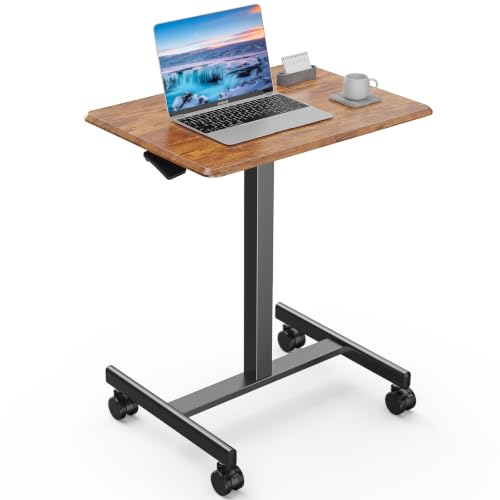
Check the manual for caster use, permitted loads and movement restrictions. A small rolling laptop desk and a full workstation are different products; do not assume either accepts a monitor arm.
Before You Order
- Confirm top dimensions, foot dimensions and usable knee space.
- Confirm the height range suits both working positions.
- Add up the desktop equipment and accessories using the manufacturer’s load-rating definition.
- Check monitor-arm clamp clearance and the approved top material and thickness.
- Check delivery access, assembly space and the return policy for the exact configuration.
FAQ
Is a 48-by-24-inch desk enough?
It may be, but the answer depends on the equipment and room. Lay out the actual devices within that rectangle and test the chair space. It is not a guaranteed fit for every pair of monitors.
Do small standing desks have the same height range?
No. Desktop size does not establish the frame’s travel. Compare the minimum and maximum finished heights for each model.
Should I buy the largest desk that fits?
Choose a size that leaves comfortable working and circulation space. Filling every available inch along the wall can make the room harder to use.