Standing on a hard floor for hours can create a surprisingly large load on the feet, calves, knees, and lower back. A balance board can add controlled movement beneath the desk, but the wrong design may feel unstable, crowd your foot space, or encourage awkward ankle angles rather than improving comfort.
This guide evaluates standing-desk balance boards from an ergonomics-and-durability perspective. We focus on usable motion, surface grip, board height, noise, materials, and how well each design fits ordinary home-office routines—not just how active it feels on day one.
Our top picks



As an Amazon Associate we earn from qualifying purchases at no extra cost to you.
🛒 Best Price Today on Amazon
Prime members get fast, free shipping on everything above, plus member-only deals. New members get a 30-day free trial — cancel anytime.
How to Choose a/an Balance Board For Standing Desk (2026)
- Motion range: Gentle rocking is usually more practical than extreme tilt for typing, mousing, and video calls. Look for movement you can control without constantly gripping the desk.
- Surface and traction: A textured, non-slip top helps keep shoes or socks planted. Rounded edges and an enclosed roller are preferable to exposed parts that can catch toes.
- Height and clearance: Check the board’s profile against your desk height. A thick platform can effectively raise you several inches and may require lowering the desk or changing your footwear.
- Construction: Solid wood, molded plastic, and dense foam each have different strengths. Wood generally feels firmer, while foam is quieter and more forgiving but may compress over time.
- Workday practicality: Consider noise, storage, cleaning, and fatigue. The best board is one you can use intermittently throughout the day rather than abandon after a few uncomfortable sessions.
The Best Balance Board For Standing Desk (2026)s Reviewed
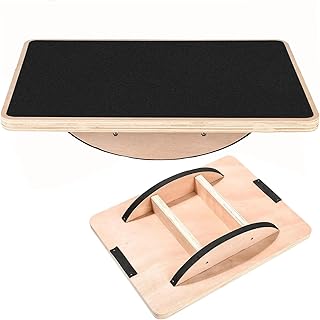
Trobing Standing Desk Mat Balance Board
The Trobing combines a wooden wobble platform with a rollerball and a mat-like footprint, making it a strong choice for users who want movement without a narrow fitness-board feel. Its design encourages small weight shifts and foot repositioning, while the broader base should feel more approachable during ordinary desk work. Use it in short intervals at first, since a roller-based board can fatigue the ankles faster than a flat anti-fatigue mat.
Large Rocker Board Anti-Fatigue Mat
This large-size rocker board is built around a simple idea: provide a stable, forgiving surface with enough room to change stance. It is particularly suitable for people who dislike the confined feel of compact balance boards or frequently alternate between shoes and socks. The rocking action is less multidirectional than a fully swiveling model, but that predictability can be an ergonomic advantage when concentration matters.
Gaiam Evolve Balance Board
The Gaiam Evolve is the most exercise-oriented option in this group, with a stability-rocker format intended for continuous movement, balance practice, and occasional training away from the desk. It offers a firmer, more deliberate response than a soft foam pad, which appeals to users who want one product for office use and light fitness. Keep the rocking subtle while typing; larger shifts are better reserved for breaks.
2-in-1 Standing Desk Balance Board and Foot Mat
This dual-sided model is designed to switch between an active balance surface and a more supportive foot mat, with 360-degree swivel movement and a foot-massage texture. That versatility makes it useful for households where one person wants motion and another prefers cushioning. The swivel function rewards controlled use, although users with sensitive ankles may find its freedom of movement more demanding than a rocker board.
Wooden Wobble Board with Ankle Support
This wooden wobble board takes a firmer, more traditional approach and adds an ankle-supportive shape intended to keep movement manageable. It is a good fit for buyers who want a durable-feeling platform for standing-desk use, physical-therapy-style balance work, or core training. Because wood transmits movement clearly, pair it with a grippy floor and avoid placing it on a surface where the entire board can slide.
Frequently Asked Questions
Are balance boards good for standing desks?
They can be useful when used intermittently and at low intensity. A balance board encourages small postural adjustments and reduces the static feeling of standing, but it should complement—not replace—comfortable footwear, a suitable desk height, and regular sitting or walking breaks.
Which type is best for beginners?
A broad rocker board or padded anti-fatigue model is generally the easiest starting point. It offers predictable front-to-back movement and more standing area than a compact roller or highly mobile swivel design.
How long should I stand on one?
Begin with five to ten minutes at a time, several times during the day. If your feet, calves, knees, or lower back become sore, stop and reassess your desk height, footwear, and board position rather than trying to “push through” the discomfort.
Can I use a balance board while working?
Yes, but keep the movement modest during precision tasks such as typing or using a mouse. More active rocking is better suited to phone calls, reading, or short movement breaks, when you can pay attention to your balance.
Final Thoughts
The Trobing is a well-rounded pick for shoppers who want a mat-like design with engaging roller movement, while the large rocker board is the safer everyday choice for a spacious, predictable stance. Choose the Gaiam Evolve if exercise versatility matters, or the 2-in-1 model if you want both active balance and foot-mat functionality.