Key takeaways
- Desktop depth: Look for roughly 28 to 32 inches of depth when possible. This gives monitors adequate viewing distance while preserving room for a keyboard, writing area, and wrist movement.
- Load stability: Check the stated weight capacity, leg construction, and cross-support. Large screens create leverage, so a desk should resist rocking when you type or adjust a monitor arm.
- Monitor height: Built-in shelves can raise screens to a healthier eye level, but they are not universally adjustable. Make sure the display position will let your neck remain relaxed rather than tilted upward.
- Workstation shape: L-shaped desks suit corner offices and separate computing from paperwork. Straight, extra-long desks are usually better for two people or for wide monitor layouts with fewer awkward corners.
- Long-term practicality: Favor durable finishes, sensible cable management, accessible outlets, and storage that does not steal knee space. LED lighting is optional; stable construction and clear legroom are not.
What's inside
Running two or more monitors from a compact desk can expose weaknesses that are easy to miss in product photos: shallow desktops, crowded cable paths, unstable monitor risers, and limited legroom. A desk may look spacious yet leave little usable depth once stands, speakers, a keyboard, and a laptop are in place.
This guide evaluates multi-monitor desks through an ergonomics-and-durability lens. The focus is on working surface depth, frame stability, adjustability, storage, power access, and how well each design supports a comfortable setup over years of daily use—not simply how many features appear on the listing.
As an Amazon Associate we earn from qualifying purchases at no extra cost to you. Product prices and availability are accurate as of the date shown and are subject to change.


🛒 Best Price Today on Amazon
Prime members get fast, free shipping on everything above, plus member-only deals. New members get a 30-day free trial — cancel anytime.
How to Choose a Home Office Desk For Multiple Monitors (2026)
- Desktop depth: Look for roughly 28 to 32 inches of depth when possible. This gives monitors adequate viewing distance while preserving room for a keyboard, writing area, and wrist movement.
- Load stability: Check the stated weight capacity, leg construction, and cross-support. Large screens create leverage, so a desk should resist rocking when you type or adjust a monitor arm.
- Monitor height: Built-in shelves can raise screens to a healthier eye level, but they are not universally adjustable. Make sure the display position will let your neck remain relaxed rather than tilted upward.
- Workstation shape: L-shaped desks suit corner offices and separate computing from paperwork. Straight, extra-long desks are usually better for two people or for wide monitor layouts with fewer awkward corners.
- Long-term practicality: Favor durable finishes, sensible cable management, accessible outlets, and storage that does not steal knee space. LED lighting is optional; stable construction and clear legroom are not.
The Best Home Office Desk For Multiple Monitors (2026)s Reviewed
Furologee 66” L-Shaped Desk
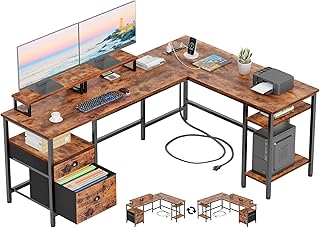
This reversible L-shaped desk is a strong choice for corner offices that need monitor elevation, file storage, and a dedicated writing or gaming zone. Its built-in monitor stands and shelving help organize a multi-screen setup, although buyers should measure their chair position carefully to ensure the corner configuration does not restrict leg movement.
55-Inch U-Shaped Electric Standing Desk
The U-shaped layout creates useful separation between monitors, peripherals, and paperwork, while electric height adjustment supports alternating seated and standing work. Its keyboard tray, memory presets, outlets, and USB ports are practical additions; however, the surrounding desktop geometry makes this desk best suited to a permanent workstation rather than a frequently rearranged room.
Grandder 55×32 Extra-Deep Electric Standing Desk
For a 49-inch ultrawide paired with additional screens, the Grandder’s 32-inch depth is more valuable than decorative extras: it allows a better viewing distance and leaves room in front of the displays. The electric frame, memory presets, anti-collision feature, and 176-pound capacity make it one of the more capable options for a heavy monitor arrangement, provided the floor is level.
LVB 70.8-Inch Industrial Computer Desk
This extra-long workstation is a sensible pick for dual-monitor users who prefer a straightforward, rigid surface over integrated shelving. Its generous width can accommodate two people or a broad monitor array, while the metal-and-wood design should suit demanding daily use; add monitor arms or risers if the desktop height does not place screens at eye level.
Korfile 59-Inch L-Shaped Computer Desk
The Korfile combines a corner-friendly footprint with power outlets, monitor stands, adjustable drawers, and a reversible layout. It is particularly useful where storage is important, but users with large monitor arms should verify clamp clearance and keep heavier equipment distributed across the frame rather than concentrated at one end.
Frequently Asked Questions
How much desk space do two monitors need?
Most two-monitor setups need at least 48 to 55 inches of usable width, depending on screen size and bezel thickness. Extra depth is equally important because it prevents the keyboard and monitor stands from competing for the same space.
Are built-in monitor stands a good idea?
They can improve organization and raise screens without requiring separate risers. Their limitation is fixed positioning, so confirm the stand height and width before buying, especially if you use large displays or need precise ergonomic adjustment.
Is a standing desk better for multiple monitors?
Not automatically, but height adjustment makes it easier to vary posture during long work sessions. Choose a frame with sufficient lifting capacity and low wobble; a standing desk that shakes under monitor weight is less useful than a stable fixed-height model.
What is the best shape for a home office?
An L-shaped desk generally makes efficient use of a corner and separates tasks naturally. A straight, extra-long desk is easier to position and often provides better continuous support for wide monitors, shared work, or monitor-arm mounting.
Final Thoughts
The Grandder is the strongest overall choice for a deep, heavy multi-monitor setup, while the LVB offers excellent width with a simpler, durable workstation format. For corner rooms and built-in organization, the Furologee 66” L-shaped desk is a practical alternative—provided its storage layout leaves you adequate knee and chair clearance.