Key takeaways
- Wood studs: standard spacing is 16 inches on center (sometimes 24). A 48-inch desk can usually hit three studs. Use 3-inch structural or lag screws, at least 2 per stud.
- Drywall only: even heavy-duty toggle bolts are rated for shear loads, not sustained pull-out from a cantilevered desk. Fine for a fold-down shelf used lightly, not recommended for a monitor setup.
- Steel studs: use snap toggles rated for metal studs, or add a plywood backer screwed across several studs.
- Brick or concrete: sleeve anchors or concrete screws into solid masonry hold very well; avoid the mortar joints.
- Plaster and lath: find the studs; plaster crumbles under point loads.
A floating wall-mount computer desk is worth it when you need a workstation that takes zero floor space, and it holds a laptop or a single monitor safely if it is fixed into at least two wall studs (or with proper masonry anchors) at about 28 to 30 inches high; drywall-only anchors are the most common reason these desks sag or pull out.
Types of Floating Desks
| Type | Typical size | Typical load | Best for |
|---|---|---|---|
| Fixed floating shelf-desk (hidden steel rods or cleat) | 30–60 in wide, 15–20 in deep | 30–80 lb when stud-mounted | Laptop plus one monitor, minimalist look |
| Bracket-supported desk (visible L or triangular brackets) | 36–72 in wide, 18–24 in deep | 80–200 lb with heavy brackets in studs | Monitor setups, DIY builds |
| Fold-down wall desk (cabinet with drop-front) | 24–40 in wide, 12–20 in deep open | 20–50 lb on the open leaf | Small apartments, hiding work at night |
| Wall-mounted desk with storage cabinet above | 30–48 in wide | Varies | Hallways, kitchens, entry nooks |
Fold-down cabinets are the most space-efficient, typically projecting only 4 to 8 inches when closed, but their hinged leaves carry far less weight. If you lean on your desk or use a heavy monitor, a fixed or bracket-supported desk is the safer bet.

ARTETHYS Wall Mounted Desk Folding with Light Drop Down Hanging Desk,Gray
Included for 'Floating Wall Mount Computer Desk: Height, Depth and How to Mount It Safely' because the listing specifies Gray, details this guide uses to compare options.
View on Amazon
Modway Render Mid-Century Modern, Wall Mount Office Desk, Oak
Included for 'Floating Wall Mount Computer Desk: Height, Depth and How to Mount It Safely' because the listing specifies Wall Mount Office Desk and Oak, details this guide uses to compare options.
View on Amazon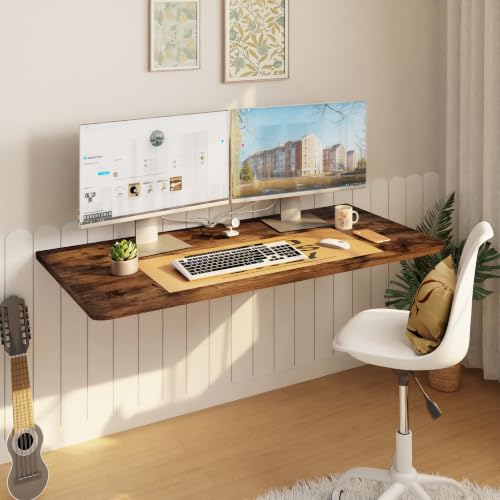
IAE Wall Mount Folding Desk,Floating Computer Desk for Small Spaces,Rustic
Included for 'Floating Wall Mount Computer Desk: Height, Depth and How to Mount It Safely' because the listing specifies Floating Computer Desk for Small Spaces and Rustic, details this guide uses to compare options.
View on Amazon
Sleekform Floating Wall Desk with Drawer, 30 x 16 x 6 Inch, Modern White
Included for 'Floating Wall Mount Computer Desk: Height, Depth and How to Mount It Safely' because the listing specifies 30 x 16 x 6 Inch and Modern White, details this guide uses to compare options.
View on AmazonHeight and Depth: The Measurements That Matter
With a floating desk you choose the height, which is a genuine ergonomic advantage over fixed-leg desks. Use these starting points, then adjust for your chair:
| User height | Desktop height (seated) | Standing desktop height |
|---|---|---|
| 5’0″–5’3″ | 25–26.5 in | 37–39 in |
| 5’4″–5’7″ | 26.5–28 in | 40–42 in |
| 5’8″–5’11” | 28–29.5 in | 42–44 in |
| 6’0″–6’3″ | 29.5–31 in | 44–47 in |
The underside of the desk must still clear your thighs. Measure from the floor to the top of your thighs while seated at your normal chair height and add about 1 to 2 inches. If the desk has a thick 1.5-inch top, set the top surface at least that much higher.
Depth is the real limit. A 15-inch-deep floating desk handles a laptop; a monitor on its stand plus a keyboard needs about 20 to 24 inches. If your desk is shallower, wall-mount the monitor itself above the desk on a VESA arm and free the whole surface for keyboard and mouse.
What the Wall Can Actually Hold
The desk is a lever. A 20-inch-deep desk with a 20-pound monitor near the front edge and your forearms leaning on it creates a strong pull-out force on the top fasteners. That is why mounting method matters more than the advertised capacity.
- Wood studs: standard spacing is 16 inches on center (sometimes 24). A 48-inch desk can usually hit three studs. Use 3-inch structural or lag screws, at least 2 per stud.
- Drywall only: even heavy-duty toggle bolts are rated for shear loads, not sustained pull-out from a cantilevered desk. Fine for a fold-down shelf used lightly, not recommended for a monitor setup.
- Steel studs: use snap toggles rated for metal studs, or add a plywood backer screwed across several studs.
- Brick or concrete: sleeve anchors or concrete screws into solid masonry hold very well; avoid the mortar joints.
- Plaster and lath: find the studs; plaster crumbles under point loads.
A useful trick for any floating desk is a horizontal backer board, a 1×4 or 1×6 screwed across multiple studs, then mounting the desk to that board. It spreads the load and lets you place the desk anywhere along the wall, not just where the studs happen to fall.
Renters: Options That Avoid Big Holes
Most leases allow small picture-hanging holes; a floating desk needs larger ones. Before drilling, ask your landlord. Alternatives that still feel like a floating desk include a narrow console desk 12 to 16 inches deep placed against the wall, a leaning ladder desk that rests against the wall without fasteners, or a fold-down desk mounted on a rail that hits only two studs, which makes patching easier when you leave.
Cable Management on a Floating Desk
A floating desk looks clean only if the cables do too. Options in order of effort:
- Adhesive cable raceway painted the wall color, running from desk to outlet.
- An under-desk cable tray screwed to the underside to hold a power strip and adapters.
- An in-wall cable kit with a recessed plate behind the monitor; check local code, and never run standard power cords inside walls, only low-voltage cables or a kit designed for power.
Decision Matrix
| Your situation | Recommended setup |
|---|---|
| Studio apartment, laptop only | Fold-down cabinet desk, 24–32 in wide |
| Kids’ homework station | Fixed floating desk at a height you can raise later by remounting |
| Full-time remote worker | Bracket-supported desk 48–60 in wide, 22–24 in deep, in studs |
| Hallway or kitchen nook | Shallow 15–18 in floating desk with monitor on a wall arm |
| Standing worker | Second floating shelf at standing height on the same wall |
Materials and Price Ranges
Prefinished floating desks in laminate or engineered wood usually run about $60–$200. Solid wood floating desks with concealed steel brackets typically cost $200–$500. Fold-down cabinet desks run roughly $100–$350. A DIY version, a butcher-block or plywood top with heavy-duty brackets, often lands around $100–$250 in materials and lets you set exact width and depth.
Common Mistakes
- Mounting at a “standard” 30 inches without checking your own elbow height.
- Choosing a 12-inch depth and then adding a monitor on a stand.
- Relying on drywall anchors for a cantilevered load.
- Forgetting the outlet: plan the desk so power is within reach of a short cord.
- Not leaving 36 inches behind the chair for it to roll out.
Done right, a floating desk turns any 3 to 5 feet of wall into a usable office, with nothing on the floor to clean around.