Key takeaways
- Shelf pin spacing: most furniture uses 32 mm (about 1.25 in) increments, so you may end up with 5.5 or 6 inches between shelves, not exactly 5.25. That’s fine.
- Shelf depth: standard bookcase shelves are 9.5 to 11.5 inches deep. CDs will sit 4 to 6 inches back from the edge unless you push them forward. A simple filler block or a second row behind (for archive discs) uses the depth.
A computer desk with a CD rack has a built-in column or hutch of narrow shelves, usually 5 to 6 inches deep and tall, sized for jewel cases. These desks are harder to find than they were 20 years ago, so in 2026 there are three realistic routes. You can buy one of the few desks that still include media slots, buy a desk with adjustable shelves and set them to CD spacing, or pair any desk with a separate slim media tower. Whichever you pick, the job is the same. Know how many discs you own, which case sizes they use, and how much shelf length that adds up to.
Start with case sizes, not the desk
Disc collections are rarely just CDs. Games, DVDs and Blu-rays use taller cases that will not fit a true CD slot. Measure your mix first.

MyGift CD Storage Rack, 15 Disc Jewel Case Holder, Black Metal Stand
Included for 'Computer Desk With a CD Rack: Slot Sizes, Capacity Math and Built-In vs Tower' because the listing specifies 15 Disc Jewel Case Holder and Black Metal Stand, details this guide uses to compare options.
View on Amazon
Rainmae CD Storage Shelf for Display Wooden Metal CD Holder Desk Rack Organizer Sturdy Game Disc Display CD Organizer for Countertop Storage Media Shelf Home Office Ideal for Music Enthusiasts (Black)
Included for 'Computer Desk With a CD Rack: Slot Sizes, Capacity Math and Built-In vs Tower' as a relevant option in this category; details come from the product listing.
View on Amazon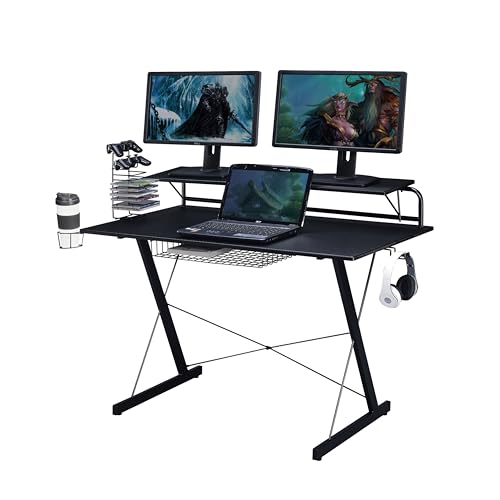
Techni Sport 48x24 Gaming Desk w/Monitor Stand, Cup Holder, CD Rack,Black
Included for 'Computer Desk With a CD Rack: Slot Sizes, Capacity Math and Built-In vs Tower' because the listing specifies Cup Holder and CD Rack, details this guide uses to compare options.
View on Amazon| Case type | Approx. size (H x W x spine) | Shelf height needed | Shelf depth needed | Cases per 12 in of shelf |
|---|---|---|---|---|
| Standard CD jewel case | 4.9 x 5.6 x 0.4 in | 5.25 in | 5.75 – 6 in | About 29 |
| Slim CD case | 4.9 x 5.6 x 0.2 in | 5.25 in | 5.75 – 6 in | About 55 |
| CD digipak / cardboard sleeve | about 5.0 x 5.6 x 0.25 – 0.5 in | 5.5 in | 6 in | 25 – 45 |
| DVD case | 7.5 x 5.3 x 0.55 in | 7.75 – 8 in | 5.5 – 6 in | About 21 |
| Blu-ray / console game case | 6.75 x 5.4 x 0.5 in | 7 – 7.25 in | 5.75 in | About 23 |
Measure CDs stood upright with the spine facing out. The case is 4.9 inches tall and 5.6 inches deep. A slot that’s 5.25 inches high and 6 inches deep fits them with a little room to grab. If your shelves are 8 inches tall, they fit everything, but CDs will look lost and you’ll lose about a third of your storage density.
Quick capacity math
A collection of 200 jewel-case CDs needs about 7 feet of shelf length (200 x 0.4 in = 80 in). A typical built-in desk CD column with 6 to 8 shelves, 10 to 12 inches wide, holds 180 to 260 CDs. For larger collections, plan on a separate tower.
Three desk layouts that include media storage
Side media column
A tall, narrow column on one end of the desk, often 10 to 14 inches wide, runs from floor to desktop or above. It’s the classic design. It’s best when you want to see spines while sitting. Make sure the column sits on the side opposite your mouse hand so you’re not reaching across it.
Hutch with media slots
Shelves above the desk surface, often split into small cubbies. These put CDs at eye level and keep the floor clear, but hutches cut monitor height. Check that the hutch opening leaves at least 18 to 20 inches of vertical clearance for a 24- to 27-inch monitor on its stand.
Under-desk media shelf
Some compact computer desks have a lower shelf or side unit at about 6-inch spacing, originally intended for CDs, games or small tower PCs. It’s out of the way, but you’ll bend down to browse, and dust settles there faster.
Built-in rack vs. desk plus separate tower
| Factor | Desk with built-in CD rack | Any desk + slim media tower |
|---|---|---|
| Capacity | Usually 100 – 260 CDs | Towers commonly hold 200 – 600+ CDs |
| Floor footprint | Compact; all in one unit | Adds 8 – 14 in width beside the desk |
| Choice of desk | Very limited in 2026 | Any size or style, including standing desks |
| Wall anchoring | Usually only needed for tall hutches | Required for towers over about 4 ft |
| Flexibility later | Rack stays with the desk | Tower moves to a living room or office |
Using adjustable shelves as a CD rack
If you find a desk you like with an adjustable-shelf bookcase side, you can usually set shelves to CD spacing. Two things to check:
- Shelf pin spacing: most furniture uses 32 mm (about 1.25 in) increments, so you may end up with 5.5 or 6 inches between shelves, not exactly 5.25. That’s fine.
- Shelf depth: standard bookcase shelves are 9.5 to 11.5 inches deep. CDs will sit 4 to 6 inches back from the edge unless you push them forward. A simple filler block or a second row behind (for archive discs) uses the depth.
Particleboard shelves 0.6 inches thick and about 24 inches wide can sag over time with a full load of CDs. CDs are heavier than they look, about 0.2 lb per jewel case, or 6 lb per foot. Keep unsupported spans under 24 inches, or choose 0.75-inch shelves.
Materials and longevity
- Laminated particleboard is the most common material on desks with built-in racks. It’s affordable and fine for CD weight on short spans, but the shelf edges chip when cases are dragged in and out.
- Solid wood or plywood handles weight better and lasts longer, but costs more and is rare on CD-specific desks.
- Metal wire racks are light and cheap, but discs can tip through the gaps and the look is utilitarian.
Keep discs away from windows. Direct sun warps jewel cases and fades artwork. Do not put a CD rack right next to a PC exhaust vent either, as the warm air will gradually warp cases.
Which route fits you
| Your collection and space | Best route |
|---|---|
| Under 150 CDs, small room | Desk with a side media column or adjustable shelves |
| 150 – 400 CDs | Any desk plus one slim tower, anchored to the wall |
| Mixed CDs, games and DVDs | Adjustable shelves set to 7.5 – 8 in for larger cases, 5.5 in for CDs |
| Over 400 CDs | Desk plus a dedicated media cabinet or two towers |
| Standing desk owner | Freestanding tower beside the desk, not attached to the moving frame |
Price expectations
Compact computer desks with a built-in media column usually cost $90 to $250. Slim CD and DVD towers run $40 to $150 depending on capacity and material. A desk with adjustable bookcase shelving typically sits in the $150 to $400 range.
Bottom line
Count your discs, separate CDs from taller cases, and multiply by 0.4 inches per jewel case. If the total fits in about 8 feet of shelving, a desk with a media column or adjustable shelves works. Beyond that, buy the desk you want and add a slim, wall-anchored tower. It holds more and lets you keep the collection if the desk changes.