Key takeaways
- Weight per arm: Check each monitor’s weight against the arm’s rating. Most mounts here hold 4.4 to 19.8 lbs per screen, which covers nearly every 24 to 32 inch display.
- VESA compatibility: Confirm your monitors support 75x75mm or 100x100mm VESA holes. Ultra-thin or curved panels sometimes need an adapter plate.
- Mounting style: C-clamp mounts to a desk edge in minutes, while grommet mounting routes through a hole for a cleaner permanent install. The best kits include both.
- Range of motion: Full-motion arms with tilt, swivel, and rotation let you switch a screen to portrait for reading code or documents without buying anything extra.
- Desk thickness and depth: Triple and quad mounts need a sturdy desk at least 1 inch thick and enough depth so extended arms do not push screens past the far edge.
A cluttered desk with two or three monitors balanced on their factory stands wastes surface space and forces your neck into awkward angles all day. Upgrading to a proper desk mount frees up the room behind your keyboard, lets you fine-tune height and tilt for each screen, and instantly makes even a modest setup look like a professional command center. In 2026 the arms are stronger, the gas springs are smoother, and prices have dropped enough that going mountless makes little sense.
We evaluated eight of the most popular dual, triple, and quad monitor mounts on stability, weight capacity, range of motion, and how painless the installation actually is. Whether you run a coding rig, a trading station, or a creative workstation, one of these arms will match your screen count and desk depth without wobbling every time you type.
Our top picks




As an Amazon Associate we earn from qualifying purchases at no extra cost to you. Ratings are shown as listed on Amazon.
⚡ Save on Your Next PC — Amazon Prime
Prime members get fast free shipping on the systems above, plus early access to Prime Day & Black Friday PC deals. New members get a 30-day free trial.
Watch: Top 8 Desk Mounts for Multiple Monitors in 2026 — Video Review
How to Choose
- Weight per arm: Check each monitor’s weight against the arm’s rating. Most mounts here hold 4.4 to 19.8 lbs per screen, which covers nearly every 24 to 32 inch display.
- VESA compatibility: Confirm your monitors support 75x75mm or 100x100mm VESA holes. Ultra-thin or curved panels sometimes need an adapter plate.
- Mounting style: C-clamp mounts to a desk edge in minutes, while grommet mounting routes through a hole for a cleaner permanent install. The best kits include both.
- Range of motion: Full-motion arms with tilt, swivel, and rotation let you switch a screen to portrait for reading code or documents without buying anything extra.
- Desk thickness and depth: Triple and quad mounts need a sturdy desk at least 1 inch thick and enough depth so extended arms do not push screens past the far edge.
The Best Picks Reviewed
MOUNTUP Triple Monitor Mount for 17-32 inch Screens
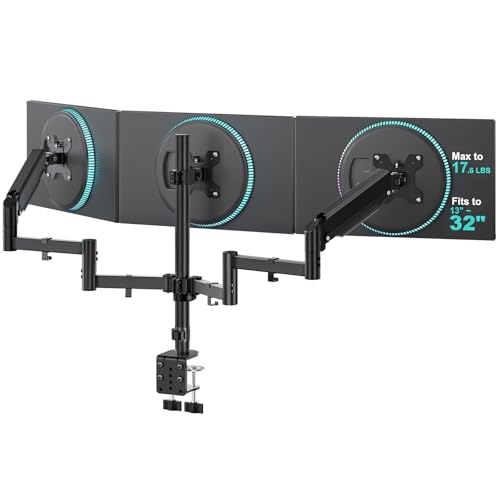
Our overall favorite for three-screen setups. The full-motion arms hold up to 19.8 lbs each and the central pole stays rock-solid even when you nudge one screen. Both clamp and grommet hardware are included, and cable clips route wires down the pole for a clean look.
MOUNT PRO 4 Monitor Mount for Max 32″ Screens
The pick for traders and analysts who need four displays. It handles up to 17.6 lbs per arm and uses a reinforced base to keep the wide array from sagging. Expect a longer install, but the payoff is a genuine wall of information at eye level.
HUANUO FlowLift Dual Monitor Stand
The smoothest dual arm we compared thanks to a refined gas spring that lets you reposition screens with one finger. It fits 13 to 32 inch panels, supports both VESA sizes, and ships with C-clamp and grommet bases. Ideal for anyone who repositions screens throughout the day.
WALI Triple Monitor Mount for 13-32 inch Screens
A budget-friendly triple that punches above its price, holding up to 17.6 lbs per arm. Motion is a touch stiffer than the MOUNTUP, but the build feels durable and setup is straightforward for a first-time mounter.
MOUNT PRO Triple Monitor Mount with Tilt, Swivel, Rotation
A great alternative triple with a slightly slimmer pole that suits shallower desks. Full articulation on every arm and support for both VESA patterns make it flexible for mixed monitor sizes.
Frequently Asked Questions
Will these mounts fit any desk?
C-clamp models fit desks with a free edge 0.4 to 3 inches thick. Very thin glass or floating desks may not be rigid enough for triple and quad arms, so grommet mounting or a stronger surface is safer.
Do desk mounts work with curved monitors?
Yes, as long as the monitor has standard VESA holes and its weight is within the arm rating. Some curved and ultrawide panels use recessed mounts and need the included or a third-party adapter.
Are gas spring arms better than tension arms?
Gas spring arms adjust more smoothly and hold position better over years of use. Tension spring arms cost less and are fine if you rarely reposition your screens.
Can I mix monitor sizes on one mount?
You can, provided each screen stays within the per-arm weight limit. Independent tilt and height adjustment lets you align the tops of differently sized monitors for a comfortable sightline.
Final Thoughts
For most people building a two or three screen workspace in 2026, the MOUNTUP triple or the HUANUO FlowLift dual deliver the best mix of stability, smooth motion, and value. Traders who genuinely need four panels should step up to the MOUNT PRO quad. Whichever you pick, reclaiming your desktop and dialing in ergonomic screen height is an upgrade you will feel in your neck and shoulders within the first week.