Our Top Picks
 FLEXISPOT EN2 55"x28" Whole-Piece Standing Desk with Power55x28"28 x 55 x 28 Inches99 poundsCheck on Amazon
 FLEXISPOT Comhar 48" Electric Standing Desk with Drawers48"Maple/White24 x 48 x 28.3 inches85.3 PoundsCheck on Amazon
The short answer to choosing a work from home desk adjustable enough to matter: get a dual-motor electric frame with a three-stage leg spanning roughly 25–50 inches, a noise rating under 50 dB, and a top sized to your room — typically 60 x 30 inches if space allows, 48 x 24 inches if it doesn’t. Brand, desktop material, and extras like memory presets are refinements on top of those four numbers. Here’s how to work out each one.
The three measurements that decide whether a desk fits
Height range: measure your elbow, not the spec sheet’s marketing
Desk height is correct when your forearms are parallel to the floor with shoulders relaxed. Your seated elbow height and standing elbow height define the range you actually need — a frame that can’t hit both numbers is just an expensive fixed desk.
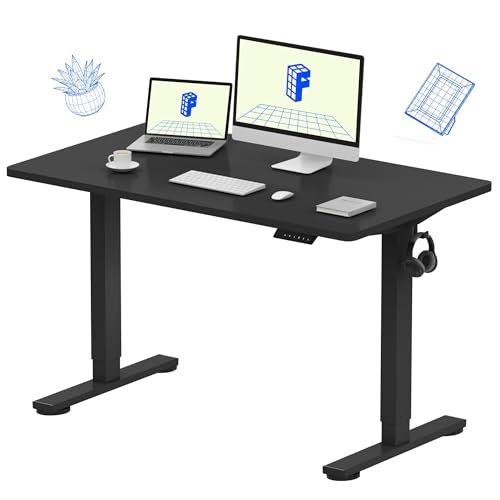
FLEXISPOT EN1 One-Piece Standing Desk, Electric Adjustable with 4 Memory Presets, 176 LBS Capacity, Stable & Quiet, Seamless Desktop for Home Office & Dual Monitors, 48"x24" Black
Chosen because it specifies Electric Adjustable with 4 Memory Presets and 176 LBS Capacity.
View on AmazonFLEXISPOT EN2 55"x28" Whole-Piece Standing Desk with Power Strip, Maple
Chosen because it specifies Maple.
View on Amazon
FLEXISPOT 60"x24" Electric Standing Desk, Black Walnut
Chosen because it specifies Black Walnut.
View on AmazonFLEXISPOT Comhar 48" Electric Standing Desk with Drawers, USB Charging Ports, Quick Assembly, Height Adjustable Sit Stand Computer Desk with Child Lock for Scandinavian Home Office, Maple
Chosen because it specifies USB Charging Ports and Quick Assembly.
View on Amazon- Two-stage frames (two telescoping sections per leg) typically run about 27–47 inches. Fine for average heights; marginal for anyone under about 5’3″ or over 6’1″.
- Three-stage frames typically span 24–25 inches at the low end to 50–51 inches at the top, covering most adult heights.
| Your height | Seated desk height (elbow level) | Standing desk height | Frame you need |
|---|---|---|---|
| 5’0″–5’4″ | 23–25 in | 36–40 in | Three-stage — the low end is the constraint |
| 5’5″–5’9″ | 25–27 in | 40–43 in | Any two- or three-stage frame |
| 5’10″–6’1″ | 27–29 in | 43–47 in | Two- or three-stage |
| 6’2″–6’5″ | 29–31 in | 47–50 in | Three-stage — the top end is the constraint |
Measure your own elbow height from the floor while sitting in your actual chair — chair height changes the seated number more than body height does. If a frame’s lowest setting sits above your seated elbow, a keyboard tray is a workaround, but buying the right range is cleaner.
Noise: the spec shared-wall dwellers should check first
- Under ~50 dB: roughly refrigerator-hum level. Quiet enough for apartments, sleeping partners, and open microphones. Most quality dual-motor frames (FlexiSpot E7, Uplift V2, Fully Jarvis) rate in the mid-40s.
- 50–60 dB: a noticeable whir that’s fine in a solo office but conspicuous at 6 a.m. Typical of budget single-motor frames.
- Lift speed: look for 1.0–1.5 inches per second. Below that, transitions feel slow enough that people stop bothering to stand.
Manual crank desks are silent and have no motor to fail, but 20–40 turns per position change means most owners stop adjusting within weeks. They’re worth it only if you rarely switch positions.
Top size and room clearance
- Depth: 24 inches is the workable minimum; 30 inches keeps a monitor at a healthy 20–28 inches from your eyes with the keyboard in front.
- Chair zone: allow 30–36 inches behind the desk edge for the chair to roll back without hitting a wall or bed.
- Room fit example: in a 10 x 12 ft room, a 60 x 30 in desk against the short wall still leaves roughly 5 feet of open floor. In rooms as small as 8 x 9 ft, stick to 48 x 24 in.
Frame construction and what weight ratings really mean
Legs are almost always powder-coated steel; the real differences are motors and geometry:
- Single motor drives both legs through a shared shaft. Ratings around 150–176 lbs, slower and louder, fine for laptop-and-one-monitor setups.
- Dual motor (one per leg) is rated 220–355 lbs, quieter, and tracks more smoothly under load.
- Load reality check: two 27-inch monitors on arms (~25–35 lbs), a desktop PC sitting on the top (20–40 lbs), speakers, a mic arm, and your forearms leaning — 90–150 lbs accumulates fast. Stay under roughly 70% of the rated dynamic capacity for motor longevity.
- Stability: some wobble is unavoidable above ~40 inches. Frames with a crossbar and longer feet wobble less; foot depth should roughly match top depth (about 23–27 in feet under a 30-in top).
Desktop materials: what you’re actually paying for
| Material | Typical price impact | Durability | Watch out for |
|---|---|---|---|
| Particleboard/MDF with laminate | Included in base price | Top surface resists dents; edge banding chips first | Can sag on 60-in+ spans if under 1 in thick |
| MDF with wood veneer | +$80–$200 | Good; veneer can chip at edges | Cannot be refinished; heavy |
| Bamboo composite | +$50–$150 | Hard and light for its size | Surface scratches show; quality varies by maker |
| Solid wood (oak, walnut, maple) | +$150–$500 | Decades; refinishable | A 60 x 30 top can add 60–80 lbs to the motor load; reacts to humidity |
Match the desk to your situation
| Your situation | Frame spec to prioritize | Top size | Realistic budget |
|---|---|---|---|
| Small apartment or shared walls | Dual motor under 50 dB, three-stage | 42–48 x 24–27 in | $250–$500 |
| Tall (6’2″+) or short (under 5’4″) | Three-stage, widest range available | Sized to equipment | $400–$800 |
| Heavy setup (PC on top, 2+ monitors) | Dual motor, 250+ lb rating, crossbar | 60 x 30 in | $400–$900 |
| Tight budget | Single motor two-stage, or crank | 48 x 24 in | $150–$300 |
| Renter or frequent mover | Lighter frame, standard top size, clamp-on accessories (no drilling) | 48 x 24–30 in | $200–$450 |
| On calls all day in a quiet room | Under 48 dB, memory presets so adjusting mid-call is one touch | Sized to equipment | $400+ |
Where the market sits in 2026: budget electric frames (Autonomous’s SmartDesk line, entry FlexiSpot models) run roughly $200–$350. Mid-range dual-motor three-stage options like the FlexiSpot E7, Fully Jarvis, and Branch’s standing desk land around $400–$800 depending on top. Premium frames such as the Uplift V2, Vari, and Steelcase’s sit-to-stand models start near $700 and pass $1,500 with solid wood tops. IKEA’s Bekant remains the cheapest widely stocked option, but its two-stage range suits average heights only.
Delivery, assembly, and what wears out first
- Shipping: frame and top usually arrive as two flat boxes totaling 60–120 lbs (more with solid wood). Boxes fit through any doorway; stairs are the real constraint — plan on a second person.
- Assembly: 30–60 minutes, mostly bolting legs to the frame and flipping the desk upright — a two-person job for 60-inch tops. Most frames are pre-drilled only for their own tops; a third-party top needs self-tapping screws or threaded inserts.
- What wears first: the keypad/controller and motor electronics, typically in years 3–7 if they’re going to fail at all, followed by laminate edge banding and plastic cable trays. The steel frame itself almost never fails — which is why the electronics warranty (5 years is typical; premium brands offer 10–15) is a better quality signal than the frame warranty.
- Features worth having: an anti-collision sensor (standard on mid-range and up), a mounted power strip and cable spine, and 3–4 memory presets — desks with presets get adjusted far more often than up/down-only controllers.
FAQ
Is a single-motor adjustable desk worth buying?
For light setups — a laptop plus one monitor, roughly 60 lbs total — yes, and the savings are real. The trade-offs are slower movement, more noise, and a 150–175 lb ceiling that heavy setups will exceed.
How do I reduce wobble at standing height?
Choose a frame with a crossbar and long feet, keep heavy items centered over the legs rather than at the front edge, use monitor arms instead of stacking monitors on stands, and re-tighten all bolts after the first month of use.
Should I get a standing desk converter instead?
Converters ($150–$400) make sense if you can’t replace your existing desk or you move frequently. The downsides: they consume desk depth, wobble more, and usually cap out around 35–50 lbs of lift capacity.
How high should my desk be when standing?
Set the surface at standing elbow height — typically 38–50 inches depending on your height (see the table above) — with your monitor’s top third at eye level. A monitor arm makes hitting both positions far easier.