Key takeaways
- Seat height range that lets your feet rest flat with thighs roughly level. Shorter users need a low minimum (16–17 in); taller users need a 21 in+ maximum.
- Seat depth leaving two to three fingers of space between the seat edge and the back of your knee.
- Lumbar support that sits at your belt line.
- Arms that drop low enough to slide under the desk, or no arms at all.
The true must-haves for a desk setup are a chair that fits your body, a desk at the right height, a screen at eye level, a separate keyboard and mouse, good task lighting and basic cable control; everything else is optional. Buy them in that order, because each one fixes a posture or comfort problem the next item can’t. This guide gives the measurements and rough budgets for each, then lists the extras worth adding once the basics are right.
The Priority List at a Glance
| Priority | Item | Target measurement | Typical budget |
|---|---|---|---|
| 1 | Adjustable chair | Seat 16–21 in high; feet flat, knees about 90° | $150–$500 |
| 2 | Desk at elbow height | Usually 28–30 in seated; 24 in+ deep | $120–$600 |
| 3 | Monitor or laptop stand | Top of screen at or just below eye level, 20–30 in away | $25–$150 |
| 4 | External keyboard and mouse | Keyboard at elbow height or 1–2 in below | $40–$150 |
| 5 | Task lamp | About 400–800 lumens on the work area, 2700–4000K | $30–$120 |
| 6 | Cable management | Power strip off the floor, cables in a tray | $20–$60 |
| 7 | Footrest (if needed) | Fills the gap when feet don’t reach the floor | $20–$60 |
1. A Chair That Fits You
The chair comes first because you’re touching it for every minute of work. What matters most:

Ergotron – LX Monitor Arm, Single Monitor Desk Mount – fits Flat Curved Ultrawide Computer Monitors up to 34 Inches, 7 to 25 lbs, VESA 75x75mm or 100x100mm – Matte Black
Chosen because it specifies LX Monitor Arm and Single Monitor Desk Mount.
View on Amazon
Ergotron – Upgraded LX Pro Premium Monitor Arm, Single Monitor Desk Mount – fits Flat Curved Ultrawide Computer Monitors up to 34 Inches, 4 to 22 lbs, VESA 75x75mm or 100x100mm – Matte Black
Chosen because it specifies Upgraded LX Pro Premium Monitor Arm and Single Monitor Desk Mount.
View on Amazon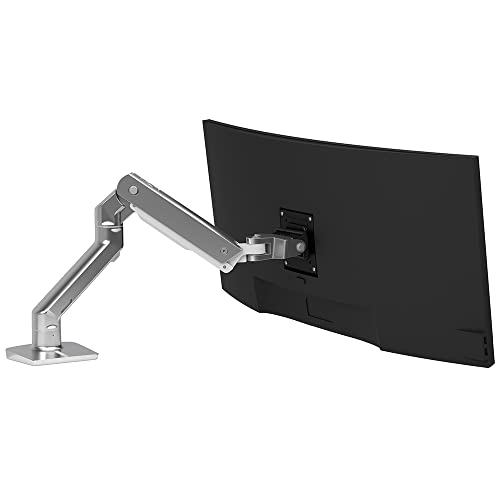
Ergotron – HX Premium Heavy Duty Monitor Arm, Single Monitor VESA Desk Mount – for Flat or Slight Curved Ultrawide Monitors Up to 49 inches, 20 to 42 lbs – Standard Pivot, Polished Aluminum
Chosen because it specifies HX Premium Heavy Duty Monitor Arm and Single Monitor VESA Desk Mount.
View on Amazon
Ergotron – LX Dual Monitor Arm, VESA Desk Mount – for 2 Monitors Up to 27 Inches, 7 to 20 lbs Each – Matte Black
Chosen because it specifies LX Dual Monitor Arm and VESA Desk Mount.
View on Amazon- Seat height range that lets your feet rest flat with thighs roughly level. Shorter users need a low minimum (16–17 in); taller users need a 21 in+ maximum.
- Seat depth leaving two to three fingers of space between the seat edge and the back of your knee.
- Lumbar support that sits at your belt line.
- Arms that drop low enough to slide under the desk, or no arms at all.
If you only sit a couple of hours a day, a simpler chair is fine. For full workdays, an adjustable task chair is the single best upgrade.
2. A Desk at the Right Height and Depth
Most desks are 29–30 inches tall, which suits people roughly 5’8″ to 6’2″ without a keyboard tray. Shorter users often type better at 26–28 inches. A desk that’s too high forces your shoulders up; raise the chair and add a footrest, or lower the keyboard with a tray.
| Your height | Seated keyboard height (approx.) | Standing desk height (approx.) |
|---|---|---|
| 5’0″ | 23–24 in | 37–38 in |
| 5’4″ | 24.5–25.5 in | 39–40 in |
| 5’8″ | 26–27 in | 41–42 in |
| 6’0″ | 27.5–28.5 in | 43–44 in |
| 6’4″ | 29–30 in | 45–46 in |
Depth matters too. A 24-inch-deep desk handles a 24–27 inch monitor; for 32-inch monitors or two screens, 28–30 inches of depth keeps the screens at a comfortable distance. Width of 48 inches fits one monitor and a notebook; 55–60 inches fits two monitors side by side.
3. Screen at Eye Level
A laptop on the desk puts the screen 6–10 inches too low, which tips your head forward. A laptop stand or a separate monitor fixes that. Set the top line of text at or slightly below eye level and the screen about an arm’s length away. Larger monitors can sit a little farther back. If your monitor’s stand doesn’t adjust, a monitor arm or riser adds height and frees desk space; check that your desk edge is solid wood or metal before clamping an arm.
4. Separate Keyboard and Mouse
Once the laptop is raised, you need an external keyboard and mouse so your hands can stay low while your eyes stay level. Keep the mouse close to the keyboard to avoid reaching. A compact keyboard without a number pad shortens that reach. A large desk mat (about 30–35 inches wide) keeps both on one smooth surface and protects the desk finish.
5. Task Lighting
Overhead room light usually casts your shadow onto the desk. A task lamp placed on the side opposite your writing hand lights the work area evenly. Look for adjustable brightness and a neutral-to-warm color temperature. Avoid aiming any light directly at the screen, which creates glare. If you’re on video calls, a soft light in front of you, slightly above eye level, helps more than a brighter overhead bulb.
6. Cable Management
- An under-desk cable tray holds the power strip and adapters off the floor.
- Adhesive or screw-in clips route monitor and charging cables down a leg.
- A surge protector with enough outlets for monitor, computer, lamp and chargers, typically 6–8, prevents daisy-chaining.
- Leave about 2–3 inches between the desk and the wall so plugs aren’t bent.
7. A Footrest if Your Feet Float
If raising your chair to match the desk leaves your feet dangling, a footrest is a must-have rather than an extra. Choose one with adjustable height or tilt, and size it to your stance, usually about 16–20 inches wide.
Worth Adding Once the Basics Are Done
| Extra | Who benefits most |
|---|---|
| Webcam and microphone | Daily video calls; laptop cameras are often low-angle and grainy |
| Docking station or USB-C hub | Laptop users connecting monitor, keyboard and charging with one cable |
| Small drawer unit or desk organizer | Anyone with paperwork, chargers and small tools |
| Headphones | Shared rooms or noisy homes |
| Anti-fatigue mat | Standing desk users |
| Chair mat | Rolling chairs on carpet or soft wood floors |
| Plant or personal item | Comfort and a less sterile workspace |
Setups by Situation
- Small apartment: a 40–48 inch desk, a laptop stand, a compact keyboard and a clamp lamp. Skip a second monitor until you have the depth for it.
- Back or neck pain: prioritize the chair’s lumbar support and an eye-level screen before anything else.
- Shared desk: a chair with a wide seat height range and a monitor arm that both people can adjust in seconds.
- Kids’ homework station: a lower desk (22–26 inches) or an adjustable one, plus a footrest and good lighting.
Quick Check Before You Call It Done
- Feet flat, knees about level with hips.
- Elbows near 90°, shoulders relaxed, wrists straight.
- Top of the screen at eye level, arm’s length away.
- No shadow or glare on the work area.
- No cables underfoot.
If all five check out, your desk setup has its must-haves covered, and any new purchase can be about preference rather than fixing discomfort.