Our Top Picks
A desk with pull out keyboard tray only improves posture when the tray sits at 24 to 26 inches from the floor, leaves at least 8 inches of clear knee space behind it, and is deep enough for your keyboard size — otherwise it forces your wrists up or your knees back.
Most fixed desktops are 29 to 30 inches high, which is 3 to 5 inches too high for typing with relaxed shoulders for average-height users. A properly positioned tray corrects that height difference without requiring a full standing desk or an adjustable frame. The problem is that many trays are too narrow, too shallow, or mounted too low, which creates new ergonomic issues.

VIVO Black Clamp-on 27 x 11 in Keyboard Tray, MOUNT-KB05E | Large Under Desk Keyboard & Mouse Tray for Typing, Slide Out Platform, Extra Sturdy C-Clamp Mount System, Computer Drawer
Chosen because it specifies MOUNT-KB05E.
View on Amazon
BONTEC Under Desk Keyboard Tray, Pull-Out Keyboard & Mouse Platform | C-Clamp Mount, Space-Saving Ergonomic Slide-Out Drawer, 31.3 in Including Clamps, 25.6 x 11.8 in Tray, Black
Chosen because it specifies Pull-Out Keyboard & Mouse Platform.
View on Amazon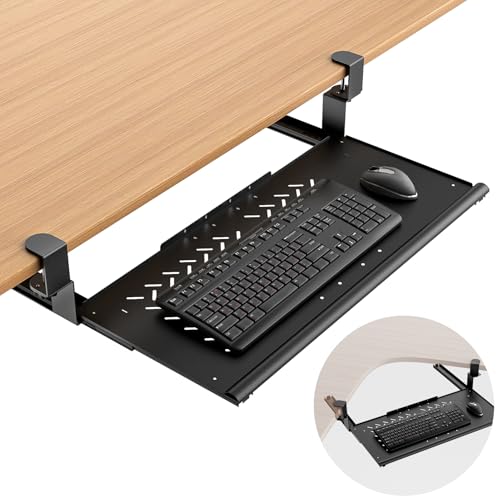
Strifuture Keyboard Tray Under Desk - Full Metal Slide Out Holder, Rust-Resistant & Scratch-Proof, 26x13" Tray, Double C-Clamps for L Shape/Regular Desks, Standing/Sitting Workstation(Black-A)
Chosen because it specifies Full Metal Slide Out Holder and Rust-Resistant & Scratch-Proof.
View on Amazon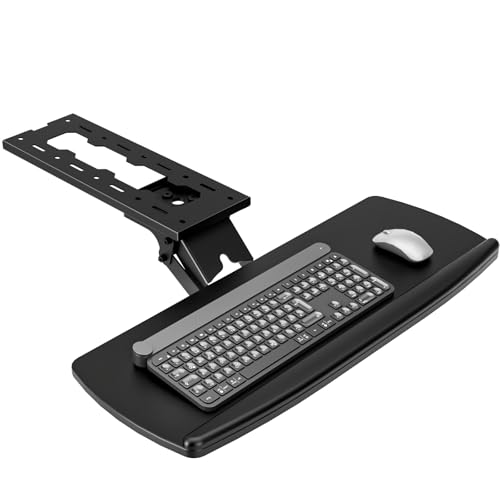
AX WABER Keyboard Tray Under Desk with Storage Drawer, Height Adjustable Keyboard Tray Slide Out 360° Swivel Tilt, Ergonomic Under Desk Mount Keyboard & Mouse Holder for Gaming Home Office, Black
Chosen because it specifies Height Adjustable Keyboard Tray Slide Out 360° Swivel Tilt and Black.
View on AmazonWhy Tray Height Matters More Than Desk Height
Ergonomic typing height is measured from the floor to the home row of keys with your elbows at 90 to 110 degrees and wrists neutral. For most people between 5’4″ and 6’0″ tall using a standard office chair with a 17 to 19 inch seat height, that number falls between 24 and 26 inches.
A 29 to 30 inch desktop forces you to lift your shoulders or angle your wrists upward, which increases strain on the neck, shoulders, and forearms over long sessions. A pull-out tray mounted 4 to 6 inches below the desktop brings the keyboard down into that neutral zone while keeping the desktop free for monitors, writing, or other tasks.
| Measurement | Ideal Range | What Goes Wrong Outside the Range |
|---|---|---|
| Tray surface to floor (typing height) | 24–26 inches | Above 27 inches: shoulder elevation; Below 23 inches: thigh contact for taller users |
| Desktop surface to floor | 29–30 inches (standard) | Used for typing, requires chair raised too high and feet dangle |
| Knee clearance behind tray (underside of tray to top of knees) | Minimum 8 inches, 9–10 inches preferred | Less than 7 inches: knees hit tray, you sit too far back to reach keys |
| Knee clearance depth (front edge of desk to back of tray mechanism) | At least 20–24 inches of open depth | Drawer boxes or crossbars block legs, especially in compact desks |
| Chair seat height + 1 inch armrest clearance | 17–19 inches seat, tray should clear armrests by 1 inch | Tray collides with armrests, prevents rolling in close |
Before buying, measure your seated elbow height. Sit in your chair with feet flat, arms relaxed at your sides, then bend your elbows to 90 degrees and measure from the floor to the underside of your forearm. That is your target tray height. If that number is under 24 inches, you will need a lower tray or a taller chair with a footrest. If it is over 27 inches, a 30 inch desktop with a standard 5-inch drop tray may still leave you too low.
Tray Depth and Width: Full-Size vs. Tenkeyless vs. Compact
Tray dimensions determine whether you can type with wrists straight and still have room for a mouse. Manufacturers often list only the outer tray size, not the usable flat area inside the lip or edge.
How much depth do you actually need?
- Full-size keyboard (with number pad): Needs 17.5 to 18.5 inches of width and 5.5 to 6.5 inches of depth for the board alone. For comfortable use, the tray should be at least 11 to 12 inches deep front-to-back to allow 2 to 3 inches of palm support in front of the spacebar. Without that, wrists hang off the edge or you rest them on a sharp lip.
- Tenkeyless (TKL, no number pad): Needs about 14 to 15 inches wide and 5.5 inches deep. An 11-inch deep tray works well and leaves room to place a mouse beside the keyboard if the tray is at least 24 to 26 inches wide.
- Compact / 60-65% keyboard: Needs only 11.5 to 12.5 inches wide. A 20-inch wide tray is sufficient, but depth still matters for wrist position.
Width decides mouse placement
A tray that is only 22 inches wide will fit a full-size keyboard but leaves no space for a mouse, forcing you to reach up to the desktop for every click — which defeats the ergonomic benefit. If you use a mouse with your keyboard on the tray, look for:
- Single wide tray: 26 to 30 inches wide, 11 to 12 inches deep. Accommodates keyboard plus mouse on one surface.
- Keyboard-only tray: 22 to 24 inches wide with a separate slide-out or side-mounted mouse platform, usually 8 x 10 inches.
- Under-desk clearance: The tray plus mouse platform should slide fully under the desk without hitting legs or modesty panels when pushed in.
Also check tray thickness. A tray surface thicker than 0.75 inches reduces knee clearance by that amount. Thin but rigid trays made from 0.5 inch engineered wood with metal supports or solid wood slats preserve the most legroom.
Slides and Hardware: What Holds Up After Thousands of Pulls
The slide mechanism determines how smoothly the tray extends, how much weight it holds, and how long it lasts. Most desks with pull out keyboard trays use one of three systems.
| Slide Type | Weight Capacity | Feel and Durability | Best For |
|---|---|---|---|
| Wood-on-wood / plastic friction guides | 8–12 lbs | Highest friction, wears and becomes loose after 1,000–2,000 cycles, can stick in humidity | Light, occasional use; usually $150–$300 desks |
| Center-mount roller slides | 15–25 lbs | Smooth for first year, nylon rollers flatten over time, some side-to-side wobble when fully extended | Budget-friendly daily use; usually $250–$450 desks |
| Ball-bearing telescoping slides (14–16 inch full extension) | 25–45 lbs | Lowest wobble, stays smooth for 5,000+ cycles, locks fully extended and fully retracted | Heavy daily typing, keyboard + mouse + wrist rest; usually $350–$650 desks |
Ball-bearing slides cost more but are the only type that reliably holds a keyboard, mouse, and wrists without dipping at the front edge when extended. Look for slides rated for at least 25 lbs per pair and labeled full-extension, which means the tray comes out completely rather than stopping 3 to 4 inches inside the desk. Side-mount ball-bearing slides also allow 0.5 inch of side-to-side adjustment, useful if your floor is not perfectly level.
Check how the tray attaches. A tray screwed only into particleboard from below will loosen within a year under daily pulling. Metal mounting brackets that wrap the slide and anchor into the desk’s solid frame or metal crossbar will outlast the desk surface itself.
Assembly, Clearance, and Moving Realities
A pull-out tray adds hardware, weight, and fit constraints that standard desks do not have.
- Box weight and doorway fit: A 48 to 55 inch desk with a tray and slides usually ships at 70 to 110 lbs in one or two boxes. The assembled depth is 23 to 30 inches, but measure your doorway (typically 29 to 32 inches) and hallway turns before delivery. Trays that are pre-assembled to the desk cannot be narrowed to fit.
- Room fit: In a 10×12 ft room, a 55 x 24 inch desk with a tray extended another 11 inches needs at least 36 inches of chair pull-back space behind it to sit and slide. That leaves about 58 inches of remaining floor width — enough for a bookshelf, but tight for a second desk.
- What wears first: The front lip or wrist edge, the slide screws into particleboard, and the tray’s finish where palms rest. A rounded front edge and a replaceable slide bracket extend life more than a thicker finish.
- Height adjustment limits: If the desk has leveling feet, they usually add only 0.5 to 1 inch. They cannot correct a tray that is 2 inches too high or too low. For that, you need a chair with adjustable seat height and a footrest.
- Chair compatibility: Armrests wider than 26 inches outside-to-outside will collide with the desk legs before the tray can be used close to the body. Measure your chair’s widest point at armrest height and compare it to the desk’s leg spacing, typically 42 to 48 inches for a 55 inch desk.
Which Desk With Pull Out Keyboard Tray Should You Choose?
Match the desk to your primary constraint, not just the look.
| Your Situation | Recommended Tray Spec | Desk Type to Look For |
|---|---|---|
| Small apartment or 10×10 ft home office | 24–26 inch wide tray, 11 inch deep, ball-bearing slides that retract flush | 48 inch compact desk with metal frame and shallow 22–24 inch desktop; keeps footprint small while tray holds TKL board |
| Back, neck, or shoulder pain from high typing | Tray height 24–25.5 inches from floor, 26–30 inch wide for keyboard + mouse, palm support area | Adjustable-height desk frame (26–30 inch range) or fixed desk with verified 5–6 inch drop from desktop to tray |
| Use a full-size keyboard and mouse on the tray | At least 28 inches wide, 12 inches deep, 35+ lb slide rating | 55–60 inch executive or computer desk with side-mount ball-bearing slides and reinforced tray |
| Kids, pets, or heavy daily use | Ball-bearing slides with soft-close and lock-in, rounded front edge, metal brackets | Solid wood or metal-frame desk with engineered wood top; avoid friction guides and center-mount rollers |
| Renter who may move within a year | Tray that detaches with 4–8 screws, no glued hardware | Metal-frame desk that breaks down flat; usually $300–$500 range and under 90 lbs total |
If you already own a desk that is too high and cannot add a tray, a separate under-desk keyboard drawer kit (usually $40–$90) with 14 inch ball-bearing slides can be mounted to most solid desktops that have at least 1 inch of clear underside and no obstructing drawer box. Verify you still retain 8 inches of knee clearance after mounting — some kits hang 2 to 2.5 inches below the desktop and reduce legroom significantly.
Check Before You Buy
- Measure seated elbow height and compare to the listed tray-to-floor height, not just the desktop height.
- Confirm usable tray dimensions (inside the lip), not outer dimensions, and ensure 2 to 3 inches of palm rest depth.
- Verify slide type — ask for ball-bearing full-extension if the listing only says “smooth slides.”
- Check knee clearance: underside of tray to floor minus your thigh thickness (typically 5 to 7 inches when seated) should be 8 inches or more.
- Test chair fit: roll your chair under the desk in a showroom or compare leg spacing to your chair’s armrest width.