
A small desk can solve a space problem while creating several ergonomic ones. Shallow work surfaces may leave no room for a mouse, compact frames can wobble under monitor weight, and low shelves often force awkward reaching or leg positions. The best choice is not simply the desk with the smallest footprint; it is the one that preserves a usable working posture without making the room feel crowded.
This guide evaluates compact computer desks through an ergonomics-and-durability lens. We focus on footprint, usable depth, monitor height, storage access, folding convenience, frame stability, and the practical demands of daily laptop or desktop work. The products below suit bedrooms, dorms, apartments, and multipurpose rooms, but each serves a slightly different space-saving priority.
Our top picks




 Lufeiya White Small Desk with Drawers
- Modern Simple Style Design: Computer desk with 2-tier…
- Sturdy Structure: Extra fixed steel brackets and adjustable…
- Easy Assemble: A detailed instruction manual and tool…
As an Amazon Associate we earn from qualifying purchases at no extra cost to you.
🛒 Best Price Today on Amazon
Prime members get fast, free shipping on everything above, plus member-only deals. New members get a 30-day free trial — cancel anytime.
How to Choose a Small Space Computer Desk (2026)
- Measure the working zone: Record available width, depth, and clearance for your chair before shopping. Allow enough room to pull the chair back and stand without blocking a doorway or drawer.
- Check usable depth: A compact desk should still leave space for your keyboard and mouse. For monitor use, prioritize a surface deep enough to keep the screen at a comfortable viewing distance.
- Assess stability: Look for a rigid frame, secure joints, and shelves that do not flex noticeably. Folding designs are convenient, but their hinges and locking points deserve particular attention.
- Protect neutral posture: Your elbows should remain near a right angle, shoulders relaxed, and wrists reasonably straight. A monitor shelf can help raise the screen, but it should not eliminate the space needed for the keyboard.
- Match storage to habits: Shelves are useful for books, accessories, and a computer tower, while drawers hide smaller items. Choose accessible storage rather than adding organizers that consume the desk’s limited work area.
The Best Small Space Computer Desks (2026) Reviewed
Dripex 27.5-Inch Compact Desk
The Dripex Computer Desk for Small Spaces makes a narrow footprint more useful with a monitor shelf and two lower storage tiers. It is a strong option for a compact desktop or laptop station where vertical organization matters, although users should keep heavier equipment low to reduce strain on the frame and improve stability.
GreenForest Folding Desk
The GreenForest Folding Desk No Assembly is particularly practical for rooms that change function throughout the day. Its foldable construction and two-tier layout make storage simple, while the approximately 27.3-by-22-inch footprint suits tight areas; just confirm that the folded desk can be stored safely without becoming a trip hazard.
TEMI 35.8-Inch Folding Desk
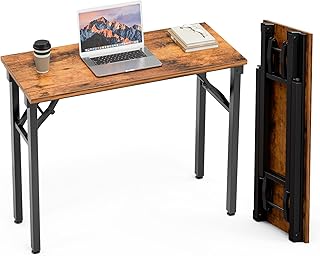
The TEMI Small Computer Desk Folding Table offers more side-to-side workspace than ultra-compact models while retaining a portable, no-assembly design. That extra width benefits a laptop, notebook, and external mouse, making it a better everyday writing or study surface than desks that prioritize minimum depth above all else.
ODK 27.5-Inch Desk with Storage
The ODK Small Desk with Storage and Monitor Stand is designed for users who want a dedicated screen position without giving up a compact footprint. Its deep brown finish works well in bedroom or study settings, and the lower storage helps clear the main surface; keep frequently used items within easy reach to avoid repeated twisting.
Lufeiya 40-Inch Desk with Drawers
The Lufeiya Small White Desk with Drawers provides the broadest work area among these compact-oriented options and adds enclosed fabric storage for stationery or accessories. Its reversible layout can be useful when room arrangements are constrained, while the 40-inch width gives a laptop user more freedom to spread out without moving to a full-size workstation.
Frequently Asked Questions
What is the best desk depth for a small computer setup?
Around 20 to 24 inches is a practical starting point for a laptop or compact monitor setup, provided the desk leaves room for the keyboard and mouse. Shallower surfaces can work, but they require careful screen placement and disciplined cable management.
Are folding desks durable enough for daily work?
They can be, especially when used within their weight limits and opened on a level floor. Before buying, inspect the hinge and locking design, avoid dragging the desk while loaded, and periodically check fasteners for loosening.
Should a monitor sit on a raised shelf?
A raised shelf can improve screen height and free valuable surface space, but the top of the display should remain near eye level when you sit upright. If the shelf places the monitor too high, a flat desk surface may be more ergonomic.
How can I make a tiny desk more comfortable?
Use a separate keyboard and mouse when possible, position the screen directly in front of you, and keep the frequently used items within a relaxed reach. A supportive chair and adequate leg clearance matter just as much as the desktop itself.
Final Thoughts
For vertical storage in a very tight footprint, the Dripex is a sensible starting point; the GreenForest stands out when folding convenience is essential. If you want more usable width for everyday work, the TEMI or Lufeiya offers a more forgiving surface, while the ODK is a balanced choice for a compact monitor-based setup.









