Our Top Picks
Best PS5 Media Remotes for Easy Streaming
The best PS5 media remote for most living rooms is the official Sony PS5 Media Remote, while the PDP Gaming Universal Media Remote is the better alternative if you want broader TV-control features or a different button layout.
A PS5 media remote is most useful when the console is your main streaming device. It replaces the DualSense for launching entertainment apps, pausing playback, adjusting volume, and navigating menus from the couch. The right choice depends less on gaming performance and more on four practical details: button placement, TV and sound-system control, setup, and whether the remote works with the streaming equipment already in your room.
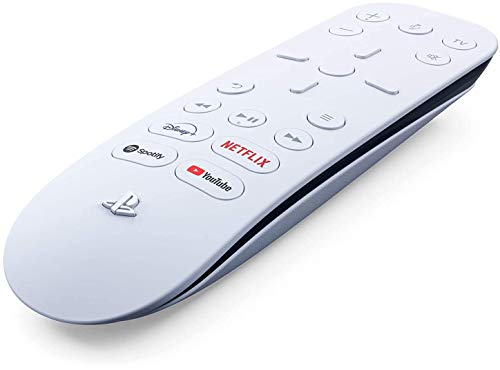

PlayStation Media Remote for PS5 (Renewed)
Picked as a relevant option in this category.
View on Amazon
Sony PS5 Multimedia Remote Control (RENEWED Premium)
Picked as a relevant option in this category.
View on Amazon
PlayStation PlayStation 5 Media Remote Control
Picked as a relevant option in this category.
View on AmazonQuick comparison: Sony versus PDP
| Feature | Sony PS5 Media Remote | PDP Gaming Universal Media Remote |
|---|---|---|
| Best for | Simple PS5 and TV streaming control | People wanting additional universal-remote functions |
| PS5 navigation | Dedicated PS, options, directional, confirm, back, and playback controls | Dedicated PS5 navigation and playback controls |
| TV control | Power, volume, mute, and input through compatible infrared devices | TV and selected entertainment-device control, depending on programming |
| Connection to PS5 | Bluetooth | Bluetooth for the PS5, with infrared functions for compatible devices |
| Power | Two AA batteries | Two AAA batteries |
| Approximate physical size | About 5.7 x 1.6 x 0.8 inches | About 6.5 x 1.5 x 0.8 inches, depending on revision |
| Typical market range | Usually $25–$40 | Usually $25–$40 |
Dimensions and features can vary slightly by regional packaging or product revision. Neither remote replaces every feature of a smart-TV remote, soundbar remote, or cable-box controller, so check compatibility before buying.
1. Sony PS5 Media Remote: best overall for a PS5-centered room
Sony’s remote is the easiest recommendation when your PS5 handles Netflix, YouTube, Disney+, Hulu, Apple TV, or other supported streaming apps. Its layout is familiar: a directional pad and central confirm button sit in the middle, with back, options, PS, playback, volume, mute, and TV-power controls placed around them.
The layout works particularly well from a deep sofa because the main navigation buttons are grouped in the center rather than spread across the entire shell. Four app shortcut buttons provide quick access to selected streaming services, although the exact services printed on the buttons may differ by region or production run. Treat those shortcuts as a convenience rather than a reason to choose the remote.
Why choose it
- Official PS5 pairing and straightforward on-screen setup.
- Comfortable shape for one-handed playback control.
- Dedicated volume, mute, input, and power buttons for compatible TVs.
- Less cluttered than a full universal remote.
- Good match for apartments where the PS5, television, and soundbar are close together.
Limitations
The Sony remote is not a complete replacement for every remote in a complex entertainment center. Infrared TV functions require a line of sight, and soundbar or receiver control may depend on how the television passes commands through HDMI-CEC. If your system includes a cable box, receiver, Blu-ray player, and multiple external inputs, you may still need the original remotes.
2. PDP Gaming Universal Media Remote: best for broader device control
The PDP Gaming Universal Media Remote is a strong choice when you want PS5 navigation but also need a more traditional universal-remote arrangement. It includes the familiar directional pad, playback controls, volume and mute buttons, and television functions, while its programming features can make it useful with compatible home-entertainment equipment.
Its longer body can be easier to grip from a wide sectional, but the extra length may feel less convenient on a narrow side table. The buttons are generally easy to identify without turning on a light, though buyers should check the current layout because licensed accessories can receive design revisions.
Why choose it
- Useful when the same seat controls both the PS5 and a compatible television.
- Traditional remote shape with clearly separated playback and navigation areas.
- Good alternative if you prefer AAA batteries.
- Can reduce the number of remotes on a coffee table when its programmed functions match your equipment.
Limitations
“Universal” does not mean universal compatibility with every soundbar, receiver, streaming box, or cable provider. Programming can also take longer than pairing the Sony remote. If you mainly want Netflix and YouTube on a PS5, the additional controls may add clutter without solving a real problem.
Choose by your seating and equipment setup
| Your situation | Better choice | Why |
|---|---|---|
| Small apartment or 10 x 12 ft living room | Sony PS5 Media Remote | Simple controls suit a TV and PS5 placed within one room; fewer buttons are easier to use on a small table. |
| Several devices under the TV | PDP Gaming Universal Media Remote | Its broader control set may reduce remote swapping if your devices are supported. |
| Children or pets around the furniture | Either, with a protective storage spot | Both are lightweight and easy to knock behind a sofa; keep the remote in a lidded tray or wall pocket. |
| Deep sectional or reclining sofa | Sony for simple use; PDP for more controls | Both are easier to reach than a phone, but a larger remote can be easier to find between cushions. |
| Soundbar connected through the TV | Sony first | Try HDMI-CEC and TV volume control before adding a more complicated universal setup. |
| Frequent input switching | PDP, if compatible | A dedicated input button is more useful when switching between PS5, cable, and another console. |
Button layout matters more than the number of features
For streaming, the buttons used most often are directional navigation, confirm, back, options, play/pause, fast-forward, rewind, volume, and mute. A remote that places these controls in predictable zones is more useful than one with many rarely used buttons.
Before buying, consider the distance between your sofa and coffee table. At least 18–24 inches of clear space in front of the main seat makes it easier to place a remote tray without blocking knees or a recliner footrest. On a compact 10 x 12 ft room layout, a narrow table 14–18 inches deep usually leaves more walking clearance than a large trunk-style coffee table. Keep the remote away from the table edge: a 55–65-inch television console often puts the accessory within reach, but a low ottoman can make it easy for pets or children to knock it onto the floor.
Setup and compatibility checklist
- Install fresh batteries and turn on the PS5.
- Open Settings, then go to Accessories and the media-remote settings or accessory setup screen.
- Put the remote into pairing mode according to its instructions and select it when it appears.
- Test the directional, back, options, and playback buttons inside a streaming app.
- Test TV power, volume, mute, and input from your normal seating position.
- If volume does not work, check HDMI-CEC on both the PS5-connected television and soundbar. Manufacturers use different names for this feature, including Bravia Sync, Anynet+, Simplink, and Viera Link.
Bluetooth lets the remote communicate with the PS5 without pointing directly at the console. TV power and volume functions may still use infrared, so keep the front of the remote aimed toward the television or soundbar. If the PS5 is inside a closed cabinet, pairing may work while heat buildup remains a concern; leave ventilation space around the console rather than sealing it behind a door.
Which PS5 media remote should you buy?
Choose the Sony PS5 Media Remote if you want the least complicated route to streaming, prefer a compact control layout, and use the PS5 with one television and perhaps a soundbar. It is the best fit for most couch-based streaming setups.
Choose the PDP Gaming Universal Media Remote if you regularly switch inputs or want one accessory to handle more compatible entertainment equipment. It makes the most sense when its extra programming options match your actual devices.
If neither remote fits your setup, a regular television remote with HDMI-CEC may be enough for basic playback, but it will not necessarily open PS5 apps or provide the same console-navigation buttons. For a furniture-friendly living room, store the chosen remote in a fixed tray, sofa-arm organizer, or shallow console drawer so it does not disappear under cushions—the everyday convenience matters as much as the button count.