Key takeaways
- For a cinema-first room: Favor a projector with strong native contrast, a good dynamic iris or laser-dimming system, and flexible lens shift. A dark room benefits more from black-level performance than from excess brightness.
- For a large screen: Look for a model with enough measured brightness for your screen size and gain, plus a throw ratio that suits the planned mount. A 130–150-inch image can make a projector rated at 2,000 lumens feel dim after calibration.
- For mixed movies and gaming: Compare input lag, HDMI capabilities, and whether the desired resolution and refresh rate work together. “4K” alone does not indicate gaming performance.
- For an awkward room layout: Choose generous optical lens shift and zoom before relying on digital keystone correction. Optical adjustment preserves image detail; keystone processing can soften it.
Best 4K Laser Home Theater Projectors for Dedicated Rooms: Which Type Fits Your Theater?
The best 4K laser home theater projector for a dedicated room is the one that can fill your chosen screen from your actual mounting distance while delivering enough calibrated brightness and contrast for your preferred content. For most light-controlled theaters, start with a native-4K or pixel-shifting 4K model rated around 2,000–3,000 lumens, then check its throw range, lens shift, installation depth, and replacement or service costs before choosing.
Quick picks by room and viewing priorities
- For a cinema-first room: Favor a projector with strong native contrast, a good dynamic iris or laser-dimming system, and flexible lens shift. A dark room benefits more from black-level performance than from excess brightness.
- For a large screen: Look for a model with enough measured brightness for your screen size and gain, plus a throw ratio that suits the planned mount. A 130–150-inch image can make a projector rated at 2,000 lumens feel dim after calibration.
- For mixed movies and gaming: Compare input lag, HDMI capabilities, and whether the desired resolution and refresh rate work together. “4K” alone does not indicate gaming performance.
- For an awkward room layout: Choose generous optical lens shift and zoom before relying on digital keystone correction. Optical adjustment preserves image detail; keystone processing can soften it.
Projectors worth shortlisting
These established product lines illustrate different strengths; confirm the exact model’s current specifications and availability before buying, since features vary between generations and regional versions.
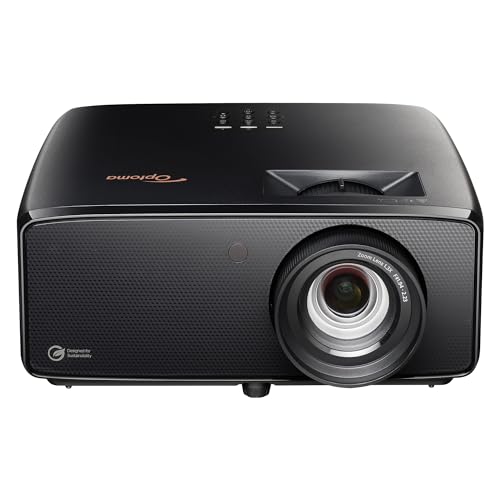
Optoma UHZ36 4K UHD Laser HDR Home Theater Projector - Black
Included for 'Best 4K Laser Home Theater Projectors' because the listing specifies Black, details this guide uses to compare options.
View on Amazon
Epson Home Cinema LS11000 4K HDR Laser Projector
Included for 'Best 4K Laser Home Theater Projectors' as a relevant option in this category; details come from the product listing.
View on Amazon
Sony VPL-XW5000ES 4K HDR Laser Home Theater Projector with Native 4K SXRD Panel, Black
Included for 'Best 4K Laser Home Theater Projectors' because the listing specifies Black, details this guide uses to compare options.
View on Amazon
ViewSonic LS901-4K 4K UHD Laser Projector 5500 Lumens, HDR Home Theater
Included for 'Best 4K Laser Home Theater Projectors' because the listing specifies HDR Home Theater, details this guide uses to compare options.
View on Amazon| Projector | Why consider it | Check before installation |
|---|---|---|
| Sony BRAVIA Projector 8 | Premium native-4K positioning for a cinema-focused room, with an emphasis on image processing and contrast. | Budget, lens-to-screen distance, and whether its brightness suits your screen size. |
| JVC DLA-NZ800 | High-end native-4K laser option for viewers who prioritize dark-scene detail and a dedicated installation. | Chassis dimensions, mounting support, throw distance, and room ventilation. |
| Epson Pro Cinema LS12000 | Laser 4K PRO-UHD option with motorized lens controls suited to a permanent theater setup. | Its pixel-shifting approach is not native 4K; verify the image and feature trade-offs against your priorities. |
| BenQ V5000i | Ultra-short-throw laser design for a theater where a conventional ceiling mount is impractical. | It must sit near the screen on a stable, accurately positioned surface; it is not a drop-in replacement for a long-throw projector. |
Premium native-4K laser models commonly cost several thousand dollars, with flagship systems reaching well into five figures. More affordable laser models often use pixel shifting or ultra-short-throw optics. Treat broad price bands as a starting point: bundles, screen requirements, and model revisions can change the total substantially.
Brightness: size the image for the room, not the headline lumen rating
Manufacturers’ brightness figures are useful for comparison, but actual output depends on picture mode, calibration, lens position, and operating settings. A cinema-accurate mode may be dimmer than the brightest mode. Dark walls and ceilings also matter: light reflected from a white ceiling can wash out perceived contrast even when the projector itself has excellent black levels.
As a practical planning estimate, a 100–120-inch screen is a comfortable target for many dedicated rooms with a roughly 2,000-lumen-class projector. At 130–150 inches, prioritize greater calibrated output, a suitable screen gain, or a smaller image. These are starting points, not guarantees: screen material and projector output can shift the result considerably.
Throw distance and room fit: measure before ordering
Throw ratio is the distance from the lens to the screen divided by image width. A projector with a 1.35–2.84:1 throw ratio, for example, needs roughly 11.25–23.7 feet of lens-to-screen distance for a 100-inch-wide image. A 100-inch diagonal 16:9 screen is about 87 inches wide, so the corresponding distance is approximately 9.8–20.6 feet.
| 16:9 screen diagonal | Approx. image width | Distance at 1.35–2.84:1 throw ratio |
|---|---|---|
| 100 in | 87 in | 9.8–20.6 ft |
| 120 in | 105 in | 11.8–24.9 ft |
| 135 in | 118 in | 13.3–28.0 ft |
These calculations use the full stated zoom range and do not allow for installation tolerances. Measure from the lens—not the back of the projector—and check the manufacturer’s calculator for the exact model. Keep the projector outside the audience’s sightline and avoid placing it where a ceiling fan, light fixture, or HVAC grille interferes with the beam or airflow.
Installation requirements that affect the total cost
- Mount and structure: Check the projector’s weight and mounting pattern, and attach the bracket to a ceiling joist or an appropriately rated structure. A heavy projector may need a sturdier mount and professional installation.
- Lens shift and alignment: Optical vertical and horizontal lens shift can solve modest placement constraints. Do not assume keystone correction can compensate for a projector mounted far off-axis without a quality penalty.
- Ventilation: Follow the specific model’s clearance requirements around air intakes and exhaust vents. Enclosed hush boxes need engineered ventilation; trapping hot air can shorten component life or trigger shutdowns.
- Cables and power: Plan conduit or an in-wall-rated HDMI cable route before closing walls or ceilings. Long HDMI runs may require active or fiber-optic cables, particularly for high-bandwidth formats.
- Screen placement: Leave room for the screen casing, speakers, and trim. Confirm that the image’s lower edge will clear furniture and that seated viewers can see the full picture comfortably.
Laser running costs and ownership over time
Laser light sources avoid routine lamp replacement, but they are not maintenance-free. Their rated life is usually expressed in tens of thousands of hours until output falls to a specified level, not as a promise that brightness will remain unchanged. At four hours per day, 20,000 hours is about 13.7 years of use; at eight hours per day, it is about 6.8 years. Actual longevity depends on operating mode, heat, and usage.
Estimate electricity costs with this formula: watts ÷ 1,000 × hours used × your electricity rate. For example, a projector averaging 300 watts, used four hours daily for a year, consumes about 438 kWh. At $0.20 per kWh, that is roughly $88 annually. Use the model’s rated power for a closer estimate, and remember that laser-module or optical repairs can be expensive once warranty coverage ends.
Keep dust filters clean if the model has user-serviceable filters, leave ventilation paths unobstructed, and use a surge protector appropriate to your installation. Compare warranty terms and the availability of authorized service before paying extra for a high-end chassis.
How to choose your final model
- Choose the screen size and aspect ratio first.
- Measure the lens-to-screen distance and calculate the required throw ratio.
- Match brightness to screen size, screen material, and how completely you can darken the room.
- Prioritize contrast for a fully light-controlled movie room; prioritize brightness if you need a larger image or occasional ambient light.
- Confirm mount location, lens shift, power, ventilation, cable path, and projector weight.
- Compare the complete cost: projector, screen, mount, wiring, installation, electricity, and potential service.
For a dedicated theater, the strongest choice is not automatically the brightest or most expensive projector. It is the model that fits the measured room, produces a satisfying image at your intended screen size, and can be installed and maintained without compromises.