Key takeaways
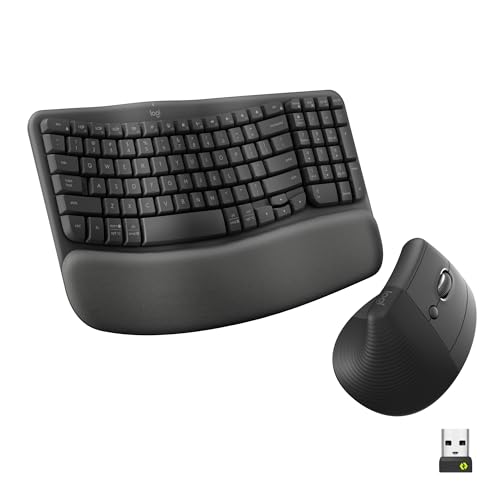
- Wave keyboards: A gently curved single-piece board like the Logitech Wave Keys MK670 eases wrist angle with almost no learning curve, ideal for first-timers.
- Split keyboards: Fully separated halves, as in the MEETION combo, allow the most natural shoulder-width hand position for those with existing strain.
- Vertical mice: The Logitech Lift and similar upright mice cut forearm pronation, the single biggest ergonomic win for mouse users.
Wrist pain, forearm tension, and the dreaded tingle of carpal tunnel almost always trace back to two flat, unnatural devices: a standard keyboard and mouse. An ergonomic combo rethinks both, curving the keys to match your hands’ natural angle and standing the mouse upright so your forearm rests in a neutral handshake position. For anyone who types all day, switching is one of the most effective ways to prevent repetitive strain before it becomes chronic.
This guide explains what actually makes a keyboard and mouse combo ergonomic, how to choose between wave, split, and vertical designs, and what features matter most. We reference standout 2026 sets like the Logitech Wave Keys with Lift vertical mouse and the split-design MEETION combo, so you can invest in a pairing that keeps your wrists happy for years.
Our top picks




As an Amazon Associate we earn from qualifying purchases at no extra cost to you. Ratings are shown as listed on Amazon.
⚡ Save on Your Next PC — Amazon Prime
Prime members get fast free shipping on the systems above, plus early access to Prime Day & Black Friday PC deals. New members get a 30-day free trial.
Watch: Review: The Ultimate Guide to Ergonomic Keyboard and Mouse Combos — Video Review
What Makes a Combo Ergonomic
Two design principles do the heavy lifting. First, a curved or split keyboard, often called a wave layout, lets your wrists stay straight instead of bending outward to reach the keys. Second, a vertical or sculpted mouse rotates your hand into a natural handshake grip, reducing the forearm twist that a flat mouse forces. Together they keep your wrists, forearms, and shoulders in neutral alignment throughout the day.
Wave, Split, or Vertical: Pick Your Style
- Wave keyboards: A gently curved single-piece board like the Logitech Wave Keys MK670 eases wrist angle with almost no learning curve, ideal for first-timers.
- Split keyboards: Fully separated halves, as in the MEETION combo, allow the most natural shoulder-width hand position for those with existing strain.
- Vertical mice: The Logitech Lift and similar upright mice cut forearm pronation, the single biggest ergonomic win for mouse users.
Features Worth Paying For
Beyond the core shape, a cushioned palm rest, like the faux-lambskin rest on the SABLUTE combo, supports your wrists during pauses. Wireless connectivity clears cable clutter and lets you position each half optimally, while a rechargeable battery, such as the SABLUTE’s 4000mAh cell, saves the hassle of disposables. Adjustable DPI on the mouse and quiet keys round out a comfortable, distraction-free setup.
Comfort Takes a Short Adjustment
Expect a brief adjustment period, usually a few days to a week, as your hands relearn a curved or split layout. Typing speed dips at first, then typically recovers and surpasses your old pace once the neutral position becomes natural. Sticking through that first week is the difference between abandoning a combo in a drawer and reaping years of strain-free typing.
Tips
- Set the keyboard so your elbows sit at about 90 degrees and your wrists stay flat, not bent up or down.
- Keep the mouse close to the keyboard to avoid overreaching, which reintroduces shoulder strain.
- Use the palm rest for resting between bursts of typing, not as a place to plant your wrists while actively typing.
- Give a new layout a full week before judging it; early awkwardness almost always fades.
Frequently Asked Questions
Do ergonomic keyboards really prevent wrist pain?
They significantly reduce the awkward wrist angles and forearm twist that cause repetitive strain. Combined with good posture and breaks, a curved keyboard and vertical mouse noticeably ease discomfort for most users.
Is a wave or split keyboard better?
A wave keyboard like the Logitech Wave Keys is easier to adopt and suits most people, while a fully split design like the MEETION offers maximum adjustability for those with significant existing strain.
Are vertical mice hard to get used to?
Most people adapt within a few days. The upright grip feels unusual at first but quickly becomes natural, and the reduction in forearm strain is immediate and lasting.
Should I choose wireless or wired?
Wireless is generally better for ergonomics because you can position the keyboard and mouse freely. Rechargeable models like the SABLUTE avoid the recurring cost and waste of batteries.
Conclusion
An ergonomic combo works by keeping your wrists straight with a wave or split keyboard and your forearm neutral with a vertical mouse. Choose a wave board for an easy transition or a split one for maximum adjustment, add a cushioned palm rest and rechargeable wireless convenience, and give yourself a week to adapt. Proven sets like the Logitech Wave Keys with Lift mouse and the SABLUTE combo make that investment easy, and your wrists will thank you for years.