Key takeaways
- Sitting vs. reclining: If you sit upright against a headboard, a legged bed desk keeps the screen at eye level; if you lounge flat, prioritize a cushioned lap surface or an angled stand instead.
- Tilt and height adjustment: Look for at least a 0-40 degree tilt and 2-4 height stops so the keyboard sits flat while the screen angles up toward your face.
- Heat management: A hard ventilated top or a cushion with a rigid board underneath prevents the duvet from blocking your laptop’s fan vents.
- Weight and footprint: Trays under 3 lbs travel between rooms easily; heavier desks near 8 lbs feel steadier but are harder to move and store.
- Extras that earn their space: Cup holders, tablet slots, side drawers, and a USB port turn a bare surface into a genuine workstation, but skip them if you only need a stable base.
Working from a bed or sofa has stopped being a rare treat and become a daily reality for millions of remote workers, students, and anyone recovering from illness. The trouble is that a laptop resting directly on a duvet overheats, slouches your neck forward, and leaves you aching after an hour. The fix is a purpose-built surface, but shoppers quickly discover two very different categories: the compact “laptop desk” you set on your thighs and the taller “bed desk” that straddles your lap on folding legs. Knowing when to reach for each is the difference between a comfortable afternoon and a stiff evening.
This roundup compares the strongest options in 2026 across both styles, from featherweight $24 trays to a $167 posture system built for lying down. We weighed stability, tilt range, heat management, and how quickly each folds flat for storage, so you can match the right surface to the way you actually sit, recline, or lounge.
Our top picks




As an Amazon Associate we earn from qualifying purchases at no extra cost to you. Ratings are shown as listed on Amazon.
⚡ Save on Your Next PC — Amazon Prime
Prime members get fast free shipping on the systems above, plus early access to Prime Day & Black Friday PC deals. New members get a 30-day free trial.
Watch: Laptop Desk vs. Bed Desk: When to Use Each for Comfort — Video Review
How to Choose
- Sitting vs. reclining: If you sit upright against a headboard, a legged bed desk keeps the screen at eye level; if you lounge flat, prioritize a cushioned lap surface or an angled stand instead.
- Tilt and height adjustment: Look for at least a 0-40 degree tilt and 2-4 height stops so the keyboard sits flat while the screen angles up toward your face.
- Heat management: A hard ventilated top or a cushion with a rigid board underneath prevents the duvet from blocking your laptop’s fan vents.
- Weight and footprint: Trays under 3 lbs travel between rooms easily; heavier desks near 8 lbs feel steadier but are harder to move and store.
- Extras that earn their space: Cup holders, tablet slots, side drawers, and a USB port turn a bare surface into a genuine workstation, but skip them if you only need a stable base.
The Best Picks Reviewed
SAIJI Height & Angle Adjustable Lap Desk
At around $30, the SAIJI is the flexible all-rounder that bridges both categories. Four legs plus a hinged tabletop let you use it as a lap tray while seated or raise it into a standing-desk-style riser beside the bed. The multi-angle top is ideal for anyone who alternates between typing and reading.
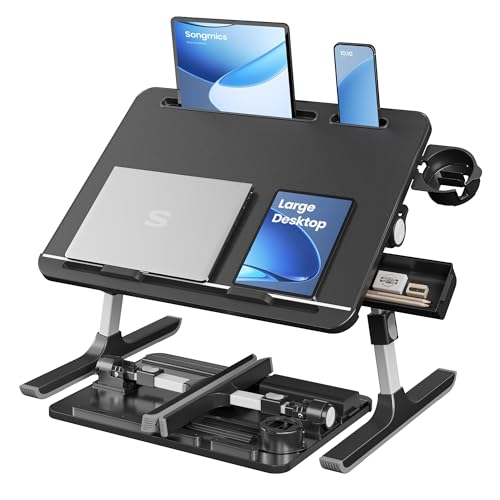
SONGMICS Bed Laptop Desk
The $33.99 SONGMICS is the classic legged bed desk done well: a 15.7 x 22-inch surface, adjustable height, and a fold-flat frame that slides under the mattress. It shines for propped-up work sessions where you want the screen lifted well above the covers.
OPTIXCELL Wooden Lap Desk Pillow
For true couch loungers, the $59.46 OPTIXCELL pairs a rigid wooden top with a soft pillow base and built-in armrests. Because it molds to your legs, it stays put on soft cushions where a legged desk would wobble, making it the pick for casual reclined browsing.
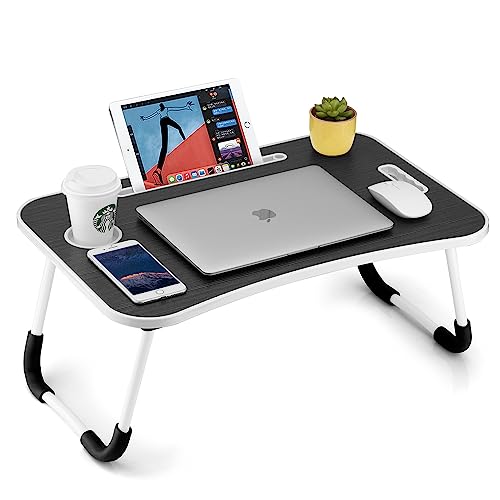
FISYOD Foldable Laptop Table
The FISYOD tray, near $29.74 in pink, wood, or black finishes, adds a cup holder, tablet slot, and a lifting handle. It is the lightweight everyday choice: fold it, carry it by the handle, and set it on a bed, sofa, or the floor in seconds.
MADOTO Laptop Desk for Lying Down
At $167 the MADOTO is a premium posture system aimed at people who genuinely work flat on their back to relieve neck and back strain. Its long articulating arm floats the laptop above your face, so it is overkill for casual use but a lifeline for those with chronic pain.
Frequently Asked Questions
Is a laptop desk or a bed desk better for posture?
A legged bed desk is generally better because it raises the screen closer to eye level, reducing the forward head tilt that causes neck strain. Cushioned lap trays are more comfortable for short sessions but keep the screen low.
Will these surfaces stop my laptop from overheating?
Yes, as long as the top is a solid or ventilated board rather than fabric. Any of these picks lifts the vents off the duvet; models with mesh or slotted tops offer the best airflow.
Can I use one of these as a standing desk too?
The SAIJI and similar height-adjustable models raise high enough to work standing beside a bed or on a countertop, doubling as a compact sit-stand riser.
How much should I spend?
Simple folding trays run $24-$34 and suit most people. Spend $60 or more only if you need a molded cushion base or, like the MADOTO, a full lying-down articulating arm.
Final Thoughts
Choose a legged bed desk when you sit upright and want the screen raised, and a cushioned lap desk when you lounge and value comfort over height. For most readers the sub-$35 folding trays hit the sweet spot, while the OPTIXCELL and MADOTO answer specific needs for couch comfort and flat-back recovery. Match the surface to your posture first, and the features second, and you will work from bed without paying for it later.